---
title: 'Angular: How to use Virtual Scroll with a Flat Tree?'
url: https://blog.octoperf.com/angular-how-to-use-virtual-scroll-with-a-flat-tree/
date: '2020-08-13'
authors:
- gpereira
categories:
- Development
tags:
- Angular
- Material Design
- Application Performance
description: How to replace Angular Material CdkTree (FlatTreeControl) by a CdkVirtualScroll loop? This blog post is a complete step by step guide.
---
# Angular: How to use Virtual Scroll with a Flat Tree?
While developing OctoPerf's frontend I quickly stumbled upon **performance issues with Angular Material tree when too many nodes where opened**.
[OctoPerf](https://octoperf.com) is a load testing solution.
As such, it displays a tree of actions and containers used to script the load testing scenarios:
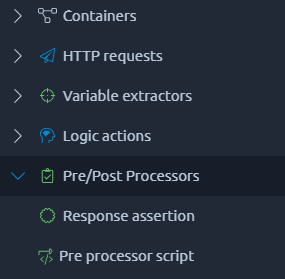
**With hundreds of directories expanded, the frontend quickly became slow to the point of being unusable.**
By default, even nodes outside of the visible part of the tree are rendered in the DOM.
Since this feature [is not directly available yet](https://github.com/angular/components/issues/10122), I had to switch from a classic CSS scrollbar to a [Virtual Scroll](https://material.angular.io/cdk/scrolling/overview#virtual-scrolling) manually.
This blog post lists all the steps I had to follow in order to **use a Virtual Scroll on a complex Material Tree**.
> __Note:__
>
> The actions tree in octoPerf uses a `FlatTreeControl` to manage the data. It is probably quite harder (or even impossible) to use a Virtual Scroll with a `NestedTreeControl`!
## Updating the Tree HTML
The first step is to update the tree component.
**This blog post presents striped down versions of the code for clarity.**
In the previous version it used the Material tree:
```html
```
**It can be replaced by a Virtual Scroll loop:**
* The `cdk-virtual-scroll-viewport` component specifies the _itemSize_ (the height of our tree nodes in our case),
* The structural directive `*cdkVirtualFor` loops over the tree dataSource.
```html
```
**Since we are not in a tree anymore, we cannot use dedicated directives** such as `matTreeNodePadding` to display the indentation of the nodes.
Here it is replaced by a simple style binding `[style.padding-left]="depth(node) * 20 + 'px'"`.
The depth is computed in the component and is basically the depth of the current node minus the depth of the root node.
This will obviously depend on what kind of nodes your tree is displaying.
Also, you may have to make a few css adjustment to enforce the height of your nodes, here with the _app-tree-node_ class:
```css
.app-tree-node {
min-height: auto !important;
height: 26px;
}
```
> __Note:__
>
> The `maxBufferPx` and `minBufferPx` inputs sets the buffer size of the virtual scroll in pixels. I had to increase these values (100 to 200px being the default) in order to avoid displaying a clear tree when the user quickly scrolls through it.
The OctoPerf actions tree uses another component to display the files/directory nodes: `lib-storage-node`.
In the previous version, the toggle button `lib-toggle-button` was added before the node component.
I could not manage to make this work with the Virtual Scroll and decided to **move the toggle button into the node**.
## Update the Tree Node Component
The Virtual Scroll does **View Recycling** by default to improve rendering performance.
The size of the view cache can be adjusted via the `templateCacheSize` property and setting it to 0 disables caching.
Since we are trying to improve UI performance that might be a bad idea.
**So we have to take extra care to handle this view recycling cache.**
The recycling of views implies a few modifications on the tree node component.
Here is the previous version of the tree node:
```html
{{node | storageNodeToName}}
```
It is a simple component. It displays an icon and a name for each node using pipes (`storageNodeToIcon` and `storageNodeToName`).
Buttons are injected using a [portal](https://material.angular.io/cdk/portal/overview) and displayed on mouse over ([More about this](#performance-improvement-with-cdkportal)).
**Compared to the Virtual Scroll one, the HTML is quite similar:**
```html
{{node | storageNodeToName}}
```
The toggle button to expand/collapse directories was moved from the tree component to the node component ([More about this](#fix-toggle-button)).
The major update to do is on the component itself.
In the MatTree version, the _node_ data and _expanded_ state are injected directly on class fields, and the buttons CdkPortal is set in the `ngOnInit` method:
```ts
@Component({
selector: 'lib-storage-node',
templateUrl: './storage-node.component.html',
styleUrls: ['./storage-node.component.scss']
})
export class StorageNodeComponent implements OnInit {
@Input() node: StorageNode;
@Input() expanded: boolean;
public nodeButtons: ComponentPortal;
constructor(public ref: ElementRef,
public treeControl: StorageTreeControlService,
private injector: Injector,
@Inject(STORAGE_NODE_BUTTONS) @Optional() private nodeButtonsType: any) {
}
ngOnInit() {
this.nodeButtons = new ComponentPortal(this.nodeButtonsType ? this.nodeButtonsType : StorageNodeButtonsComponent, null,
new PortalInjector(this.injector, new WeakMap([[STORAGE_NODE, this.node]])));
}
}
```
`ngOnInit` is not called when the component view is recycled.
**So to prevent visual glitches such as nodes having the buttons displayed or files (tree leaves) with a toggle button, the node data is injected via a setter**:
```ts
@Component({
selector: 'lib-storage-node',
templateUrl: './storage-node.component.html',
styleUrls: ['./storage-node.component.scss']
})
export class StorageNodeComponent {
public hasChild: boolean;
public nodeButtons: ComponentPortal;
@Input() public expanded: boolean;
private _node: StorageNode;
constructor(public ref: ElementRef,
public treeControl: StorageTreeControlService,
private injector: Injector,
@Inject(STORAGE_NODE_BUTTONS) @Optional() private nodeButtonsType: any) {
}
@Input() set node(node: StorageNode) {
this._node = node;
this.hasChild = node.type === 'DIRECTORY';
}
get node(): StorageNode {
return this._node;
}
[...]
}
```
As the logic to display a toggle button only for directories was moved from the tree component to the node component (the code feels clearer this way!), the node setter updates the _hasChild_ property.
### Performance Improvement With CdKPortal
**The node buttons are only visible when the user places his mouse cursor over it.**
Previously I only used two CSS classes to do it.
`hover-show-child` on the buttons div that hides them by default:
```css
.hover-show-child {
display: none;
}
```
`hover-show-parent` on the node div that displays the `hover-show-child` when hovered (SCSS):
```css
.hover-show-parent {
&:hover {
.hover-show-child {
display: block;
}
}
}
```
This does the trick but **all buttons are present in the DOM even when not displayed**.
To improve the global performance of the tree it is better to completely remove the buttons from the view when the user has not his mouse over the tree node.
So I dropped the CSS classes in favor of a boolean property named _hover_ on the component:
`
`
This property has a getter and a setter:
```ts
private _hover = false;
[...]
@Input() set node(node: StorageNode) {
this._node = node;
this.hasChild = node.type === 'DIRECTORY';
this.hover = false;
}
set hover(hover: boolean) {
if (hover) {
this.nodeButtons = new ComponentPortal(this.nodeButtonsType ? this.nodeButtonsType : StorageNodeButtonsComponent, null,
new PortalInjector(this.injector, new WeakMap([[STORAGE_NODE, this.node]])));
} else if (this.nodeButtons && this.nodeButtons.isAttached) {
this.nodeButtons.detach();
}
this._hover = hover;
}
get hover(): boolean {
return this._hover;
}
```
Let's take a closer look at the _hover_ setter:
* When it is set to **true**, a new [ComponentPortal](https://material.angular.io/cdk/portal/overview) is created with the buttons.
* When it is set to **false**, any existing portal (`nodeButtons` class field) is detached to avoid potential memory leaks.
Also, when the node value is set, the _hover_ property is always set to false in order to avoid visual glitches after views recycling.
### Fix Toggle Button
While using a MatTree, the directive `matTreeNodeToggle` was available to toggle the node expanded state:
```html
```
Replacing the tree with a CdkVirtualScroll forces us to remove this directive from the toggle button component:
```html
```
**It can simply be replaced by a call to the `toggle` method on the `FlatTreeControl`:**
```html
(click)="treeControl.toggle(node)"
```
## Scroll To Selected Node
**One big advantage of the Virtual Scroll is its capacity to scroll to a selected index.**
In OctoPerf, when an action is selected in the center pane, is it automatically selected in the files tree on the left (like in any IDE).
In the previous version I had to implement the logic to automatically scroll to the selected tree node and its quite complex to manage.
With the `CdkVirtualScrollViewport` you can simply call the `scrollToIndex` method:
```ts
this.scrollableTree.scrollToIndex(this.dataSource.findIndex(this.treeControl._lastSelection), 'smooth');
```
Cherry on the cake, the `smooth` parameter will make the _scrollToIndex_ use a animation instead of jumping to the selected node.
That's it for the migration from a flat CdkTree to a CdkVirtualScroll.