---
title: Angular Performance Optimization - *ngFor trackBy
url: https://blog.octoperf.com/angular-performance-optimization---ngfor-trackby/
date: '2023-02-10'
authors:
- gpereira
categories:
- Development
tags:
- Angular
- Application Performance
- Debug
description: How to use the trackBy function of the *ngFor structural directive to optimize changes made to the DOM tree and thus optimize performances when updating a large list of items?
---
# Angular Performance Optimization - *ngFor trackBy
Yet another blog post dedicated to Angular performance optimizations.
This time we will **use the `trackBy` function of the `*ngFor` structural directive to optimize changes made to the DOM tree and thus optimize performances when updating a large list of items**.
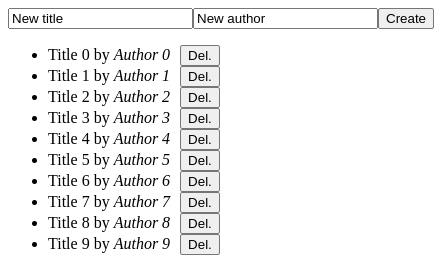
The use case is still a simple web application that displays a list of books.
Now, a form will let the user insert a book in the list, and *Delete* buttons will let the user remove items from the list:
In the previous blog posts dedicated to the same use case - a large list of item - we already studied:
* [how to use the `OnPush` change detection strategy to improve performances](https://blog.octoperf.com/angular-performance-optimization---onpush-change-detection/),
* [how to use virtual-scrolling to reduce the effective number of rendered items](https://blog.octoperf.com/angular-performance-optimization---virtual-scroll/).
To keep our example application relatively simple we will only keep the `ChangeDetectionStrategy.OnPush` option but drop the virtual-scrolling.
The `*cdkVirtualFor` directive supports the same `trackBy` function as the `*ngFor trackBy`, so all we will see here could still be used conjointly with virtual-scrolling.
Let's quickly see what this `trackBy` function is about!
## Angular `*ngFor trackBy`
The [`*ngFor` structural directive](https://angular.io/api/common/NgForOf#change-propagation) renders a template for each item in a collection: `
...
`.
### Change propagation
The [*NgForOf* directive reacts to changes](https://angular.io/api/common/NgForOf#change-propagation) made to the `books` iterator:
* Adds a new template to the DOM when a book is added,
* Removes a template from the DOM when a book is deleted,
* Reorders the DOM when books are reordered (case not studied in this blog post).
**By default, Angular uses [object references](https://en.wikipedia.org/wiki/Pointer_(computer_programming)) to track items in the list**.
Now imagine our book list is retrieved from a distant server using [HttpClient](https://angular.io/guide/http), and each operation (create or delete), refreshes the whole book list.
All object references are lost each time an action is done on the list, and Angular has to refresh the whole DOM even if most of the data is the same.
**To avoid this expensive operation, we can set the `trackBy` function of the `*ngFor` directive** and customize the default tracking algorithm:
for example books can be tracked by their ID instead of their object reference.
## Books list application
As a summary, our use case app:
* has a list of books using `*ngFor`
Default ngFor behavior based on object references to illustrate performance issues with large quantity of data.
* has add and remove book buttons
* Logs newly created `BookComponent`: a new component is created when Angular creates the template to update the DOM,
* Logs changes made to the list length to see how it correlates with DOM updates
Go to this [section](#logging-created-bookcomponent-components) to get the results.
Back to our Books list sample application!
Since we will be using the `OnPush` change detection optimization, it's preferable to **use immutable objects to avoid pitfalls**.
Please refer to this [blog post dedicated to change detection strategy](https://blog.octoperf.com/angular-performance-optimization---onpush-change-detection/#object-immutability-and-builders) to know why immutability is a must-have in such case.
### Book Object and builder
So let's create a simple *Book* immutable bean in the file `book.ts`:
```typescript
export class Book {
constructor(public readonly id: string,
public readonly title: string,
public readonly author: string) {
}
}
```
And the associated builder `book-builder.ts`:
```typescript
import {v4 as uuid} from 'uuid';
import {Book} from "./book";
export class BookBuilder {
private idValue = uuid();
private titleValue = 'title';
private authorValue = 'author';
public id(value: string): BookBuilder {
this.idValue = value;
return this;
}
public title(value: string): BookBuilder {
this.titleValue = value;
return this;
}
public author(value: string): BookBuilder {
this.authorValue = value;
return this;
}
from(book: Book): BookBuilder {
return new BookBuilder()
.id(book.id)
.title(book.title)
.author(book.author);
}
build(): Book {
return new Book(
this.idValue,
this.titleValue,
this.authorValue
);
}
}
```
This builder allows to easily create a book with an **auto-generated identifier** and default values for the *title* and *author*.
The [uuid](https://github.com/uuidjs/uuid) library that generates unique IDs can be installed with the commands:
```shell
ubuntu@pop-os:~/angular-performance-trackby$ npm install uuid
ubuntu@pop-os:~/angular-performance-trackby$ npm install @types/uuid --save-dev
ubuntu@pop-os:~/angular-performance-trackby$ npm install
```
This builder also allows us to update an existing book using the `from()` method.
Indeed, the *Book* being immutable, **we must use the builder to create a new updated instance**: `new BookBuilder().from(book).title('new title').build()`.
### Books fake CRUD
To simulate a backend server that holds our books list, we create a `BookCrudService` in the file `book-crud.service.ts`:
```typescript
import {Injectable} from '@angular/core';
import {BehaviorSubject} from "rxjs";
import {Book} from "./book";
import {BookBuilder} from "./book-builder";
@Injectable({
providedIn: 'root'
})
export class BookCrudService {
public readonly books = new BehaviorSubject([]);
public load(length: number): void {
this.books.next(Array.from({length}).map((value, index) => new BookBuilder().title(`Title ${index}`).author(`Author ${index}`).build()));
}
public create(book: Book): void {
const books = this.booksClone;
books.unshift(book);
this.books.next(books);
}
public delete(book: Book): void {
const books = this.booksClone;
this.books.next(books.filter(current => current.id !== book.id));
}
private get booksClone(): Book[] {
return this.books.value.map(book => new BookBuilder().from(book).build());
}
}
```
The `load()` method initializes the list with a given number of books.
*Create* and *delete* operations both update the book list by cloning all of its content.
This simulates a remote server that would return the updated list of books for any modification.
Such behavior allows us to see the **performance problem caused by the default tracking algorithm of the `*ngFor` directive**.
### `OnPush` change detection components
The following version of the Books list component does not use the `trackBy` function (`books-list.component.ts`):
```typescript
import {ChangeDetectionStrategy, ChangeDetectorRef, Component, OnDestroy, OnInit} from '@angular/core';
import {BookCrudService} from "../book-crud.service";
import {Book} from "../book";
import {Subject, takeUntil} from "rxjs";
@Component({
selector: 'app-books-list',
templateUrl: './books-list.component.html',
styleUrls: ['./books-list.component.scss'],
changeDetection: ChangeDetectionStrategy.OnPush,
})
export class BooksListComponent implements OnInit, OnDestroy {
private readonly destroyed = new Subject();
books: Book[] = [];
constructor(private crud: BookCrudService,
private changeDetectorRef: ChangeDetectorRef) {
}
ngOnInit(): void {
this.crud.books
.pipe(takeUntil(this.destroyed))
.subscribe(books => {
console.log('BooksListComponent list changed', books.length);
this.books = books;
this.changeDetectorRef.detectChanges();
});
}
ngOnDestroy(): void {
this.destroyed.next(true);
this.destroyed.complete();
}
}
```
Only changes made to `@Input` values are detected with the `OnPush` mode.
As we use the [`changeDetection: ChangeDetectionStrategy.OnPush`](https://blog.octoperf.com/angular-performance-optimization---onpush-change-detection/#using-the-changedetectorref) option in the `@Component` decorator,
we must **call `this.changeDetectorRef.detectChanges()` to force a refresh of the view** when changes are made to the books list (ngOnInit).
Also, changes made to the books list are tracked by a message in the browser console with `console.log('BooksListComponent list changed', books.length);`.
The HTML template `books-list.component.html` is simple:
```html
```
The `*ngFor` directive iterates over the `books` array and display a `app-book` component.
`BookComponent` displays each individual book title and author.
Here is the HTML template (`book.component.html`):
```html
{{book.title}} by {{book.author}}
```
A button allows the user to remove an individual book from the list:
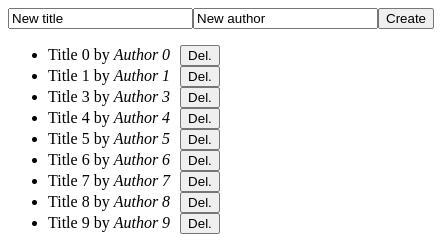
The `BookComponent` class (`book.component.ts`) does not need to specify the `ChangeDetectionStrategy.OnPush` since the parent `BooksListComponent` component already declares it:
```typescript
import {ChangeDetectionStrategy, Component, Input, OnInit} from '@angular/core';
import {Book} from "../book";
import {BookCrudService} from "../book-crud.service";
@Component({
selector: 'app-book',
templateUrl: './book.component.html',
styleUrls: ['./book.component.scss']
})
export class BookComponent implements OnInit {
@Input() book!: Book;
constructor(public crud: BookCrudService) {
}
ngOnInit(): void {
console.log('BookComponent ngOnInit', this.book);
}
}
```
The `ngOnInit()` tracks the book component creation by logging a message in the web browser console: `console.log('BookComponent ngOnInit', this.book);`.
We will use this later on to check on many `BookComponent` are created when we add an item to the books list.
### Application component
Finally, let's wrap it all together in the *AppComponent* (`app.component.ts` file) whose constructor initialises the book list with only 10 items:
```typescript
import {Component} from '@angular/core';
import {FormControl, FormGroup} from "@angular/forms";
import {BookCrudService} from "./book-crud.service";
@Component({
selector: 'app-root',
templateUrl: './app.component.html',
styleUrls: ['./app.component.scss']
})
export class AppComponent {
titleControl = new FormControl('New title', {nonNullable: true});
authorControl = new FormControl('New author', {nonNullable: true});
formGroup = new FormGroup({
title: this.titleControl,
author: this.authorControl,
})
constructor(private crud: BookCrudService) {
crud.load(10);
}
createBook(): void {
this.crud.create(this.titleControl.value, this.authorControl.value);
}
}
```
HTML template `app.component.html`:
```html
```
The `formGroup` allows for book creation by calling the `createBook()` function:
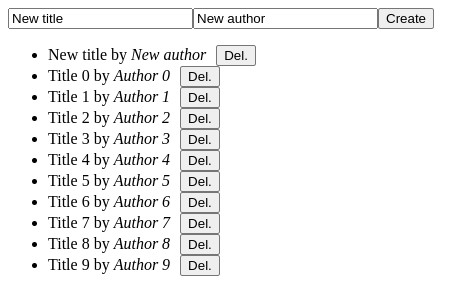
## Logging created `BookComponent` components
We can now check **how many `BookComponent` components are created every time we interact with our application**.
At first, we see in the console logs:
- the number of books in the list
- a `BookComponent` component created for each of them
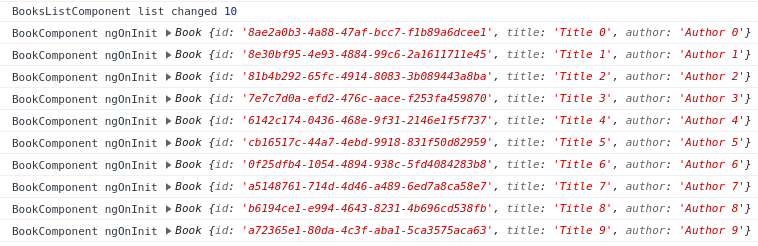
Until now that seems fine.
### Console logs on create
Let's click on the *Create* button and see what happens:
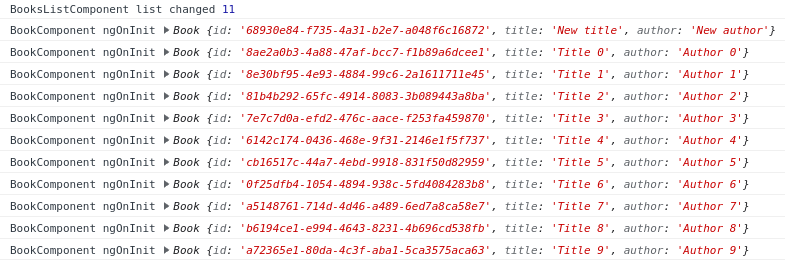
The books list now contains 11 books as expected. **But instead of simply creating a single new `BookComponent`, 11 are created.**
### Console logs on delete
Again when clicking on a *Del.* button:
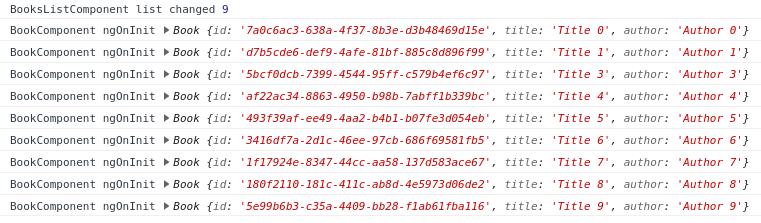
The books list now contains 9 books as expected. **But here again 9 `BookComponent` components are created.**
## Using `*ngFor trackBy`
### The `TrackByFunction`
Let's update our `BooksListComponent` to use the `TrackByFunction` and try to optimize the amount of `BookComponent` created when the list is updated (`books-list.component.ts`):
```typescript
import {ChangeDetectionStrategy, ChangeDetectorRef, Component, OnDestroy, OnInit, TrackByFunction} from '@angular/core';
import {Subject, takeUntil} from "rxjs";
import {Book} from "../book";
import {BookCrudService} from "../book-crud.service";
@Component({
selector: 'app-books-list',
templateUrl: './books-list.component.html',
styleUrls: ['./books-list.component.scss'],
changeDetection: ChangeDetectionStrategy.OnPush
})
export class BooksListComponent implements OnInit, OnDestroy {
private readonly destroyed = new Subject();
books: Book[] = [];
constructor(private crud: BookCrudService,
private changeDetectorRef: ChangeDetectorRef) {
}
trackByBookId: TrackByFunction = (index, book) => book.id;
[...]
}
```
A new `trackByBookId` function is declared and used in the associated HTML template `books-list-trackby.component.html`:
```html
```
This `TrackByFunction` simply returns the `Book.id` field to be used as an identifier.
### `trackBy` effect on created components
The behavior is still the same when the application loads.
The number of books is displayed and the `BookComponent` components are created:
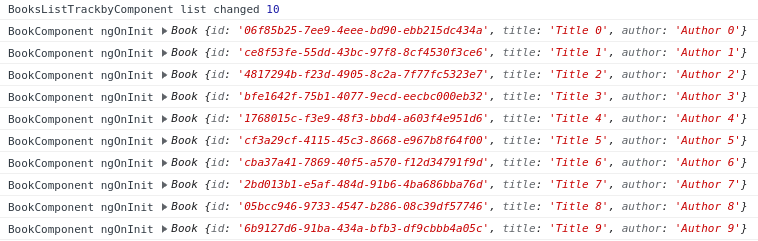
#### Console logs on create using `trackBy`
The improvement can be seen when we create a new book:

**Only one new `BookComponent` was created!**
#### Console logs on delete using `trackBy`
Deleting a book also has the expected behavior. **No new `BookComponent` is created** and the number of books is reduced by 1:

That looks good in terms of quantity of created components.
But with a small list of only 10 items we cannot see any difference in terms of performance.
## Performance check with Angular Devtools
To get meaningful results, we increase the number of displayed books to 10,000 (`app.component.ts`):
```typescript
export class AppComponent {
constructor(private crud: BookCrudService) {
crud.load(10000);
}
}
```
You should also remove the calls to `console.log` in the `BookComponent` or it will slow down and maybe freeze your web browser with such a large number of books logged!
We will be using [Angular DevTools](https://blog.octoperf.com/angular-performance-optimization---onpush-change-detection/#measure-the-change-detection-cycle-time) to measure how long it takes for Angular to handle *Create* and *Delete* operations with and without the `trackBy` function.
### Performance measures without `trackBy`
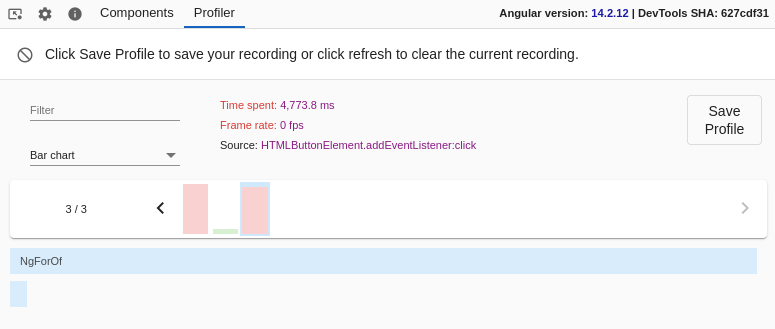
Without the `trackBy` function, it takes a bit less than 5 seconds for Angular to handle a click on the *Create* button:
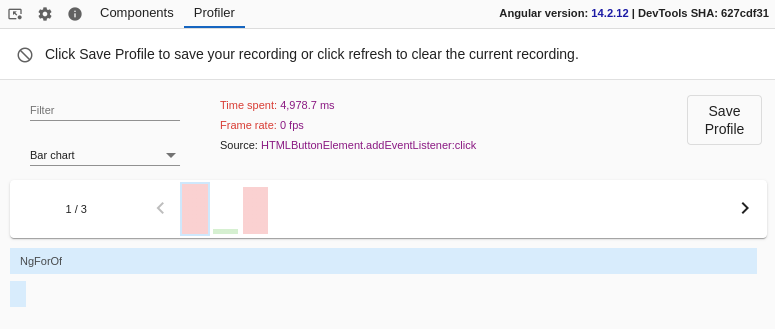
Same results for a *Del.* click: a bit less than 5 seconds:
### Performance measures with `trackBy`
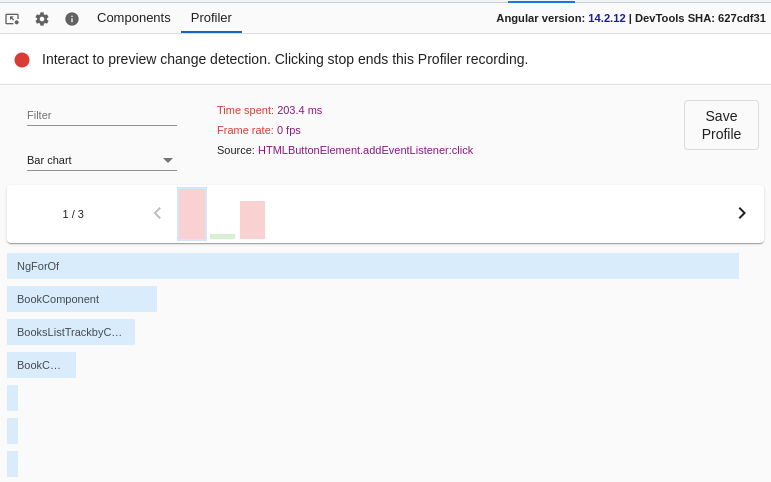
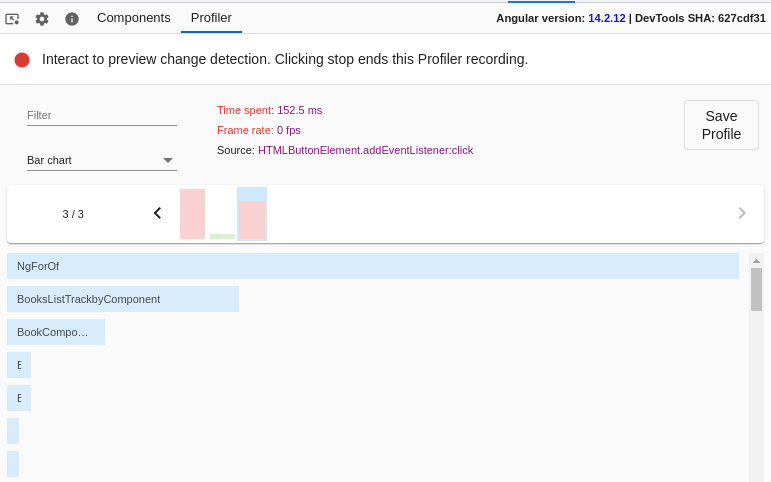
**With the `trackBy` function we can drastically increase the performances of our application!**
It takes only 203 milliseconds for Angular to handle a click on the *Create* button:
And only 152 milliseconds to handle a click on the *Del.* button:
## Conclusion
We studied how the NgForOf directive reacts to its iterator parameter to update the DOM.
By default, items are tracked by their object reference, and that can cause performance issues for big lists and/or complex rendered components by making to many changes to the DOM tree.
We saw that __using a custom `trackBy` function for the *ngFor directive allows us to customize the default tracking algorithm and greatly improve the performance of an Angular application__.