---
title: Angular Performance Optimization - No Call Expression
url: https://blog.octoperf.com/angular-performance-optimization---no-call-expression/
date: '2023-02-02'
authors:
- gpereira
categories:
- Development
tags:
- Angular
- Application Performance
description: Why calling functions in Angular template expressions is bad practice and can have huge performance impact on your application?
---
# Angular Performance Optimization - No Call Expression
At [OctoPerf](https://octoperf.com) we created a [load testing web application](https://api.octoperf.com/ui/) using [Angular](https://angular.io/) for the frontend.
The application features IDE capabilities (like [IntelliJ Idea](https://www.jetbrains.com/idea/) or [VSCode](https://code.visualstudio.com/)) to create load testing scripts:

We faced several performance issues while creating such a complex web application.
This blog post is the first of a series dedicated to **common Angular performance issues and how to solve them**.
## ESLint `no-call-expression`
If you are using [ESLint for Angular](https://github.com/angular-eslint/angular-eslint) you may have encountered the `no-call-expression` error.
This error is raised when you call a function from a template expression.
For example, in the template bellow we call `functionCall` from the `*ngIf` structural directive:
```html
```
The ESLint error can be disabled using the comment `` but you should really think twice before doing so!
**Why calling functions in Angular template expressions is bad practice and can have huge performance impact on your application?**
## Prime number computation
To have a simpler use case than our [load testing web application](https://octoperf.com), we will create a simple input form that computes the next [prime number](https://en.wikipedia.org/wiki/Prime_number).
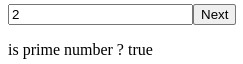
There is no direct way to know if a given number is a prime number. **So for a big input number, the computation can be time-consuming.**
This will allow us to check for performance issues in a simple Angular application.
Let's start by creating an [Angular service](https://angular.io/guide/architecture-services) that can tell if a number is prime and compute the next prime number for a given value:
```typescript
import {Injectable} from '@angular/core';
@Injectable({
providedIn: 'root'
})
export class PrimeService {
public isPrime(number: number): boolean {
if (number <= 1) {
return false;
}
for (let i = 2; i < number; i++) {
if (number % i == 0) {
return false;
}
}
return true;
}
public nextPrime(number: number): number {
while (!this.isPrime(++number)) {
}
return number;
}
}
```
Then we can create a component that contains a form and a button to compute the next value.
## Call expression from template
This first version of our component called *CallExpressionComponent* has a FormControl named *numberForm* and three methods:
* `isPrime` to know if the current *numberForm* value is a prime number,
* `computeNextPrimeNumber` to update the *numberForm* value with the next prime number,
* `triggerChangeDetection` that does nothing but triggers Angular change detection when called to simulate other interactions with our simple application.
### `CallExpressionComponent`
```typescript
import {Component} from '@angular/core';
import {PrimeService} from "../prime.service";
import {FormControl} from "@angular/forms";
@Component({
selector: 'app-call-expression',
templateUrl: './call-expression.component.html',
styleUrls: ['./call-expression.component.scss']
})
export class CallExpressionComponent {
readonly numberForm = new FormControl(0, {nonNullable: true});
constructor(private prime: PrimeService) {
}
isPrime(): boolean {
console.time('isPrime');
const isPrime = this.prime.isPrime(this.numberForm.value);
console.timeEnd('isPrime');
return isPrime;
}
computeNextPrimeNumber(): void {
console.time('computeNextPrimeNumber');
const number = this.numberForm.value;
const next = this.prime.nextPrime(number);
this.numberForm.setValue(next);
console.timeEnd('computeNextPrimeNumber');
}
triggerChangeDetection(): void {
// Nothing to do
}
}
```
> `console.time` and `console.timeEnd` are used to display messages in the browser console, letting us know how long it took to execute each function.
The associated HTML template is pretty simple with only a reactive input form, a button to call `computeNextPrimeNumber()` and text that tells the user if the input value is a prime number :
```html
is prime number ? {{isPrime()}}
```
`(mousemove)="triggerChangeDetection()"` does nothing but only triggers Angular change detection when the user moves the mouse cursor over the text.
In a real - more complex - application, **Angular change detection can be triggered by any interaction with other external components**.
### Performance issue
When interacting with this form many calls are made to the `isPrime` function:
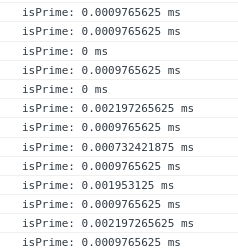
That's inherent to the way Angular checks if changes were made to a displayed value:
**For each change detection cycle, the `isPrime` function is called twice to know if the value has changed and so if the display need to be updated!**
With a small input number value, that's no big deal has the computation of the function call is fast.
But let's put a big value and see what happens:
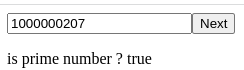
Now we can see that each one of the many function calls takes about 100-150 ms to compute.
The application starts to slow down and the web browser even complains that the **'mousemove' handler took** too much time:
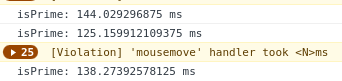
Even though the `triggerChangeDetection` method does nothing, it still triggers Angular change detection, forcing calls to `isPrime` and slowing things down.
### Angular Change Detection
That performance issue is quite insidious since there is no direct relation between the `mousemove` method call and the slow `isPrime` called in the template.
In a real-life application the **Angular detection cycle could be triggered by a completely unrelated component or directive, making it quite hard to debug**.
That's precisely why you should **avoid calling functions in Angular template expressions** even if the computation is fast.
The code may evolve with future specifications and releases, and you have no guaranty that it will remain fast in all cases.
Now let's see how we can improve performances of our test application by **avoiding calls to the `isPrime` function from the template**.
## Solution 1: React to Form Update
The most straightforward way to handle this issue is to store the `isPrime` value in a variable.
### `CallNoExpressionComponent`
Instead of calling the `isPrime()` method from the template, we simply display the `isPrime` variable value:
```html
is prime number ? {{isPrime}}
```
The associated component must be updated to **set the `isPrime` variable value each time the form control value changes**.
That's easy with [reactive forms](https://angular.io/guide/reactive-forms):
```typescript
import {Component, OnDestroy} from '@angular/core';
import {FormControl} from "@angular/forms";
import {PrimeService} from "../prime.service";
import {Subject, takeUntil} from "rxjs";
@Component({
selector: 'app-call-no-expression',
templateUrl: './call-no-expression.component.html',
styleUrls: ['./call-no-expression.component.scss']
})
export class CallNoExpressionComponent implements OnDestroy {
private readonly destroyed = new Subject();
readonly numberForm = new FormControl(0, {nonNullable: true});
isPrime = false;
constructor(private prime: PrimeService) {
this.numberForm.valueChanges
.pipe(takeUntil(this.destroyed))
.subscribe(() => {
console.time('isPrime');
this.isPrime = this.prime.isPrime(this.numberForm.value);
console.timeEnd('isPrime');
});
}
computeNextPrimeNumber(): void {
console.time('computeNextPrimeNumber');
const number = this.numberForm.value;
const next = this.prime.nextPrime(number);
this.numberForm.setValue(next);
console.timeEnd('computeNextPrimeNumber');
}
triggerChangeDetection(): void {
// Nothing to do
}
ngOnDestroy(): void {
this.destroyed.next(true);
this.destroyed.complete();
}
}
```
The functions `computeNextPrimeNumber()` and `triggerChangeDetection()` have not changed.
**The `isPrime()` method has been replaced by a variable whose value is updated in the `numberForm.valueChanges` listener.**
### Performance impact
With this version of the application, calls to our `PrimeService` are only made when the end-user interacts with the input or clicks on the *Next* button.
No call is made when the Angular change detection is triggerred by a move mouse over the text!
**That's a huge performance improvement.** It can still be slow to compute the next prime value through:
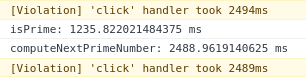
To improve user experience for this case we could add a loading state to the form, display an indeterminate progress bar,
and even delay calls to the `isPrime` variable update using the [RxJs debounceTime](https://rxjs.dev/api/operators/debounceTime) operator.
### Careful with getters
In the first version of our component `CallExpressionComponent`, the method `isPrime()` could be replaced by a getter:
`get isPrime(): boolean {[...]}`.
This would make it even **harder to spot a performance issue because the HTML template would not show a method call**:
`
is prime number ? {{isPrime}}
`
But the getter `isPrime` would be called as many times as the `isPrime()` was, **leading to the same performance problems**.
Another - more elegant? - solution would be to use [Angular pipes](https://angular.io/guide/pipes).
Let's see how it is done!
## Solution 2: Use Pipe Transform
[*Pure* Angular pipes](https://angular.io/guide/pipes#detecting-changes-with-data-binding-in-pipes) are called only when their input value changes.
### IsPrimePipe transform
This prevents the `tranform` method from being called for each detection cycle:
```typescript
import {Pipe, PipeTransform} from '@angular/core';
import {PrimeService} from "../prime.service";
@Pipe({
name: 'isPrime',
// pure: false => triggered by change detection
})
export class IsPrimePipe implements PipeTransform {
constructor(private prime: PrimeService) {
}
transform(value: number): boolean {
console.time('isPrime');
const isPrime = this.prime.isPrime(value);
console.timeEnd('isPrime');
return isPrime;
}
}
```
> **Note:**
>
> Setting the *@Pipe* parameter `pure` to false changes the update behavior:
> The transform method is called during each detection cycle to check if the output changed (just like it was done for the call to the `isPrime()` method).
### `CallPipeComponent`
The component template now uses `{{numberForm.value | isPrime}}` to display the result of the `isPrime()` method instead of a direct call to the service:
```html
is prime number ? {{numberForm.value | isPrime}}
```
So the `isPrime()` method can be removed from the component's typescript:
```typescript
import { Component, OnInit } from '@angular/core';
import {FormControl} from "@angular/forms";
import {PrimeService} from "../prime.service";
@Component({
selector: 'app-call-pipe',
templateUrl: './call-pipe.component.html',
styleUrls: ['./call-pipe.component.scss']
})
export class CallPipeComponent {
readonly numberForm = new FormControl(0, {nonNullable: true});
constructor(private prime: PrimeService) {
}
computeNextPrimeNumber(): void {
console.time('computeNextPrimeNumber');
const number = this.numberForm.value;
const next = this.prime.nextPrime(number);
this.numberForm.setValue(next);
console.timeEnd('computeNextPrimeNumber');
}
triggerChangeDetection(): void {
// Nothing to do
}
}
```
Another advantage of this solution is that it simplifies the component by extracting the logic of calling the `PrimeService.isPrime()` method into the Angular pipe.
**This code is easier to read, to test, and to maintain.**
## Conclusion
We identified a potential **performance issue caused by calling a method from the template of an Angular component**.
Dangerous use cases are:
* Calling an expression to display a value: `{{methodCall()}}`,
* Calling a method to set an input value: `` unless the method called takes a long time to compute and a loading state must be implemented.
We saw two solutions to handle this problematic: using a variable in the component or using an external Pipe.
Another solution to degraded performances on Angular applications is to [set the ChangeDetectionStrategy of the component to OnPush](https://blog.octoperf.com/angular-performance-optimization---onpush-change-detection/).