---
title: Angular Performance Optimization - Web Workers
url: https://blog.octoperf.com/angular-performance-optimization---web-workers/
date: '2023-02-10'
authors:
- gpereira
categories:
- Development
tags:
- Angular
- Application Performance
description: How to use web-workers to externalize time-consuming operations in a background thread and further improve the performances of an Angular application?
---
# Angular Performance Optimization - Web Workers
In a previous blog post we [identified a potential **performance issue caused by calling a method from the template of an Angular component**](https://blog.octoperf.com/angular-performance-optimization---no-call-expression/)
and saw that time-consuming operations could still be a problem even for an optimized application.

Using the [same use case](https://blog.octoperf.com/angular-performance-optimization---no-call-expression/#prime-number-computation) - a very simple application consisting of a number input that compute the next [prime number](https://en.wikipedia.org/wiki/Prime_number) -, we will now study **how to externalise long-running operations to a web worker**.
> [Web workers](https://developer.mozilla.org/en-US/docs/Web/API/Web_Workers_API) makes it possible to run a script operation in a background thread separate from the main execution thread of a web application.
> The advantage of this is that laborious processing can be performed in a separate thread, allowing the main (usually the UI) thread to run without being blocked/slowed down.
## Generating a Web-Worker with Angular
Angular CLI provides a very convenient way to [generate a usable web-worker for an existing application](https://angular.io/guide/web-worker).
The following command generates a file named `prime.worker.ts`:
```shell
ng generate web-worker prime
```
Its content is simple, this web worker only returns the given data as a response:
```typescript
///
addEventListener('message', ({ data }) => {
const response = `worker response to ${data}`;
postMessage(response);
});
```
The Angular CLI command also generates the following code to call the web-worker:
```typescript
if (typeof Worker !== 'undefined') {
// Create a new
const worker = new Worker(new URL('./app.worker', import.meta.url));
worker.onmessage = ({ data }) => {
console.log(`page got message: ${data}`);
};
worker.postMessage('hello');
} else {
// Web Workers are not supported in this environment.
// You should add a fallback so that your program still executes correctly.
}
```
The configuration file `angular.json` is updated and a `tsconfig.worker.json` file is generated.
**All you need to do is to restart the application and start using the created web-worker!**
As it is, this web-worker does not help our prime-number computation problem.
We need to extract the logic and use it in the generated web-worker.
## Extracting the prime number logic
In the previous version of our application, we used a synchronous Angular service to compute:
* `isPrime`: tells if the given number is prime,
* `nextPrime`: compute the next prime number.
```typescript
import {Injectable} from '@angular/core';
@Injectable({
providedIn: 'root'
})
export class PrimeService {
public isPrime(number: number): boolean {
if (number <= 1) {
return false;
}
for (let i = 2; i < number; i++) {
if (number % i == 0) {
return false;
}
}
return true;
}
public nextPrime(number: number): number {
while (!this.isPrime(++number)) {
}
return number;
}
}
```
Both these operations can take some time as we use the most basic computational method: [trial division](https://en.wikipedia.org/wiki/Trial_division).
> The most basic method of checking the primality of a given integer `n` is called trial division.
> This method divides `n` by each integer from 2 up to the square root of `n`.
> Any such integer dividing `n` evenly establishes n as composite; otherwise it is prime.
We need to externalise this logic in a static Object, so we can call it from the previously generated web-worker (or directly from a service if web-workers are not available, for example when using [Server-side rendering](https://angular.io/guide/universal)).
Let's create a file named `prime-static.ts` with the same methods as our `PrimeService` but here defined as static methods:
```typescript
export type PrimeOperation = 'isPrime' | 'nextPrime';
export class PrimeStatic {
public static isPrime(number: number): boolean {
if (number <= 1) {
return false;
}
for (let i = 2; i < number; i++) {
if (number % i == 0) {
return false;
}
}
return true;
}
public static nextPrime(number: number): number {
while (!PrimeStatic.isPrime(++number)) {
}
return number;
}
public static primeOperation(number: number, operation: PrimeOperation): number | boolean {
switch (operation) {
case 'isPrime':
return PrimeStatic.isPrime(number);
case "nextPrime":
return PrimeStatic.nextPrime(number);
default:
throw 'Unknown operation';
}
}
}
```
The `isPrime` and `nextPrime` methods are similar to the previous version.
We added the `primeOperation` method that can dynamically call the other two depending on the `operation: PrimeOperation` parameter.
This method is used in the updated `prime-worker.ts` web-worker:
```typescript
///
import {PrimeOperation, PrimeStatic} from "./prime-static";
addEventListener('message', ({data}) => {
const number: number = data.number;
const operation: PrimeOperation = data.operation;
postMessage(PrimeStatic.primeOperation(number, operation));
});
```
**So, depending on the given data, this web-worker will either compute the next prime value or tell if the current one is a prime.**
Now let's create another version of the `PrimeService` that uses this web-worker!
## Using the Web-Worker in an async service
We call it *PrimeAsyncService*.
**This service being asynchronous, it returns *Observables* instead of raw values.**
These observables send a next value when the `prime-worker` web-worker has finished its task and posted the answering message.
The file `prime-async.service.ts`:
```typescript
import {Injectable} from '@angular/core';
import {Observable, ReplaySubject} from "rxjs";
import {PrimeOperation, PrimeStatic} from "./prime-static";
@Injectable({
providedIn: 'root'
})
export class PrimeAsyncService {
public isPrime(number: number): Observable {
return this.callWorker({number, operation: 'isPrime'});
}
public nextPrime(number: number): Observable {
return this.callWorker({number, operation: 'nextPrime'});
}
private callWorker(data: { number: number, operation: PrimeOperation }): Observable {
const subject = new ReplaySubject(1);
if (typeof Worker !== 'undefined') {
// Create a new
const worker = new Worker(new URL('./prime.worker', import.meta.url));
worker.onmessage = ({data}) => {
subject.next(data);
};
worker.postMessage(data);
} else {
// Web Workers are not supported in this environment.
subject.next(PrimeStatic.primeOperation(data.number, data.operation) as unknown as R);
}
return subject;
}
}
```
The `callWorker()` function is an update of the code generated by Angular to call the web-worker:
1. It declares a subject,
2. Checks if web-workers are available,
3. Calls the `prime` worker if it is,
4. Directly calls the `PrimeStatic` object otherwise,
5. Returns the created subject.
When the `prime` worker sends a message, **it sets the next value of the subject**.
The caller of the method can subscribe to it and be notified asynchronously with the operation result.
## Stateful `CallWorkerComponent`
We can now create the `CallWorkerComponent` component that uses this service to display a number input form, a button to get the next prime number, and text that tells if the current value is a prime number.
Here is a screenshot of such component in loading the state:
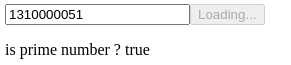
Two class fields are used in the HTML template for the component state: `loading` and `isPrime`.
Remember from our previous blog post that [methods should not be called from Angular template to avoid performance drawbacks](https://blog.octoperf.com/angular-performance-optimization---no-call-expression/#solution-1-react-to-form-update).
```html
is prime number ? {{isPrime}}
```
We also use [the `OnPush` change detection strategy](https://blog.octoperf.com/angular-performance-optimization---onpush-change-detection/#using-onpush-change-detection-strategy) to apply all tricks learned until now to maximize the performances of our application :
```typescript
import {ChangeDetectionStrategy, ChangeDetectorRef, Component, OnDestroy} from '@angular/core';
import {mergeMap, Subject, takeUntil} from "rxjs";
import {FormControl} from "@angular/forms";
import {PrimeAsyncService} from "../prime-async.service";
@Component({
selector: 'app-call-worker',
templateUrl: './call-worker.component.html',
styleUrls: ['./call-worker.component.scss'],
changeDetection: ChangeDetectionStrategy.OnPush
})
export class CallWorkerComponent implements OnDestroy {
private readonly destroyed = new Subject();
readonly numberForm = new FormControl(0, {nonNullable: true});
isPrime = false;
loading = false;
constructor(private prime: PrimeAsyncService,
private changeDetectorRef: ChangeDetectorRef) {
this.numberForm.valueChanges
.pipe(takeUntil(this.destroyed))
.pipe(mergeMap(number => this.prime.isPrime(number)))
.subscribe(isPrime => {
this.isPrime = isPrime;
this.changeDetectorRef.detectChanges();
});
}
computeNextPrimeNumber(): void {
this.loading = true;
const number = this.numberForm.value;
this.prime.nextPrime(number)
.subscribe(next => {
this.numberForm.setValue(next);
this.loading = false;
this.changeDetectorRef.detectChanges();
});
}
ngOnDestroy(): void {
this.destroyed.next(true);
this.destroyed.complete();
}
}
```
This component listens for changes made to the *numberInput* with `this.numberForm.valueChanges` and calls the async *PrimeAsyncService* with the pipe `mergeMap(number => this.prime.isPrime(number))`.
The [`ChangeDetectorRef.detectChanges()` method](https://blog.octoperf.com/angular-performance-optimization---onpush-change-detection/#using-the-changedetectorref) must be called when the state of the component is updated asynchronously as we use the `OnPush` change detection strategy.
The method `computeNextPrimeNumber` is called when the user clicks on the *Next* button.
Here again it uses the *PrimeAsyncService* to **get the next prime number value asynchronously using the underlying web-worker**.
## Web-Worker performance test
Let's check **what are the benefits in terms of performances**!
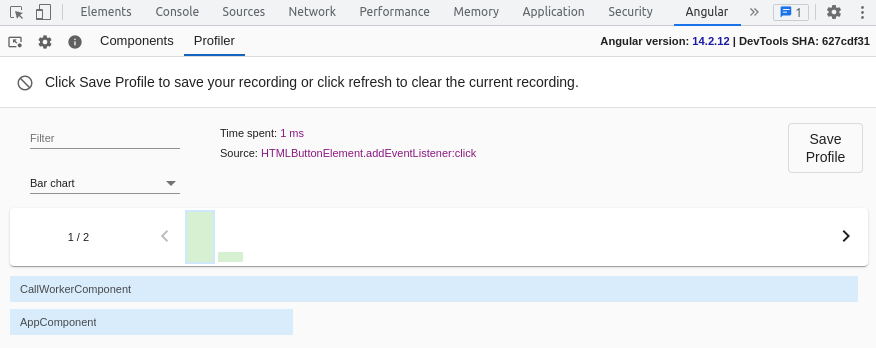
The [Angular Devtools Profiler](https://blog.octoperf.com/angular-performance-optimization---onpush-change-detection/#angular-devtools) is the proper tool to know how long it takes to Angular for reacting to a click on the *Next* button and computing the next prime number value.
It shows us that it takes only 1ms to handle the click itself:
And 0.2ms to update the component state once the web-worker has done computing the next prime value:
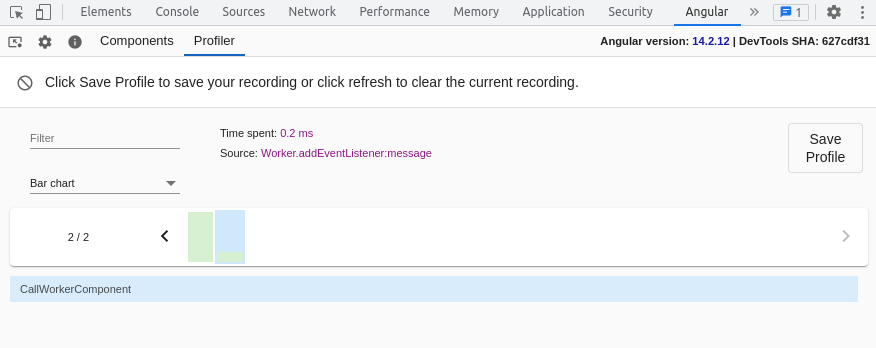
So we can conclude that **using a web-worker has successfully prevented our Angular application from freezing** even while doing an operation that can take several seconds of computing!