---
title: 'JMeter Assertions: The Ultimate Guide'
url: https://blog.octoperf.com/jmeter-assertions-the-ultimate-guide/
date: '2018-04-19'
authors:
- jloisel
categories:
- JMeter
tags:
- JMeter
- BeanShell
- JSR223
- CSS
- XPath
- Dummy
- JSONPath
description: 10+ JMeter Assertions fully reviewed. Learn how to use assertions like XPath, JSON, JSR223, Beanshell, Size and Duration through real-world examples illustrated with many screenshots.
---
# JMeter Assertions: The Ultimate Guide
Whether you want to:
- Check if the server response contains a specific string,
- Or Verify the server returned an `HTTP 200 OK`,
- Or check the value of a [json](https://www.json.org/json-en.html) field (using [JsonPath](https://goessner.net/articles/JsonPath/) like `$.store..price`).
Assertions are the way to go.
The problem is: you don't know **how to get started**. And the number of available assertions is overhelming. No worries!
This ultimate guide on [JMeter Assertion](https://jmeter.apache.org/usermanual/component_reference.html#assertions) explores every single assertion type through **comprehensive examples**. You'll know **when and how to use** each kind of assertion wisely. Once you've read this guide, **assertions won't have any secrets for you anymore**! Let's go.
## General Concepts
In this section, we cover the concepts which apply to all assertions. None of them depends on the type of assertion you are going to use.
### Supported Assertions
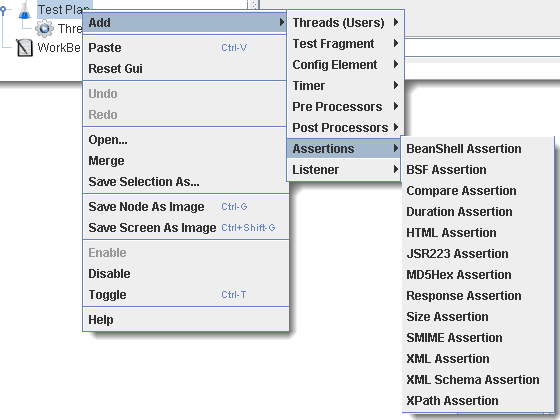
[JMeter Assertions](https://jmeter.apache.org/usermanual/component_reference.html#assertions) are a must have to **perform additional checks** on the result of a [Sampler](https://jmeter.apache.org/usermanual/component_reference.html#samplers). Assertions are part of the [Post-Processors](https://jmeter.apache.org/usermanual/component_reference.html#postprocessors) elements family.
JMeter offers a wide variety of assertions which can be used in a number of different scenarios:
| **Type** | **Usage** |
|---------------------|----------------------|
| [**Response Assertion**](https://jmeter.apache.org/usermanual/component_reference.html#Response_Assertion) | Apply a string pattern to verify against the server response |
| [**Duration Assertion**](https://jmeter.apache.org/usermanual/component_reference.html#Duration_Assertion) | Check the response was received within a given elapsed time |
| [**Size Assertion**](https://jmeter.apache.org/usermanual/component_reference.html#Size_Assertion) | Check the size of the server response contains the wanted number of bytes |
| [**XML Assertion**](https://jmeter.apache.org/usermanual/component_reference.html#XML_Assertion) | Check the response is a valid XML document |
| [**Beanshell Assertion**](https://jmeter.apache.org/usermanual/component_reference.html#BeanShell_Assertion) | Execute your own logic using [Beanshell](https://www.beanshell.org/) scripting |
| [**MD5Hex Assertion**](https://jmeter.apache.org/usermanual/component_reference.html#MD5Hex_Assertion) | Allows to check the MD5 hash of the response data (great for static files) |
| [**HTML Assertion**](https://jmeter.apache.org/usermanual/component_reference.html#HTML_Assertion) | Check html response syntax using [JTidy](https://jtidy.sourceforge.net/) |
| [**XPath Assertion**](https://jmeter.apache.org/usermanual/component_reference.html#XPath_Assertion) | Tests if a document is well-formed, with possible [DTD](https://en.wikipedia.org/wiki/Document_type_definition) validation, or putting the document through *JTidy* and testing with [XPath](https://www.w3schools.com/xml/xpath_intro.asp) |
| [**XML Shema Assertion**](https://jmeter.apache.org/usermanual/component_reference.html#XML_Schema_Assertion) | Validate an XML response against an XML schema |
| [**JSR223 Assertion**](https://jmeter.apache.org/usermanual/component_reference.html#JSR223_Assertion) | Run your own code logic using a [JSR223 Script](https://en.wikipedia.org/wiki/Scripting_for_the_Java_Platform) |
| [**Compare Assertion**](https://jmeter.apache.org/usermanual/component_reference.html#Compare_Assertion) | Compares results between themselves |
| [**SMIME Assertion**](https://jmeter.apache.org/usermanual/component_reference.html#SMIME_Assertion) | Evaluate the sample results from the *Mail Reader Sampler* |
| [**JSON Assertion**](https://jmeter.apache.org/usermanual/component_reference.html#JSON_Assertion) | Execute [JsonPath](https://github.com/json-path/JsonPath) expressions and validate Json documents |
**Which assertion should you use?** It boils down to the kind of response you have to check.
### Assertion Scope

**Assertion Scope** defines to which sample results the assertion applies to:
- **Main Sample only**: applies only on the result of a [sampler](https://jmeter.apache.org/usermanual/component_reference.html#samplers) (in most of the cases an [HTTP Request](https://jmeter.apache.org/usermanual/component_reference.html#HTTP_Request)),
- **Main Sample and sub-samples**: some samplers can generate sub-samples. For example, It happens when enabling `Retrieve All Embedded Resources` on *HTTP Request* samplers. A sub-sample result is generated per resource (CSS, Images, Javascript etc...),
- **Sub-Samples Only**: apply to sub-sample results only,
- **JMeter Variable**: apply the assertion on the value of a variable (like `${foo}`).
In most situations, you will want to use the **Main Sample Only** option. Assertions can rarely be applied on both the main result and sub-results.
### Assertion Location
As we said before, **Assertions** are a special kind of [Post-Processors](https://jmeter.apache.org/usermanual/component_reference.html#postprocessors).
> Assertions apply to samplers defined at same level or below them. If none, it applies to the parent sampler only.
Let's use some examples to understand the concept:
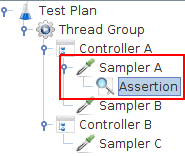
- In the case above, the Assertion only applies to *Sampler A*,
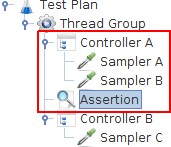
- In this case, the assertion applies to *Sampler A* and *Sampler B*,
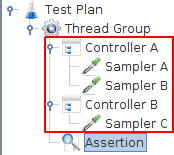
- In this case, the assertion applies to *Sampler A* and *Sampler B* and *Sampler C*.
The best advice I can give is: [Keep Things Simple and Stupid](https://en.wikipedia.org/wiki/KISS_principle). Define assertions as child of samplers and avoid trying to be too smart. **The easier it's to understand the more maintainable the script will be**.
Also, when an assertion fails, the failure is spread to the [logic controller](https://jmeter.apache.org/usermanual/component_reference.html#logic_controllers) surrounding the sampler. That means **failing assertions cause the associated controllers to fail too**.
### Performance
You must be aware that **most assertions are CPU and memory hungry**. The following table defines how much resources each type of assertion needs:
| **Assertion** | **CPU/Memory Usage** | Notes |
|---------------------|----------------------|-------|
| **Response Assertion** | **Moderate** | Regular Expressions |
| **Duration Assertion** | **Low** | |
| **Size Assertion** | **Low** | |
| **XML Assertion** | **High** | Builds XML DOM Documents |
| **Beanshell Assertion** | **Variable** | Depends on the script logic |
| **MD5Hex Assertion** | **Low** | |
| **HTML Assertion** | **High** | Parses the HTML Response |
| **XPath Assertion** | **High** | Builds XML DOM Documents |
| **XML Schema Assertion** | **High** | Builds XML DOM Documents |
| **JSR223 Assertion** | **Variable** | Depends on the script logic |
| **Compare Assertion** | **High** | Parses responses and compares them |
| **SMIME Assertion** | **Moderate** | |
| **Json Assertion** | **High** | Parses the Json document |
Each color has its own signification:
- **Low**: can be freely used, performance overhead is very low,
- **Moderate**: use them sparingly especially on big server response (like hundreds of KBs, several MB),
- **High**: mostly suitable only for [functional testing](https://en.wikipedia.org/wiki/Functional_testing) or very light load (less than 10 concurrent users).
Optimizing Assertions usage is only a fraction of the things you can do to [optimize JMeter for large scale tests](https://blog.octoperf.com/optimize-jmeter-for-large-scale-tests/). If you see the **CPU / Memory usage go through the roof** during a load test and have assertions, try disabling / removing those you don't need.
Scripting assertions like the *Beanshell* or *JSR223* assertions have **variable performance**: it really depends on what your script checks. Also, as these don't have any scope UI setting, you must **manually through scripting** define on which sample results the script applies.
### Assertion Results
The best way to see if an assertion fails is to use the [View Results Tree](https://jmeter.apache.org/usermanual/component_reference.html#View_Results_Tree) listener. Of course, there are many other ways to [Analyze JMeter Results](https://blog.octoperf.com/jmeter-result-analysis-the-ultimate-guide/).
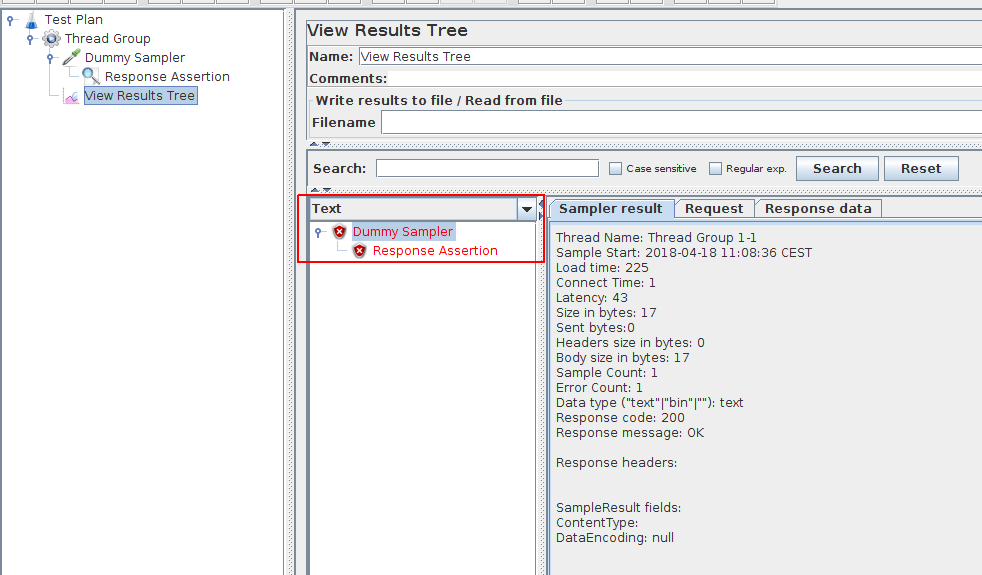
In the screenshot above, we can see the assertion failed. By **clicking on the assertion**, we can see the detailed error message:
```
Assertion error: false
Assertion failure: true
...
```
In this case, the response contained `John Smith` but the assertion checks it contains `John Doe`.
Let's now see in greater details **how each assertion works**!
### Dummy Sampler
All the examples below are simulated using the [Dummy Sampler](https://jmeter-plugins.org/wiki/DummySampler/).
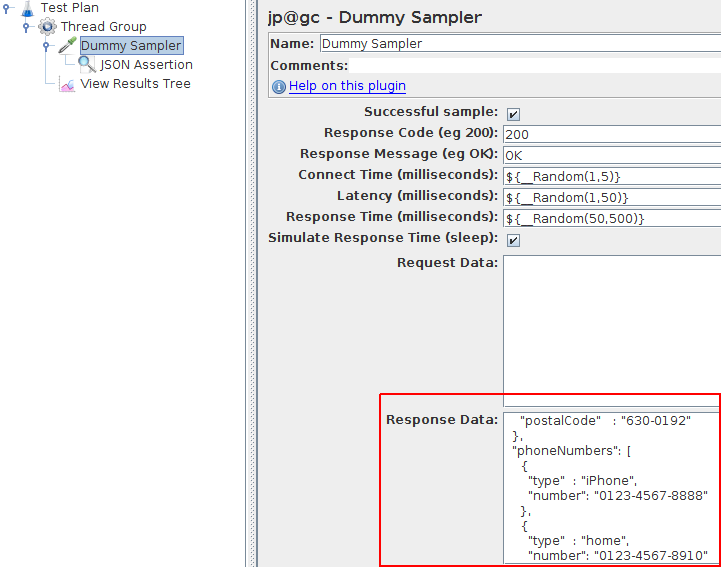
It makes it **easy to try out various assertions** without the need to setup a remote endpoint with the correct response. Try it yourself!
## Common Assertions
The following assertions are those which are used the most by Performance Engineers. Those assertions **cover a wide range of use-cases**. Knowing how to use them is the key to assert server responses properly.
### Response Assertion
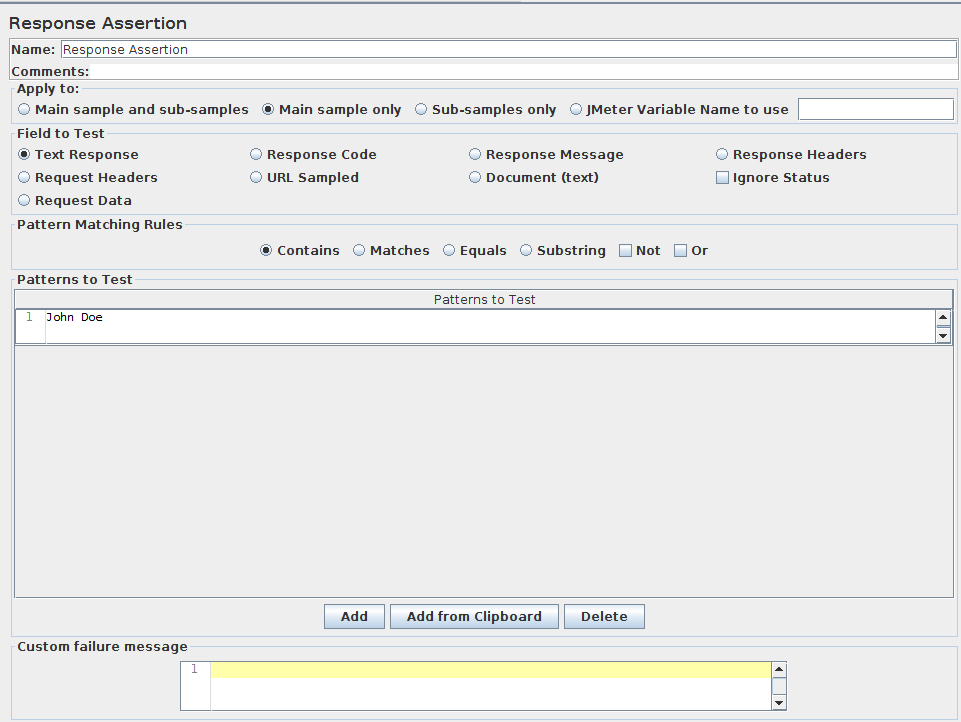
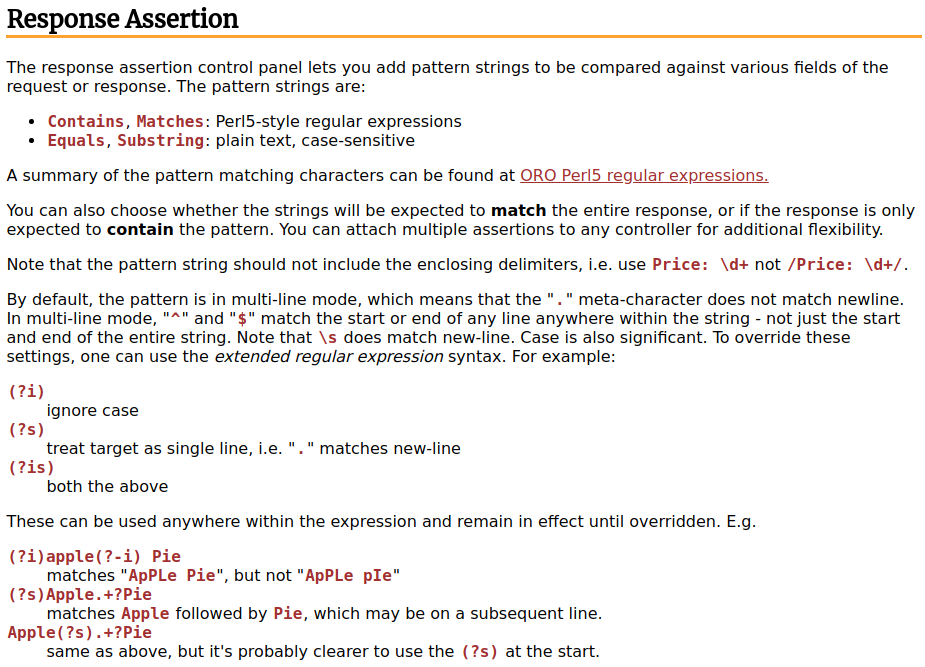
[JMeter Response assertion](https://blog.octoperf.com/jmeter-response-assertion/) is probably one of the most used JMeter assertion. It includes the following settings:
- **Field to test**: Can be *Text Response*, *Response code*, *Document (text)* and more. Tells on which part of the server response the assertion should be applied,
- **Pattern Matching Rules**: *Contains*, *Matches*, *Equals*, *Substring* with `Not` and `Or` options. By default, it checks that all **Patterns to test** are verified. By checking `Or` option, only one of the patterns to test must be true,
- **Patterns to test**: string values which must be tested against the fields to test.
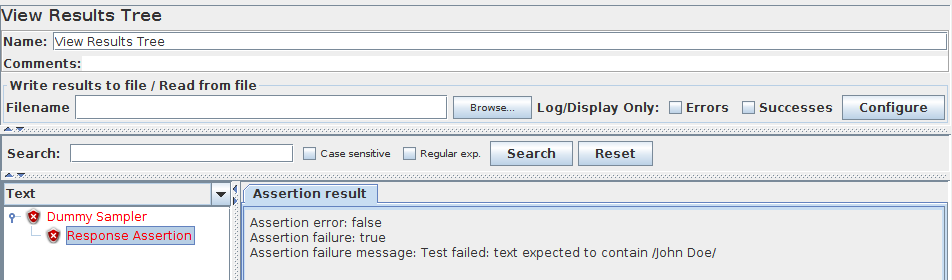
Typically, you want to make sure the response contains a specific text. In the example above, we check that the response contains `John Doe`.
```
Assertion error: false
Assertion failure: true
Assertion failure message: Test failed: text expected to contain /John Doe/
```
It's the **most commonly used assertion** for several reasons:
- Reasonable performance impact,
- Easy to use.
Personally, the `Contains` **Pattern Matching Rules** fills 95% of my needs. I guess the other options can be useful as well, but mostly only in very narrow use-cases.
The ability to **customize the error message** is a plus, definitely. That way, you can have your own message in results like [JTL files](https://wiki.apache.org/jmeter/JtlFiles) and get a better understanding of what's wrong. Due to **moderate** cpu and memory footprint, this assertion can be used sparingly.
### Duration Assertion
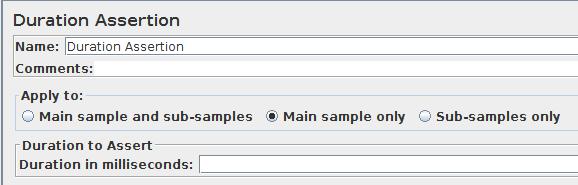
The **Duration Assertion** is especially useful to verify the application meets a certain level of performance. Typically, i'll use it to check the server responds within a reasonable amount of time. The **Duration in milliseconds** field lets you enter the expected server response time.Any response time above that limit will trigger an assertion error.
It can be seen as a way to enforce [SLA](https://en.wikipedia.org/wiki/Service-level_agreement) (Service Level Agreement). Therefore, it's more of a **performance alert than an assertion**.
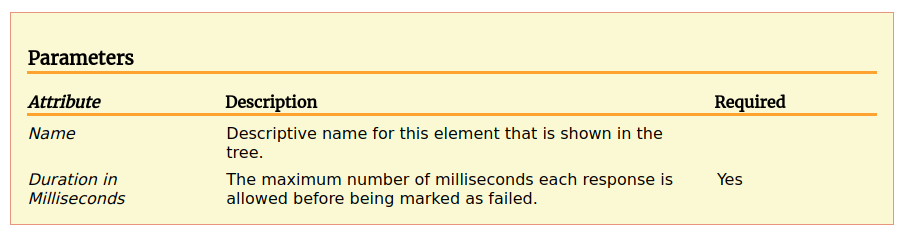
Due to **inexistent performance overhead**, that's one of my preferred assertions too. As the response time is already calculated by JMeter, it just checks the response time against the specified value. The performance cost is close to nothing!

Here is an example error message when this assertion fails:
```
Assertion error: false
Assertion failure: true
Assertion failure message: The operation lasted too long: It took 323 milliseconds, but should not have lasted longer than 1 milliseconds.
```
Due to **Low** cpu and memory footprint, this assertion can be used extensively.
### Size Assertion
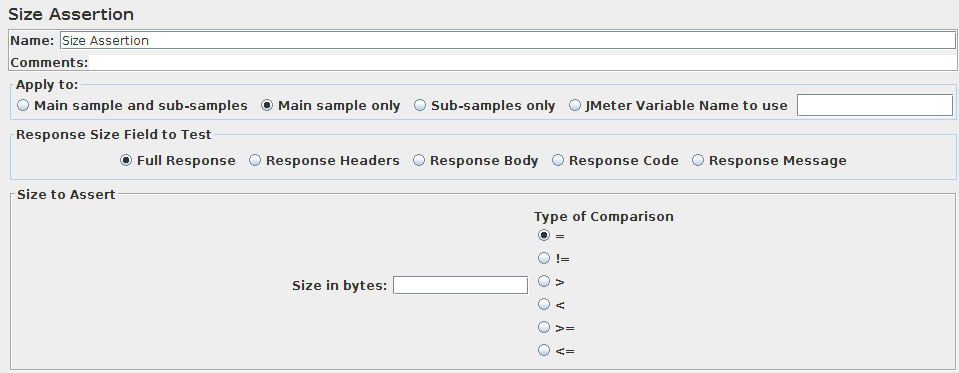
The size assertion is pretty when you need to make sure the server response is always of a certain size:
- **Size in bytes**: expected size in bytes,
- **type of comparison**: many operators available including `=`, `!=`, `>`, `<`, `>=` and `<=`.
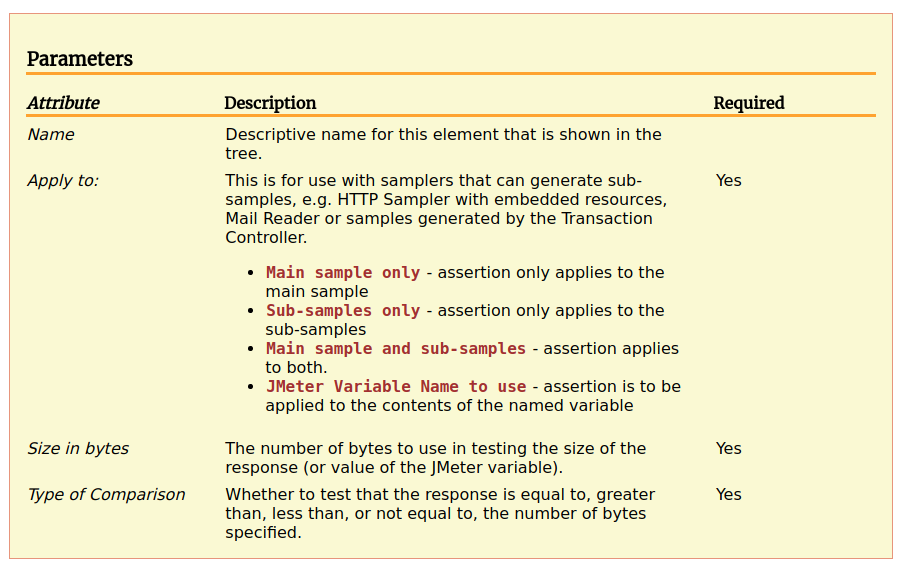
It's very simple to use. I personally use it to check the size of downloaded files like videos or music. I like to be sure the file has been fully downloaded by JMeter.
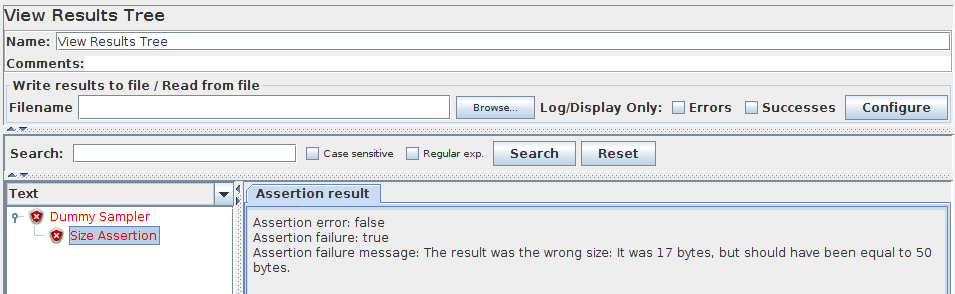
In case of failure, you should see both the expected and the real response size in bytes:
```
Assertion error: false
Assertion failure: true
Assertion failure message: The result was the wrong size: It was 17 bytes, but should have been equal to 50 bytes.
```
Due to **Low** cpu and memory footprint, this assertion should be used extensively.
### JSON Assertion
The JSON Assertion let you validate a [JSON response](https://en.wikipedia.org/wiki/JSON). Let's take an example json response:
```json
{
"firstName": "John",
"lastName" : "doe",
"age" : 26,
"address" : {
"streetAddress": "naist street",
"city" : "Nara",
"postalCode" : "630-0192"
},
"phoneNumbers": [
{
"type" : "iPhone",
"number": "0123-4567-8888"
},
{
"type" : "home",
"number": "0123-4567-8910"
}
]
}
```
Suppose we want to check that the first `phoneNumbers` type is `iPhone`. We would use the `$.phoneNumbers[:1].type` [JsonPath Expression](https://goessner.net/articles/JsonPath/index.html#e2).
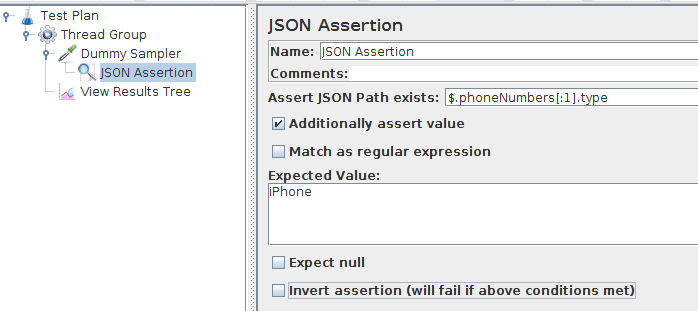
We would then configure it as following in JMeter:
- **Assert JsonPath Exists**: `$.phoneNumbers[:1].type`,
- **Additional Assert Value**: if checked, also assert the value is equal to the **Expected Value**,
- **Expected Value**: `iPhone`.
Now suppose we put `Samsung Galaxy` in *Expected Value* instead.

As expected, the assertion fails because the `phoneNumbers` first type is `iPhone`.
```
Assertion error: false
Assertion failure: true
Assertion failure message: Value expected to be 'Samsung Galaxy', but found '["iPhone"]'
```
For more information about how to use **JsonPath**, refer to our article on [JMeter Json Path Extractor](https://blog.octoperf.com/how-to-extract-data-from-json-response-using-jmeter/). It goes into much greater details about the subject.
This assertion has a **High** cpu and memory footprint because it **parses Json responses** and converts them into an object representation.
### XPath Assertion
[XPath](https://en.wikipedia.org/wiki/XPath) is a query language for selecting nodes from an XML document. What can we do with that? It's the **equivalent of JsonPath** but for XML responses. Take a look at our excellent [XPath Extractor Guide](https://blog.octoperf.com/jmeter-xpath-extractor-guide/) if you want to learn **how XPath works**.
This assertion is mostly suitable for [SOAP Web Services](https://blog.octoperf.com/soap-vs-rest-why-comparing-them-is-a-nonsense/).
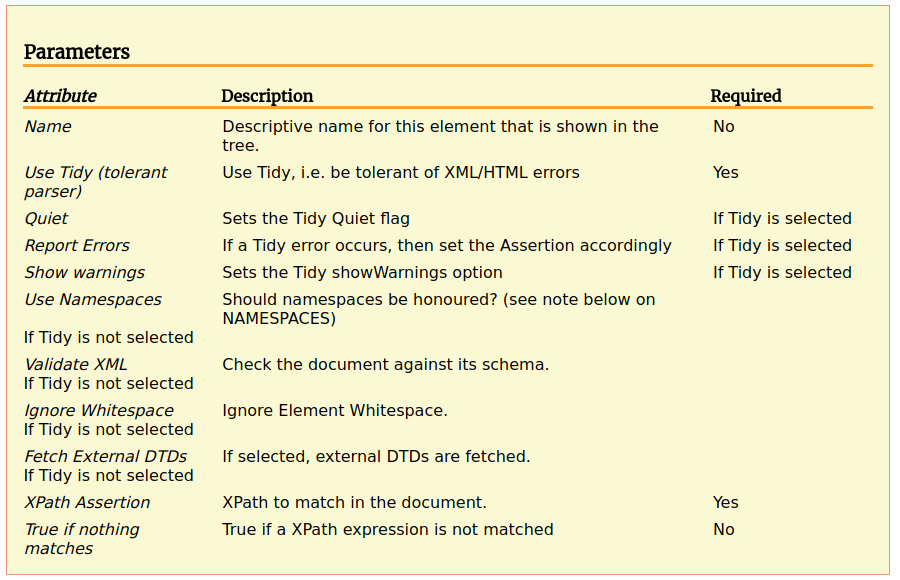
Like the [XPath Extractor](https://blog.octoperf.com/jmeter-xpath-extractor-guide/), it has several advanced settings like:
- **Use Tidy**: enable it if the XML is not well-formed,
- **Use Namespaces**: must be enabled to validate nodes like `foo:singer` in the example below,
- **Validate XML**: make sure the XML is well-formed, fail otherwise,
- **Fetch External DTDs**: download referenced XML [Document Type Definitions](https://en.wikipedia.org/wiki/Document_type_definition).
Most of the time, you can leave those settings as is (all unchecked). Unless the XML to assert is invalid, the default parser is just fine.
Let's take the same XML document as example response:
```xml
Christian Bale
Liam Neeson
Michael Caine
Tom Waits
B.B. King
Ray Charles
```
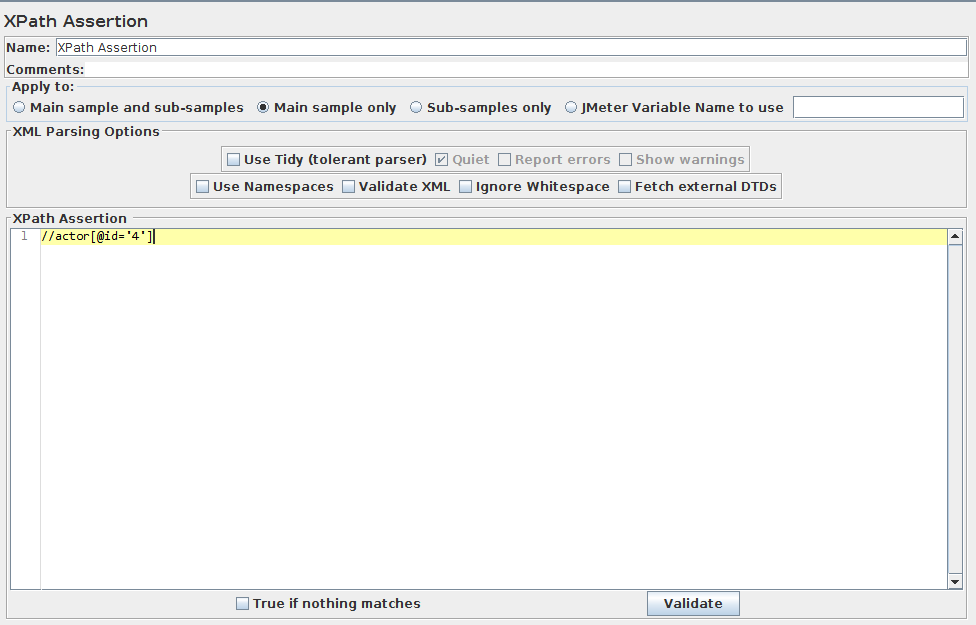
Now let's configure the XPath assertion with **XPath Assertion**: `//actor[@id='4']`. This expression is known to fail because **there is no actor with id=4**.

Running the assertion should fail with the following message:
```
Assertion error: false
Assertion failure: true
Assertion failure message: No Nodes Matched //actor[@id='4']
```
This assertion has a **High** cpu and memory usage (especially with big XML responses) because it **parses XML responses** and converts them to an object representation. Avoid using it during load tests.
### JSR223 Assertion
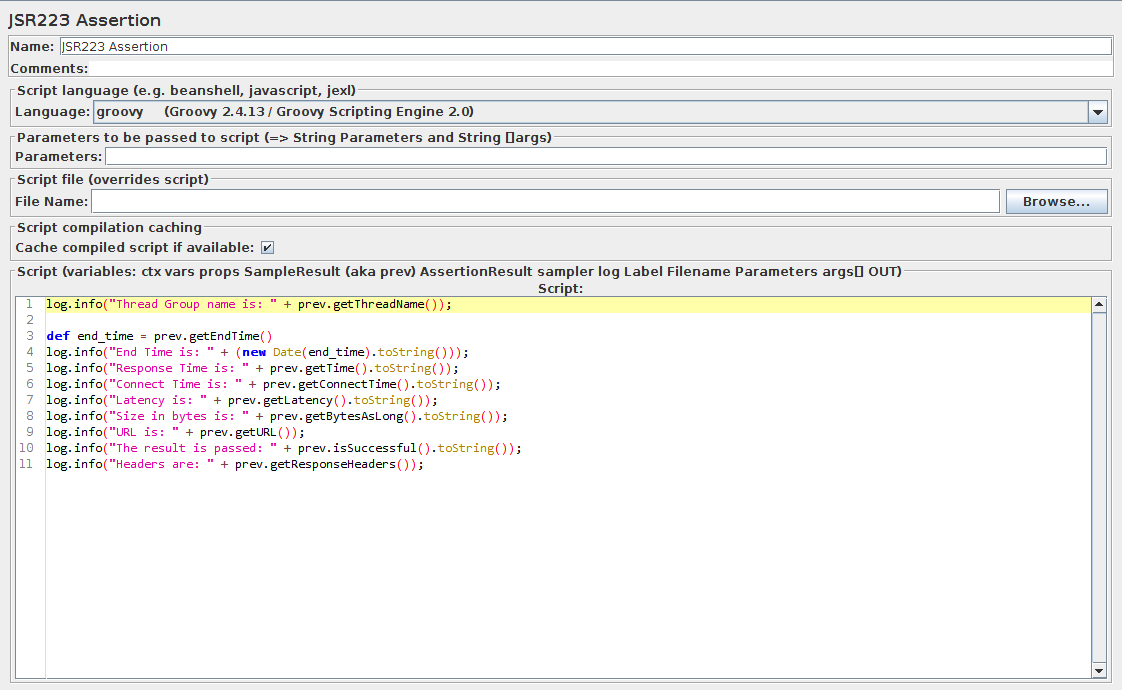
The **JSR223 Assertion** is the successor to the **BeanShell Assertion**. It provides much more flexibility on the scripting language (it supports *beanshell*, *groovy*, *java*, *jexl* and *Javascript*) and is **way faster than beanshell**. (at the condition to use `groovy`)
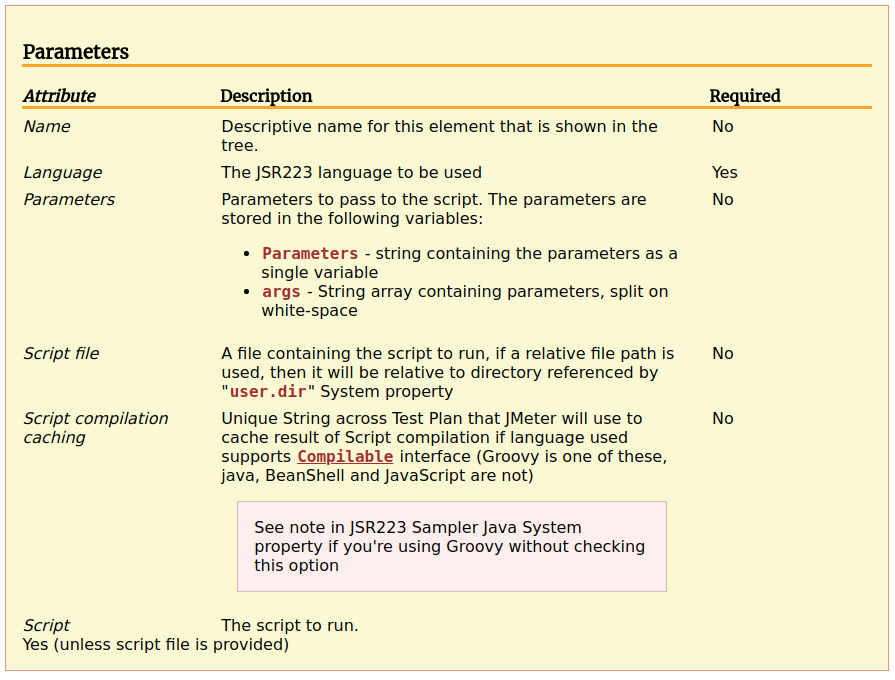
In most of the cases, you'll leave the extra settings (like `Parameters` and `Script File`) alone. These are mostly used when you need to share scripting functions accross multiple JMX projects. In this case, **you need to share the scripts**, thus make them reusable by putting the common script in a separate file.
For example, if we want to check the previous result response time with a JSR223 script, we would do the following:
```java
def response_time = prev.getTime().toInteger();
def expected_response_time = 0;
if (response_time > expected_response_time) {
AssertionResult.setFailure(true);
AssertionResult.setFailureMessage("The expected response time is : " + expected_response_time + "ms but it took: " + response_time + "ms");
}
```
Of course, it will fail because we want a response time of `0ms`.

This assertion has a **Variable**, which means the CPU and memory usage varies depending on the logic implemented inside the script. Generally speaking, **avoid heavy computation in assertions**.
## Less Used Assertions
### XML Assertion

The XML assertion is great to check if the response is a **valid XML document**. But, that's the only use-case of this assertion. It can be useful in functional testing when you need to check the **server response is well-formed**.

In case of error (like invalid XML response), you should see an error message like the following:
```
Assertion error: true
Assertion failure: true
Assertion failure message: Content is not allowed in prolog.
```
Due to **High** cpu and memory footprint, this assertion should be avoided during load tests.
### XML Schema Assertion
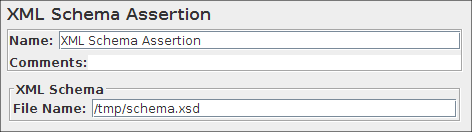
This assertion allows to check an XML response is conform to a certain [XML Schema DTD](https://en.wikipedia.org/wiki/Document_type_definition). I guess the usage is anecdotical, I've personally never used it.
It may be suited best for [SOAP Web Services](https://blog.octoperf.com/soap-vs-rest-why-comparing-them-is-a-nonsense/) where responses must follow a strict schema.
Due to **High** cpu and memory footprint, it's suitable for **functional testing** but not **load testing**.
### Beanshell Assertion
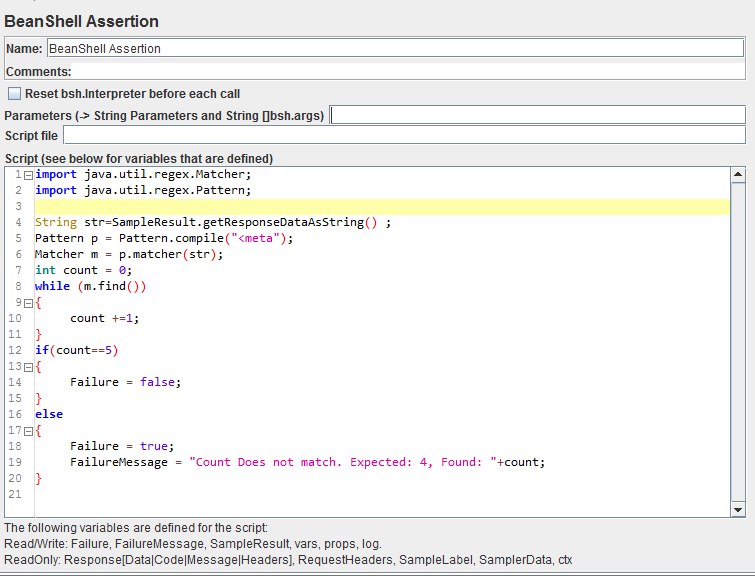
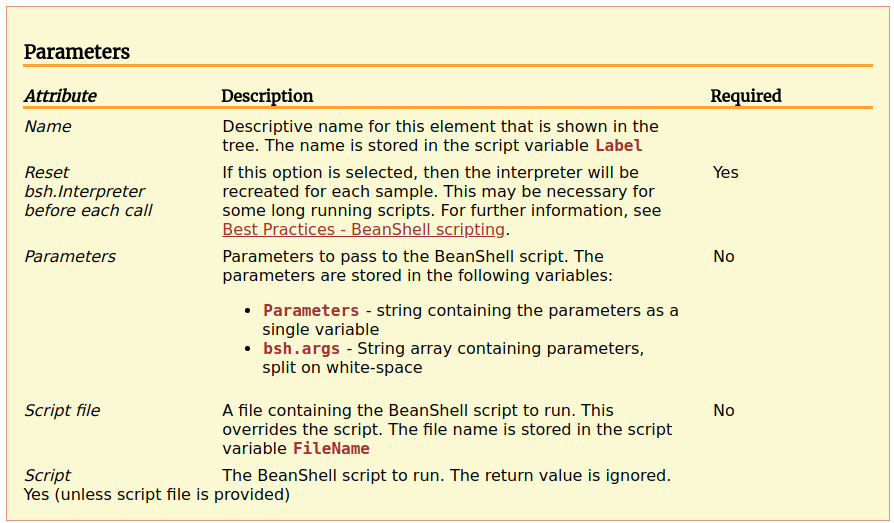
[BeanShell](https://www.beanshell.org/) is a lightweight scripting engine for Java. However, **performances are much worse than JSR223 scripting**. It's highly recommended to use the JSR223 scripting instead.
You can for example use the following script: (very similar to Java)
```java
Failure = true;
FailureMessage = "This is an Error Message";
```
And the result should be the error message configured.

It's not straight forward to use as you need to learn the scripting language (which is very similar to Java). But, it's **much more customizable** than any other assertion.
A variety of variables are available directly into the script:
- log - the Logger Object. Example: `log.warn("Message"[,Throwable])`,
- `SampleResult, prev`: the [SampleResult](https://jmeter.apache.org/api/org/apache/jmeter/samplers/SampleResult.html) Object; read-write,
- `Response`: the response Object; read-write,
- `Failure`: boolean; read-write; used to set the Assertion status,
- `FailureMessage`: String; read-write; used to set the Assertion message,
- `ResponseData`: the response body (byte []),
- `ResponseCode`: like `200`, `404` etc,
- `ResponseMessage`: e.g. `OK`,
- `ResponseHeaders` - contains the HTTP response headers,
- `RequestHeaders`: contains the HTTP request headers,
- `SampleLabel`: name of the sampler,
- `SamplerData`: data that was sent to the server,
- `ctx` - [JMeterContext](https://jmeter.apache.org/api/org/apache/jmeter/threads/JMeterContext.html) with various methods to access the current thread, previous sampler and more,
- `vars`: [JMeterVariables](https://jmeter.apache.org/api/org/apache/jmeter/threads/JMeterVariables.html) to get/set variables from the script.
**Need some examples?** See our [reusable example scripts](https://blog.octoperf.com/reusable-sample-jmeter-scripts/) blog post.
Due to **High** cpu and memory footprint, **prefer the JSR223 Assertion**. It's very similar but much faster to execute.
### MD5Hex Assertion
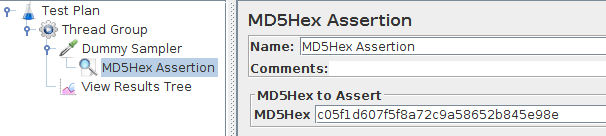
Performs an MD5 hash of the server response and compares it against the given Md5 hash. It perfectly fits the case you want to check a downloaded file is intact.
It has only one setting:
- **MD5Hex**: enter the expected response [MD5 hash](https://en.wikipedia.org/wiki/MD5).
Like explained on Wikipedia:
> The MD5 algorithm is a widely used hash function producing a 128-bit hash value. Although MD5 was initially designed to be used as a cryptographic hash function, it has been found to suffer from extensive vulnerabilities.
Let's try to run it against our dummy sampler with a **random md5 hash provided**.

As expected, the assertion fails because the MD5 hashes are different.
```
Assertion error: false
Assertion failure: true
Assertion failure message: Error asserting MD5 sum : got c9ed4e51d70d5fb374d12e63db2e42d4 but should have been c05f1d607f5f8a72c9a58652b845e98e
```
As the **server response must be exactly the same** on every check, it's **only suitable for static resources** check. Any dynamic web page will probably yield an assertion error because the content is different.
Due to **Moderate** cpu usage, it can be used to check file integrity during small load tests.
### HTML Assertion
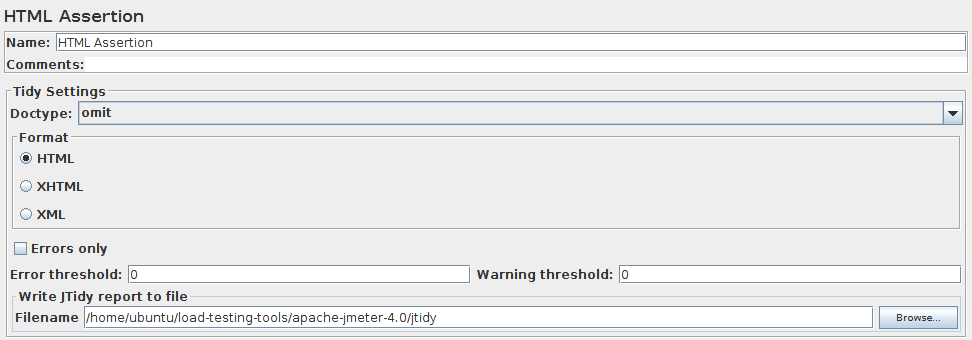
This assertion checks the HTML response is a well-formed HTML document. The strictness level can be configured by setting `Error Threshold` and `Warning Threshold` to upper levels (other than `0`). It's mostly well suited for **functional testing**.
Obviously, You don't want to check HTML response validity when throwing thousands of hits per second on your servers.
It can be configured with the following settings:
- **DocType**: `omit`, `auto`, `strict` or `loose`. Defines whenever the HTML DocType is taken into account or not,
- **Format**: `HTML`, `XHTML` or `XML`. Depends on the type of response to validate,
- **Errors only**: ignore warnings if any,
- **Error and Warning Thresholds**: set the number of tolerated errors and warnings,
- **Filename**: outputs a JTidy report there.
Here is an example JTidy report:
```
line 1 column 1 - Error: is not recognized!
line 1 column 1 - Warning: missing declaration
line 1 column 1 - Warning: discarding unexpected
line 2 column 3 - Error: is not recognized!
InputStream: Document content looks like HTML 3.2
2 warnings, 2 errors were found!
This document has errors that must be fixed before
using HTML Tidy to generate a tidied up version.
```

Usually, a failure looks like:
```
Assertion error: false
Assertion failure: true
Assertion failure message: Tidy Parser errors: 9 (allowed 0) Tidy Parser warnings: 21 (allowed 0)
```
Due to **High** cpu and memory usage, avoid using HTML assertions during load tests. It parses HTML responses which **consumes a lot of resources**.
## Final Words
While assertions provide a convenient way to **validate server responses** are as expected, you should be aware it **has a cost**. Most fancy assertions like `JSON` or `XPath` assertions should only be used in light load test (a few concurrent users), or in functional tests (usually one single user).
When used wisely, scripting assertions like `Beanshell` or `JSR223` can solve problems other assertions won't even touch. But, again beware of the performance drawback: **scripts should do as little computation as possible**.
**Load Testing** is a discipline which requires a strong attention to performance. Make sure to read our guide explaining how to [optimize JMeter for large scale](https://blog.octoperf.com/optimize-jmeter-for-large-scale-tests/) to **avoid common JMeter pitfalls**.