---
title: JMeter vs Gatling Tool
url: https://blog.octoperf.com/jmeter-vs-gatling-tool/
date: '2015-06-08'
authors:
- jloisel
categories:
- Load-Testing
tags:
- Gatling
- JMeter
- Database
- JMX
- Metrics
- BlazeMeter
- Domain Specific Language
- Grafana
- LDAP
- Proxy
- FTP
description: Which load testing tool between Apache JMeter and Gatling Tool best suits your needs? Learn the key differences between those tools and make your choice.
---
# JMeter vs Gatling Tool
I think you'll agree when I say:
It's REALLY hard to decide whenever JMeter or Gatling Tool should be used.
You're probably wondering:
- *How does [JMeter](https://jmeter.apache.org/index.html) to [Gatling Tool](https://gatling.io) compare?*
- *Which tool has best documentation? Performances? Script Maintainability?*
- *Should I use JMeter or Gatling? Or maybe both?*
Well, it turns out you can **gain significant insight on JMeter and Gatling differences** in just 5 minutes reading!
Following up our article about why we chose [JMeter to build OctoPerf, our Cloud Load Testing Platform](https://blog.octoperf.com/why-we-chose-jmeter/), this post compares **JMeter and Gatling Tool** on many different fields:
- **Project History**: which tools is improved and maintained more actively,
- **Features**: which of the two has the most features,
- **Setup**: how each tool can be installed,
- **Documentation**: which tool does have the most complete documentation,
- **Scripting**: compares how to design scripts with both tool,
- **Performances**: is JMeter faster than Gatling? Which is the most efficient tool,
- and even more!
Ready for some action? Let's go!
## Project History
This section covers historical data about these two open-source projects.
### JMeter History
JMeter has been first released in [1998](https://en.wikipedia.org/wiki/Apache_JMeter#Releases), so this project more than 15 years old.
It's a mature project which has released more than 20 versions. JMeter is purely written in [Java](https://en.wikipedia.org/wiki/Java_(programming_language)),
although [OpenHub](https://www.openhub.net/p/jmeter) shows that it also contains XML and HTML:

JMeter has more than 10.000 commits representing almost 500K lines of code. 33 people contributed to the project so far. [Philippe M.](https://twitter.com/philmdot) is one of the biggest contributor to the project, mostly in Java. He is the founder of [Ubik Load Pack](https://ubikloadpack.com/), a French company offering commercial JMeter plugins.

JMeter is open-source and released under the [Apache 2.0 license](https://www.apache.org/licenses/LICENSE-2.0).
### Gatling Tool History
[Gatling Tool](https://gatling.io) has been first released on [December 20, 2011](https://github.com/gatling/gatling/releases?after=1.2.0).
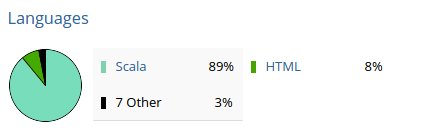
Gatling is a younger project, with almost 4 years old codebase. Gatling is mostly written in [Scala](https://www.scala-lang.org/).
> Scala differs for Java by offering full support for [Functional programming](https://en.wikipedia.org/wiki/Functional_programming).
> Scala has been created by a [Martin Odersky](https://en.wikipedia.org/wiki/Martin_Odersky), as German computer scientist.
[Stéphane Landelle](https://twitter.com/slandelle) is the main contributor and creator of Gatling tool. More than 60 people contributed to this project.
Its size is almost 50K lines of code.

Gatling tool is open-source and released under the [Apache 2.0 license](https://www.apache.org/licenses/LICENSE-2.0).
Its development is supported by [Excilys](https://www.excilys.com/).
### History Winner
**JMeter wins on Project History**. The project is significantly older and has more contributors. Both Gatling and JMeter are **maintained regularly**. JMeter has a significantly bigger codebase (almost [500K lines now](https://www.openhub.net/p/jmeter)), which Gatling tool is much smaller ([50K lines of code](https://www.openhub.net/p/gatling)). Of course, [Scala code is more concise](https://learnersguide.wordpress.com/2014/10/19/scala-vs-java/) than Java code.
## Features
### JMeter Features
JMeter has obviously a great support for [many different protocols](https://jmeter.apache.org/):
- Ability to load and performance test many different applications/server/protocol types:
- **Web**: HTTP, HTTPS (Java, NodeJS, PHP, ASP.NET, …),
- **SOAP / REST Webservices**,
- FTP,
- Database via JDBC,
- LDAP,
- Message-oriented middleware (MOM) via **JMS**,
- Mail - SMTP(S), POP3(S) and IMAP(S),
- **Native commands** or shell scripts
- TCP,
- Full featured Test IDE that allows fast Test Plan recording (from Browsers or native applications), building and debugging.
- [Command-line mode (Non GUI / headless mode)](https://jmeter.apache.org/usermanual/get-started.html#non_gui) to load test from any Java compatible OS (Linux, Windows, Mac OSX, …)
- **Dynamic HTML report**,
- **Easy correlation** through ability to extract data from most popular response formats, HTML, JSON , XML or any textual format,
- **Complete portability** and 100% Java purity,
- **Full multi-threading** framework allows concurrent sampling by many threads and simultaneous sampling of different functions by separate thread groups,
- Caching and offline analysis/replaying of test results.
Let's review Gatling Tool Features now.
### Gatling Tool Features
Gatling has the following interesting features:
- Standalone HTTP Proxy Recorder,
- **Scala**-based scripting,
- An expressive self-explanatory **DSL for test development**,
- **asynchronous non-blocking** engine for maximum performance,
- **Excellent support of HTTP(S) protocols** and can also be used for **JDBC** and **JMS** load testing,
- Validations and assertions,
- and a Comprehensive HTML Report.
You probably wonder now: **How does JMeter Features compare to Gatling Features?**
### Features Comparison Table
The following Table compares the features supported by both tools.
| Feature | JMeter | Gatling |
|:---------|:--------:|:---------:|
| HTTP | X | X |
| HTTPS | X | X |
| WebSocket | **X** | X |
| Rest Apis | X | X |
| Soap Services | X | |
| FTP | X | |
| JDBC | X | |
| Database via JDBC | X | |
| JMS | X | X |
| TCP | X | |
| HTTP Recorder | X | X |
| HTML Reporting | X | X |
| Distributed Tests | X | |
| GUI Scripting | X | |
| Code Scripting | | X |
| Command-Line Mode | X | X |
| Assertions | X | X |
| Response Extractors | X | X |
**X**: external plugins may be required.
### Features Verdict
And the winner is... **JMeter**! JMeter has clearly more features than Gatling Tool. This is completely understandable considering both project histories.
So sure, **JMeter has more features**. But, do you really need them all?
Let's see now how each tool performs when it comes to **teaching how to use them**.
## Documentation
The match between JMeter and Gatling tool ends with a draw on documentation. Both are great!
You may prefer the look of Gatling's documentation, but JMeter has recently made a great effort to refresh the look of their website.
### JMeter Documentation
The [JMeter documentation](https://jmeter.apache.org/usermanual/) is really great. Every feature of the tool is detailed with every possible setting.
They truly made a huge effort on explaining how JMeter works, how to create your first test and more.
### Gatling Documentation
The [Gatling Documentation](https://gatling.io/#/resources/documentation) is very clear and concise, like the philosophy of Scala.
There is really nothing more to say, the documentation talks about any feature in depth and covers the whole tool.
### Documentation Comparison Table
The following table compares JMeter and Gatling Tool documentations:
| Documentation | JMeter | Gatling |
|:---------|:--------:|:---------:|
| Installation | X | X |
| Quick Start | X | X |
| Reference Guide | X | X |
| Tutorials | X | X |
| Issue Tracker | X | X |
| On Stackoverflow | X | X |
As you see it, both tools have great documentation. [JMeter](https://stackoverflow.com/questions/tagged/jmeter?sort=newest&pageSize=15) and [Gatling Tool](https://stackoverflow.com/questions/tagged/gatling) are active on **StackOverFlow**, a question answering community.
### Documentation Verdict
**Both JMeter and Gatling Tool have great documentation.** The result of this battle is... **draw!**
## Setup
JMeter and Gatling tool both require a [Java JRE](https://openjdk.org/install/) installed on the machine.
### JMeter Setup
- Download [JMeter Archive](https://jmeter.apache.org/download_jmeter.cgi),
- Unzip the archive,
- Run `./bin/jmeter.sh` executable. (.bat on Windows)
### Gatling Tool Setup
- Download [Gatling Tool Archive](https://gatling.io/download/),
- Unzip the archive,
- Run `./bin/gatling.sh` executable. (.bat on Windows)
### Setup Comparison Table
The following Table compares the setup process:
| Setup | JMeter | Gatling |
|:---------|:--------:|:---------:|
| Archive Format | X | X |
| Installer Format | | |
| Command-line Executable | X | X |
| GUI Executable | X | |
| Requires Java | X | X |
### Setup Verdict
As you can see, both tools have comparable setup. When it comes to **Tool Setup**, the result is **draw**!
Both are **JVM applications** that must be installed as a **standalone program** on your machine. There is no real difference in installing JMeter or Gatling. Both are **shipped as archives**, no additional installation is required once you have a working [Java JRE](https://openjdk.org/install/).
## Scripting
One big difference between JMeter and Gatling is the project format.
Gatling saves them (called *Simulation*) as Scala classes with scala extension.
### JMeter Scripting
Here is what a JMeter JMX looks like:
```xml
false
false
continue
false
1
1
1
1433521552000
1433521552000
false
google.Com
GET
true
false
true
false
false
```
JMeter saves projects as an XML file with `jmx` extension. See [JMeter JMX Format](https://wiki.apache.org/jmeter/JmxTestPlan) for more information.
**JMeter is GUI oriented**. Opening, editing and saving a JMX file must be made with **JMeter Graphical interface**.
Do not attempt to modify the JMX yourself, even if the XML is human readable, it's really not sustainable. JMeter's GUI probably suits well for people accustomed to graphical tools.
Here is what JMeter graphical interface looks like:

JMeter JMX is more verbose than Gatling Scala simulation. But, you're not intended to read the JMX file directly.
JMeter has a GUI to open those file, and display them. Gatling simulations are expected to be edited and modified directly.
### Gatling Scripting
Here is what a Gatling simulation looks like:
```scala
package computerdatabase // 1
import io.gatling.core.Predef._ // 2
import io.gatling.http.Predef._
import scala.concurrent.duration._
class BasicSimulation extends Simulation { // 3
val httpConf = http // 4
.baseURL("http://computer-database.herokuapp.com") // 5
.acceptHeader("text/html,application/xhtml+xml,application/xml;q=0.9,*/*;q=0.8") // 6
.doNotTrackHeader("1")
.acceptLanguageHeader("en-US,en;q=0.5")
.acceptEncodingHeader("gzip, deflate")
.userAgentHeader("Mozilla/5.0 (Windows NT 5.1; rv:31.0) Gecko/20100101 Firefox/31.0")
val scn = scenario("BasicSimulation") // 7
.exec(http("request_1") // 8
.get("/")) // 9
.pause(5) // 10
setUp( // 11
scn.inject(atOnceUsers(1)) // 12
).protocols(httpConf) // 13
}
```
In contrast to JMeter, **Gatling Tool has no GUI**. Editing the simulation requires you to write code.
Gatling tool is clearly made for developers, although they claim it can be used by non programmers too.
The Gatling simulation Scala syntax is pretty easy to understand, but as a developer so point of view is a little biased.
I would definitely recommend to use [Scala IDE](https://scala-ide.org/) to edit Gatling Simulations. [Intellij IDEA](https://www.jetbrains.com/idea/) originally designed for **Java** also supports **Scala** via a [plugin](https://plugins.jetbrains.com/plugin/1347-scala).

Running a Gatling simulation:
```sh
ubuntu@desktop:~$ ./bin/gatling.sh
Choose a simulation number:
[0] computerdatabase.BasicSimulation
[1] computerdatabase.advanced.AdvancedSimulationStep01
[2] computerdatabase.advanced.AdvancedSimulationStep02
[3] computerdatabase.advanced.AdvancedSimulationStep03
[4] computerdatabase.advanced.AdvancedSimulationStep04
[5] computerdatabase.advanced.AdvancedSimulationStep05
```
Simply hit *0* then *Enter*, and it runs the **BasicSimulation** script.
### Scripting Comparison Table
The following table compares JMeter and Gatling on Scripting:
| Scripting | JMeter | Gatling |
|:---------|:--------:|:---------:|
| Code | X | |
| UI | | X |
**JMeter** is clearly oriented toward **UI Scripting**, while **Gatling Tool** is oriented toward **Code Scripting**. Each tool target a different audience:
- **JMeter**: mainly intended to be used by QA Engineers,
- **Gatling Tool**: mainly intended to be used by Devops Engineers.
### Scripting Verdict
You've probably heard this a million times: the scripting winner depends on your feelings.
Do you prefer a point-and-click tools or Write Code? Depending on your preference, one tool may be better than the other.
## Performance
### JMeter Performance
JMeter uses the *One Thread = One User* Paradigm. It means that each simulated virtual user inside the load generator equals to a single thread.
Wait times are simulated by *Thread.sleep*. The user waits for the server response when sending a request.
This is sometimes called *Synchronous processing*.
### Gatling Performance
Gatling uses a more advanced engine based on [Akka](https://akka.io). Akka is a distributed framework based on the actor model.
It allows fully asynchronous computing. **Actors** are small entities communicating with other actors through messaging.
It can simulate multiple virtual users with a single Thread. Gatling also makes use of [Async HTTP Client](https://hc.apache.org/httpcomponents-client-ga/).
**Gatling is technically superior to JMeter**. The programming model is definitely more innovant.
### Performance Verdict
There was a [debate about JMeter versus Gatling performance](https://badmoodperf.blogspot.fr/2013/07/a-propos-de-gatling-et-jmeter.html). As of today, **none is performing better than the other**.
Sure, the **asynchronous thread model** adopted by Gatling reduces CPU and memory usage a little bit, but usually the bottleneck comes from **Network Bandwidth**. Simulating **1K concurrent users** on a single machine with **1GBps** is equivalent to giving roughtly **1MBps per user**. This is clearly much lower than [DSL or 4G Bandwidth](https://en.wikipedia.org/wiki/Bandwidth_(computing)).
We decided to **give the point to Gatling Tool.** The innovative approach to the threading model, although bringing only minor benefits, merits attention.
## Distributed Testing
You may ask: **Which tool does support distributed testing?**
*Distributed Testing* is the ability to use several **slaves computers** as load generators. The idea is to spread the load over multiple machines to be able to simulate **more concurrent users**.
### JMeter Distributed Testing

When load testing an HTTP application, once you need to simulate several thousands users a single machine may not enough.
The load must be splitted among multiple machines. JMeter and Gatling tool are clearly not behaving the same way on this field.
**JMeter is distributed**. JMeter uses a *master / slave* architecture. The master is connected to slaves via the RMI protocol.
The master sends the JMX to simulate to each slave. Each slave plays the JMX. If you have 6 slaves, and your JMX simulates 1000 users, then you end up playing 6x1000 = 6000 users.
Results are sent back to the master for consolidation.
If you want more info, see the [Distributed Testing with JMeter](https://jmeter.apache.org/usermanual/jmeter_distributed_testing_step_by_step.pdf) tutorial.
### Gatling Distributed Testing
**Gatling is single host**. Although Gatling is based on Akka which is a distributed actor framework, Gatling is not distributed.
It cannot scale horizontally. You can of course launch multiple Gatling instances on different machines at the same time, but it's fully manual.
You will also need to consolidate the results from the multiple injectors manually.
Distributed load testing is planned for Gatling, but [only as a commercial feature](https://github.com/gatling/gatling/issues/415).
### Distributed Testing Verdict
**JMeter stands out!** Gatling Tool simply doesn't support distributed testing in the free version. Only [Gatling Frontline](https://gatling.io/gatling-frontline/), the paid Saas version, supports it.
## HTTP Recorders
Both JMeter and Gatling Tool have built-in **HTTP Proxy Recorders**. The principle is quite simple:

The proxy is a [man-in-the-middle](https://en.wikipedia.org/wiki/Man-in-the-middle_attack) technique to intercept both client requests and server responses. Those requests and responses are then stored as a script.
### JMeter Recorder
JMeter has a built in proxy recorder to generate the requests from the user navigation.
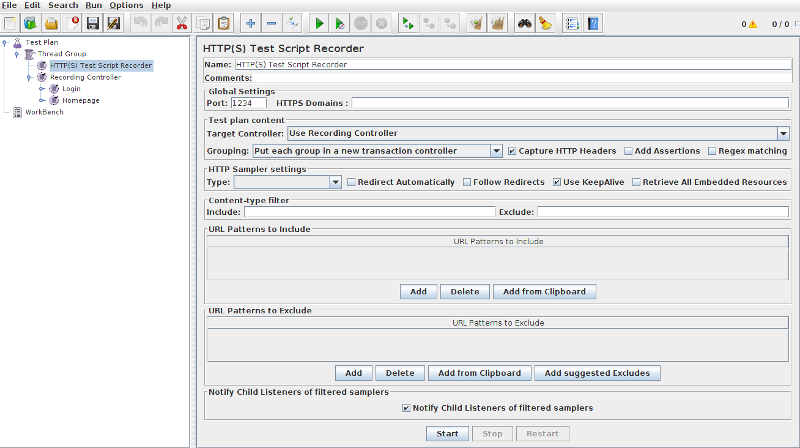
If you want more information, see the [JMeter Proxy step by step guide](https://jmeter.apache.org/usermanual/jmeter_proxy_step_by_step.pdf).
### Gatling Recorder
Gatling has a separate Web proxy recorder, which works the same way as the JMeter recorder. It generates a Scala simulation from the recorded user session.

It has an interesting feature which allows to convert an [HAR archive](https://api.octoperf.com/doc/design/#har-format) into a Gatling simulation.
### Recorder Winner
The result of Recorder battle is **draw.** No tool clearly stands out on this point. Both have working HTTP recorders.
## Test Execution
### JMeter Test Execution
To launch a test with JMeter, there are two methods:
- Launch the GUI, then launch the test inside GUI,
- Launch the test via command-line (recommended).
JMeter offers various ways to view the results when using the GUI, for example with a graph:
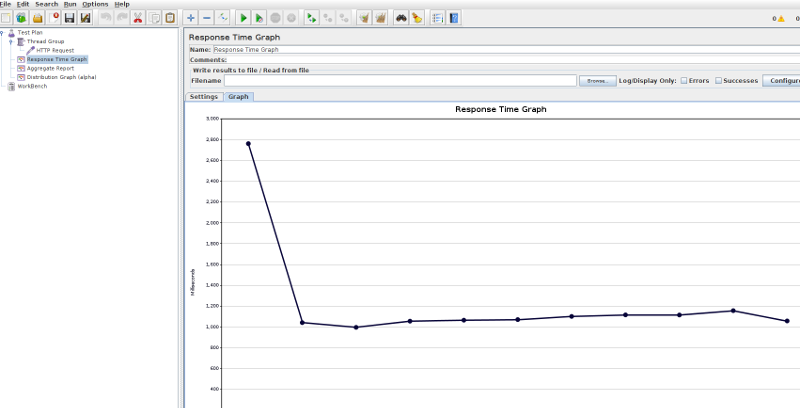
But the recommended way is to launch JMeter in command-line, and save results as [JTL files](https://wiki.apache.org/jmeter/JtlFiles). Using GUI listeners consumes a lot of memory.
Since JMeter 3.0, [HTML Reports](https://jmeter.apache.org/usermanual/generating-dashboard.html) are available too!

Those reports include many interesting performance metrics and charts like:
- A Statistics table providing in one table a summary of all metrics per transaction including 3 configurable percentiles,
- An error table providing a summary of all errors and their proportion in the total request,
- Response times Over Time (Includes Transaction Controller Sample Results) chart,
- and more.
The best way is to use a [BackendListener](https://jmeter.apache.org/usermanual/realtime-results.html) which exports results to Grafana or InfluxDB:

### Gatling Test Execution
To launch a test with gatling, run the *.sh* script and select the simulation (within *user-files/simulations* folder):
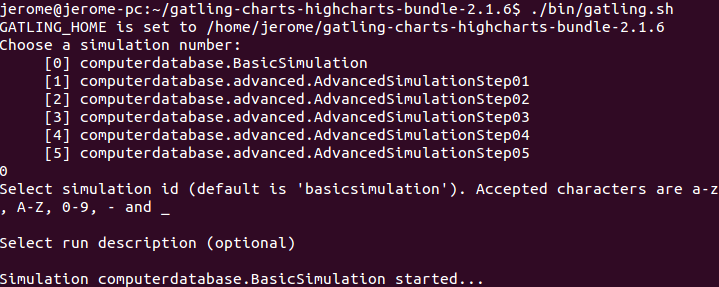
During the test run, gatling displays statistics within the console. The results of the test can be viewed at the end of the test.
Gatling generates a generic test report with response time, number of OK/KO transactions and detailed statistics for every request. The report is not customizable.

Like JMeter, Gatling can be plugged into external analysis tools too!

[Gatling supports Grafana with InfluxDB and Graphite](https://gatling.io/docs/2.3/realtime_monitoring/) along with their commercial offer named **Frontline**.
### Test Execution Comparison Table
Let's sum up the *Runtime* comparison with a table:
| Runtime | JMeter | Gatling |
|:---------|:--------:|:---------:|
| Command-line live metrics | X | X |
| HTML Report | X | X |
| Raw Results | X | X |
| UI Results | X | |
| Graphite Support | X | X |
| Grafana + InfluxDB | X | X |
### Test Execution Verdict
Both tools are **performing similarly** when it comes to **running tests**. The only single advantage JMeter has is the ability to use [UI Results Listeners](https://jmeter.apache.org/usermanual/listeners.html).
The **Runtime result is draw**. Although JMeter has a little more results features,
## Cloud Load Testing
### JMeter Cloud
There are multiple companies that provide **Cloud Load Testing** for JMeter including brands like **Blazemeter**, **Flood IO** or **RedLine 13**.
All of them are just providing a **facility to scale tests** into the Cloud and provide a **basic results reporting**. You **upload your JMX** scenario or Gatling simulation to those providers, and they run your scenario on Cloud machines.
[OctoPerf](https://octoperf.com) is world first JMeter Saas Company, providing **JMeter Web UI Scripting**. We also **Scale from multiple locations** and provide **fully customizable test reports**.
### Gatling Tool Cloud
Some of the Cloud solutions exposed in the previous point also support Gatling Tool. [Gatling Frontline](https://gatling.io/gatling-frontline/) is the defacto recommended standard for running Gatling tests in the cloud.
### Cloud Load Testing Verdict
**JMeter has better Cloud Support.** Many solutions, even the expensive [HP Storm Runner](https://resultspositive.com/hp-stormrunner/), are having support for JMEger tests.
## Which Tool Should I Use?
Before answering the crucial question, let's review all the scores:
| Winner On | JMeter | Gatling |
|:---------|:--------:|:---------:|
| History | X | |
| Features | X | |
| Documentation | X | X |
| Setup | X | X |
| Scripting | X | X |
| Performance | | X |
| Distributed Testing | X | |
| HTTP Recorders | X | X |
| Test Execution | X | X |
| Cloud Load Testing | X | X |
| **Total** | 9 / 10 | 7 / 10 |
**JMeter is clearly the winner**. With greater number of Features and support for Distributed Testing, JMeter compensates for slightly less performances than Gatling Tool. JMeter's **Longer Presence** can be seen with two different point of views:
- **The tool is old**: True, JMeter is older and thus may be obsolete at some point,
- **The tool is mature**: Thanks to years of support and maintenance, the tool is stable and battle-tested.
**Choosing JMeter or Gatling tool really depends on what you are comfortable with**. JMeter is **QA Engineers** oriented while Gatling is **Devops Engineers** oriented.
Both tools are overall really great. The end choice really comes to your own feeling. *Which Tool Am I comfortable with?* The first answer coming out of your mind is probably the good one.