---
title: JMeter XPath Extractor Guide
url: https://blog.octoperf.com/jmeter-xpath-extractor-guide/
date: '2018-04-10'
authors:
- jloisel
categories:
- JMeter
tags:
- JMeter
- XML
- XPath
description: Learn by examples how to use JMeter XPath Path Extractor to work with XML and HTML server responses. Master XPath Expressions through real-life examples and detailed screenshots.
---
# JMeter XPath Extractor Guide
If you're here, it's probably because you need to **extract variables** from an [XML](https://en.wikipedia.org/wiki/XML) (like [SOAP](https://en.wikipedia.org/wiki/SOAP)) response using [JMeter](https://jmeter.apache.org/). Best of all, it works with [HTML](https://en.wikipedia.org/wiki/HTML) Too.
If you're new to **JMeter**, read our [JMeter Tutorial](https://blog.octoperf.com/jmeter-tutorial-for-beginners/) to get started quickly. Besides, we have an excellent guide on [JMeter's Json Extractor](https://blog.octoperf.com/how-to-extract-data-from-json-response-using-jmeter/) too.
Good news! You're on the **definitive guide** to master [JMeter XPath Extractor](https://jmeter.apache.org/usermanual/component_reference.html#XPath_Extractor) using [XPath Expressions](https://www.w3schools.com/xml/xpath_syntax.asp). Let's go!
## XPath Expressions
### XPath Syntax
**XPath expressions** are a language to select nodes within an XML document. XPath supports different kind of expressions to select various parts of the document.
| **Expression** | **Selects** |
|------------|-------------|
|*name*| All nodes with name *name*|
|`/`| starting from the root node |
|`//`| Selects nodes in the document from the current node that match the selection no matter where they are |
|`.`| current node |
|`..`| parent of the current node |
|`@`| node with a given attribute |
### Example XML
Sounds weird? Let's see some practical examples. Suppose we have the following XML document:
```xml
Christian Bale
Liam Neeson
Michael Caine
Tom Waits
B.B. King
Ray Charles
```
That's a **pretty simple XML**, but it offers a surprisingly high number of possible Xpath expression combinations.
### Example XPath Expressions
We can apply the following XPath Expressions to select nodes:
| **Path Expression** | **Selects** |
|-------------------------------------|----------------------------------------------------------------------------------------------|
| `/` | The document node |
| `/root` | The 'root' element |
| `/root/actors/actor` | All 'actor' elements that are direct children of the 'actors' element |
| `//foo:singer` | All 'singer' elements regardless of their positions in the document |
| `//foo:singer/@id` | The 'id' attributes of the 'singer' elements regardless of their positions in the document |
| `//actor[1]/text()` | The textual value of first 'actor' element |
| `//actor[last()]` | The last 'actor' element |
| `//actor[position() < 3]` | The first and second 'actor' elements using their position |
| `//actor[@id]` | All 'actor' elements that have an 'id' attribute |
| `//actor[@id='3']` | The 'actor' element with the 'id' attribute value of '3' |
| `//actor[@id<=3]` | All 'actor' nodes with the 'id' attribute value lower or equal to '3' |
| `/root/foo:singers/*` | All the children of the 'singers' node. |
| `//*` | All the elements in the document. |
| `//actor|//foo:singer` | All the 'actor' elements AND the 'singer' elements. |
| `name(//*[1])` | Name of the first element in the document. |
| `number(//actor[1]/@id)` | Numeric value of the 'id' attribute of the first 'actor' element. |
| `string(//actor[1]/@id)` | String representation value of the 'id' attribute of the first 'actor' element. |
| `string-length(//actor[1]/text())` | Length of the first 'actor' element's textual value. |
| `local-name(//foo:singer[1])` | Select the local name of the first 'singer' element, i.e. without the namespace. |
| `count(//foo:singer)` | Select the number of 'singer' elements. |
| `sum(//foo:singer/@id)` | Select the sum of the 'id' attributes of the 'singer' elements. |
As you can see, **there is nothing difficult** here. It's just a matter of practice to get things working the way you want. The trickiest part is to test XPath expressions on a given response.
### Testing XPath Expressions
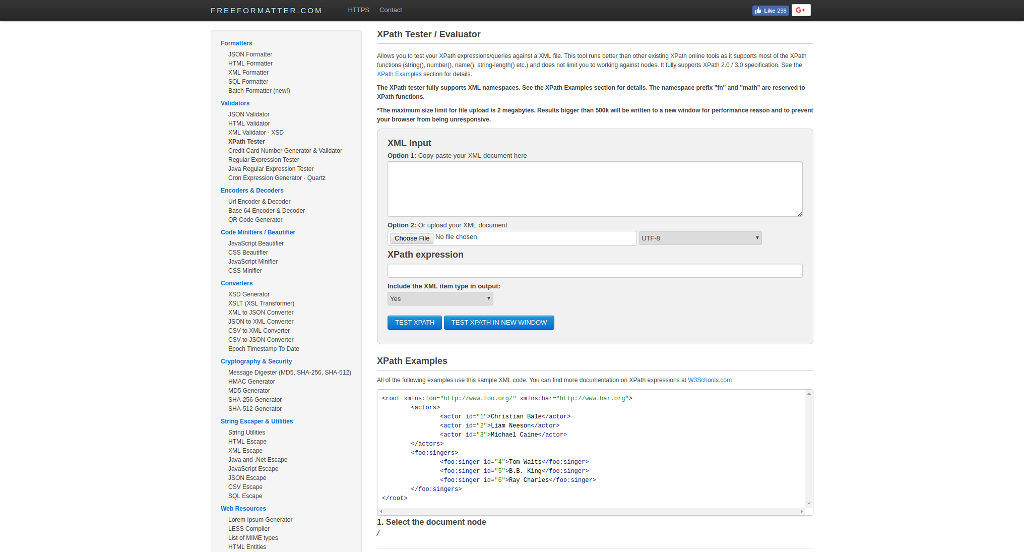
Need to **try some Xpath Expressions quickly** outside JMeter? Give a try to [XPath Tester](https://xpather.com/). It supports configuring both the XML input and the XPath expression.
Let's now explore JMeter's XPath Extractor settings.
## JMeter XPath Extractor
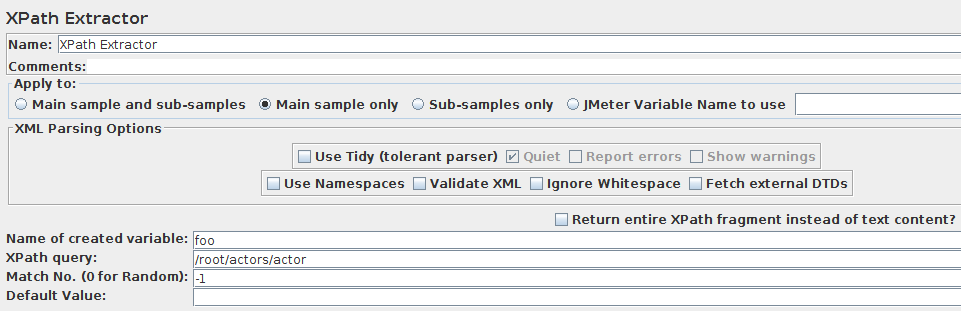
JMeter's [XPath Extractor](https://jmeter.apache.org/usermanual/component_reference.html#XPath_Extractor) has some interesting **advanced features**:
- **Use Tidy (tolerant parser)**: If checked use Tidy to parse HTML response into XHTML,
- *Use Tidy*" should be checked on for HTML response. Such response is converted to valid XHTML (XML compatible HTML) using Tidy,
- *Use Tidy*" should be unchecked for both XHTML or XML response (for example RSS).
> For HTML, CSS/JQuery Extractor is the correct and performing solution. Don't use XPath for HTML extractions.
[Tidy](https://jtidy.sourceforge.net/) should be used when receiving invalid XML responses. **Tidy is much more tolerant** than the built-in XML parser.
When Tidy is selected:
- **Quiet**: Sets the Tidy Quiet flag ,
- **Report Errors** If a Tidy error occurs, then set the Assertion accordingly,
- **Show warnings**: Sets the Tidy showWarnings option.
When Tidy is not selected:
- **Use Namespaces**: If checked, then the XML parser will use namespace resolution.(see note below on NAMESPACES) Note that currently only namespaces declared on the root element will be recognised. See below for user-definition of additional workspace names,
- **Validate XML**: Check the document against its schema,
- **Ignore Whitespace**: Ignore Element Whitespace,
- **Fetch External DTDs**: If selected, external DTDs are fetched,
- **Return entire XPath** fragment instead of text content? If selected, the fragment will be returned rather than the text content.
For example `//title` would return `Apache JMeter` rather than `Apache JMeter`. In this case, `//title/text()` would return `Apache JMeter`.
## Concrete Examples
We are going to cover most common xpath use-cases. These cases are pretty often encountered on real-world applications.
### Common Configuration
Let's take an example script we've setup for this purpose.
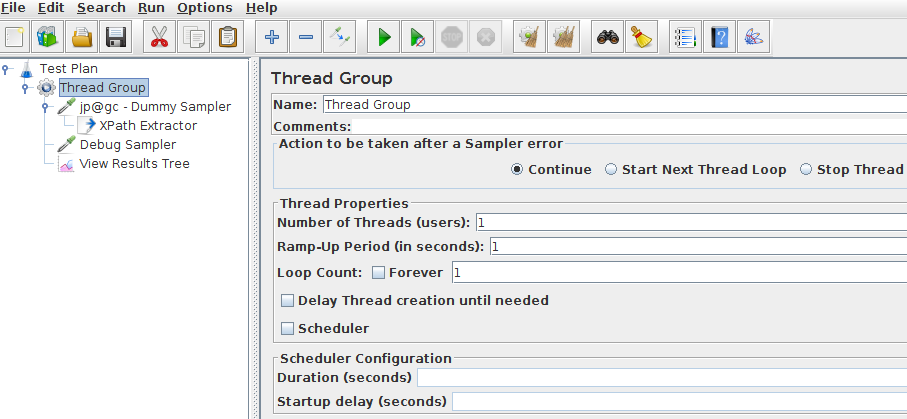
The script is configured with the following settings:
- **Thread Group**: very simple one with just one concurrent user simulated,
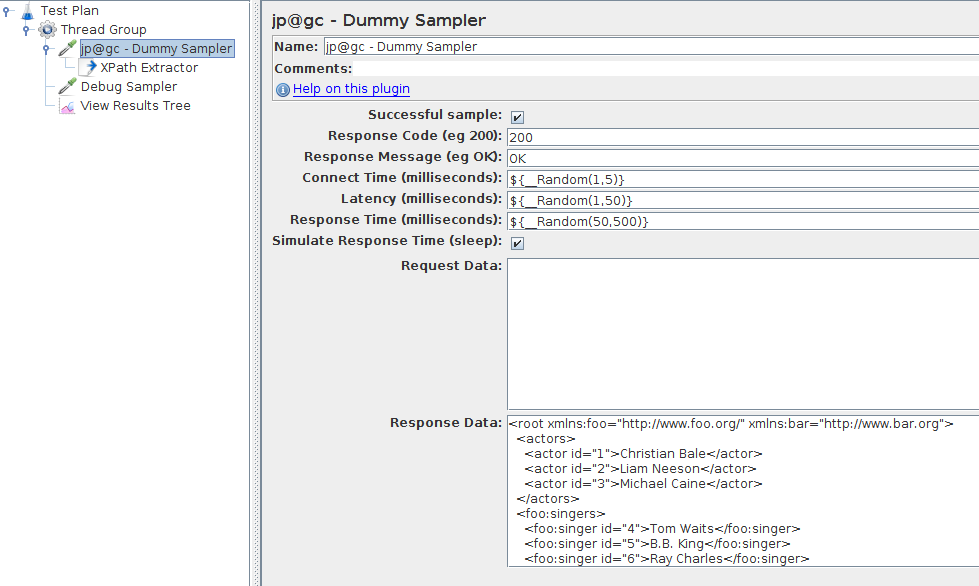
- **Dummy Sampler**: Simulates a request whose response is the XML from the example above. The plugin is not installed? Follow our [JMeter Plugins Installation Guide](https://blog.octoperf.com/jmeter-plugins-installation-guide/).
Finally, we add a [Debug Sampler](https://jmeter.apache.org/usermanual/component_reference.html#Debug_Sampler) along with a [View Results Tree](https://jmeter.apache.org/usermanual/component_reference.html#View_Results_Tree) listener to view resulting variables:
- `Add > Sampler > Debug Sampler`
- `Add > Listener -> View Results Tree`.
### Extracting Node Value
First, let's see how to extract the value inside an XML node.

- **XPath Extractor**:
- **Apply To**: Main sample only,
- **XML Parsing Options**: left as is,
- **Variable Name**: `foo`,
- **XPath Query**: `/root/actors/actor` (extract actor names),
- **Match No.**: `-1`,
- **Default Value**: none.
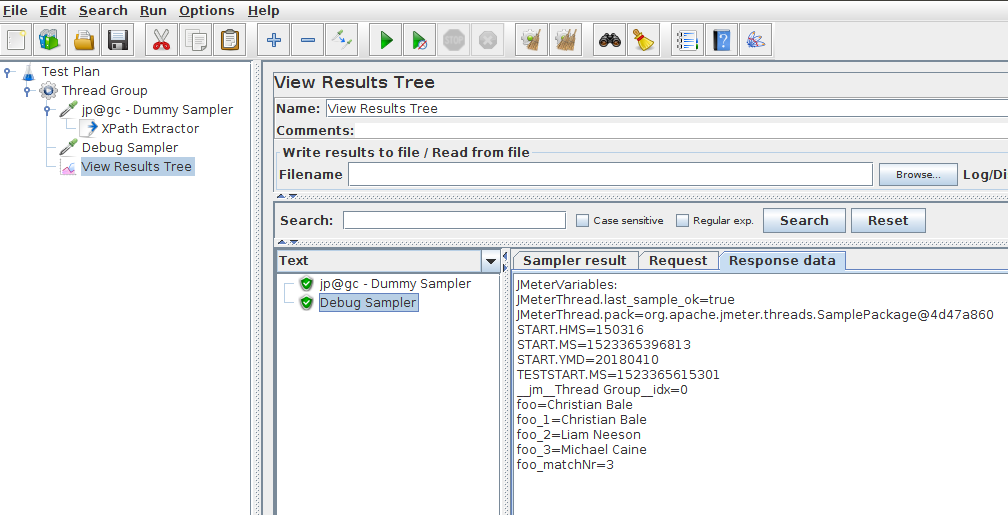
We have the following results:
```
foo=Christian Bale
foo_1=Christian Bale
foo_2=Liam Neeson
foo_3=Michael Caine
foo_matchNr=3
```
As expected, we successfully extracted all actor names!
### Extracting Attribute Value
Now let's try to extract the `foo:singer` ids. This is a typical use case where you want to **extract an attribute value**.
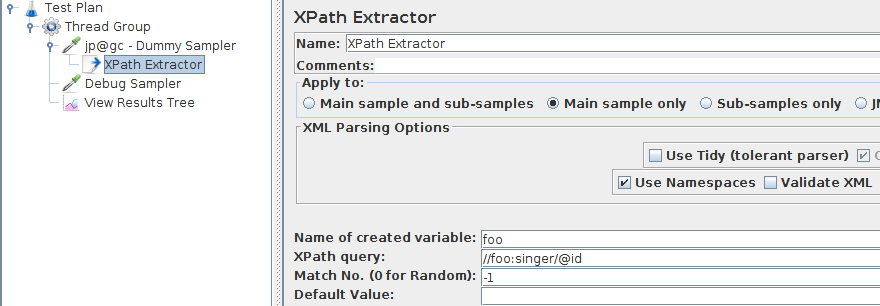
- **XPath Extractor**:
- **Apply To**: Main sample only,
- **XML Parsing Options**: left as is,
- **Variable Name**: `foo`,
- **XPath Query**: `//foo:singer/@id` (extract actor names),
- **Match No.**: `-1`,
- **Default Value**: none,
- **Use Namespaces**: set to `true` because `foo:singer` uses `foo` namespace.
The result is then as expected the ids of the singers:
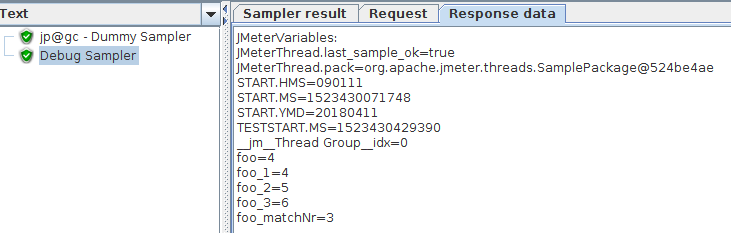
We get the following values:
```
foo=4
foo_1=4
foo_2=5
foo_3=6
foo_matchNr=3
```
### Extracting Conditional Attribute Value
We want to extract a value from the XML depending on the value of an attribute. For example, let's extract the actor whose `id=3`.
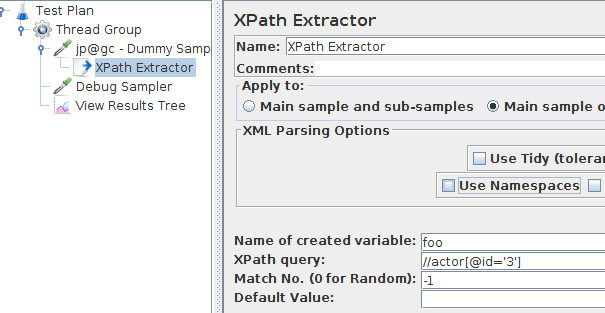
- **XPath Extractor**:
- **Apply To**: Main sample only,
- **XML Parsing Options**: left as is,
- **Variable Name**: `foo`,
- **XPath Query**: `//actor[@id='3']` (extract actor names),
- **Match No.**: `-1`,
- **Default Value**: none.
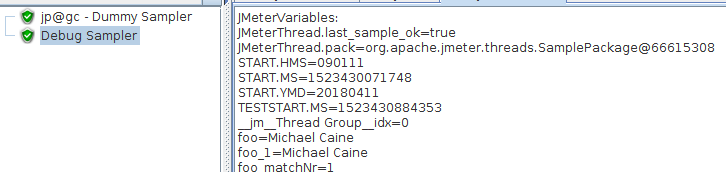
```
foo=Michael Caine
foo_1=Michael Caine
foo_matchNr=1
```
Feel free to play with the Example XPath Expressions.
## Performance
You should be aware that using XPath expressions on XML / HTML responses **consumes a significant amount of CPU and Memory**. That being said, it may be much more practical to use XPath expressions (and not [JMeter Regexp Extractor](https://blog.octoperf.com/jmeter-regex-extractor-how-to-extract-variables/)) when regular expressions are unsuitable. Typically, it happens when the content to extract is very similar to non-related other content.
Keep in mind the XPath extractor parses the HTML / XML Response and converts it to a [DOM document](https://www.w3schools.com/jsref/dom_obj_document.asp). That's typically what web browsers do and it runs fine for a single client. But it often hurts performance as stated in our guide [Optimize JMeter for Large Scale Tests](https://blog.octoperf.com/optimize-jmeter-for-large-scale-tests/).
Got only light load to simulate? Fine! Otherwise, **keep an eye on the load generator's CPU and memory usage**.