---
title: Migrating Gatling Simulations to OctoPerf With an AI Agent
url: https://blog.octoperf.com/migrating-gatling-simulations-to-octoperf-with-an-ai-agent/
date: '2026-10-24'
authors:
- gpereira
categories:
- Tutorials
tags:
- Artificial Intelligence
- Migration
- Gatling
- K6
- Design
description: 'A complete Gatling to OctoPerf migration driven from a chat: survey the project, rebuild its load as a scenario, rewrite the simulation as a K6 Virtual User, then finish by hand what has no K6 counterpart.'
---
# Migrating Gatling Simulations to OctoPerf With an AI Agent
Migrating a load testing project is rarely difficult, but it takes time and it's easy to give up halfway. That's why OctoPerf 18 comes with a **Gatling migration playbook** for AI agents.
In our [NeoLoad](https://blog.octoperf.com/migrating-a-neoload-project-to-octoperf-with-an-ai-agent/) and [LoadRunner](https://blog.octoperf.com/migrating-a-loadrunner-script-to-octoperf-with-an-ai-agent/) walkthroughs, the projects were converted into JMeter Virtual Users. A Gatling simulation is code, so here it stays code: the agent rewrites it as a K6 script, and its injection profile becomes an OctoPerf scenario. In this blog post I show the actual prompts and what the agent answered, and **both projects can be downloaded**.
## Table of Contents
- [The project](#the-project)
- [Step 1: survey](#survey)
- [Step 2: rebuild the load first](#rebuild-the-load)
- [Step 3: rewrite the scenario](#rewrite-the-scenario)
- [Step 4: work the unconverted list](#unconverted-list)
- [Open injection](#open-injection)
- [Session code](#session-code)
- [Assertions, retries and resources](#assertions)
- [Step 5: import and validate](#import-and-validate)
- [What this saves](#what-it-saves)
- [Conclusion](#conclusion)
## The project { #the-project }
The target is [JPetStore](https://petstore.octoperf.com/), our public demo shop. It's the application we used in our 2020 Gatling tutorial series, from the [first simulation](https://blog.octoperf.com/gatling-getting-started-with-simulation-scripts/) to [modular scripts](https://blog.octoperf.com/gatling-post-requests-and-modular-scripts/). I took the final simulation of this series and ported it to Java and Gatling 3.16. You can **[download it](https://blog.octoperf.com/img/blog/migrate-gatling-simulations-with-ai/jpetstore-gatling.zip)** to follow along.
It runs two scenarios in parallel:
- `Visitor` browses every category, then random products of each category for ten seconds, at a pace of one per second,
- `Buyer` signs in, searches, adds a product to the cart and places an order.
I also added a few constructs that make the migration less trivial:
- a closed injection for the visitors, `rampConcurrentUsers(0).to(10)` then `constantConcurrentUsers(10)`,
- an open injection for the buyers, `rampUsersPerSec(0.1).to(0.5)` then `constantUsersPerSec(0.5)`,
- two feeders with the random strategy, regex extractors and `substring` checks,
- some session code, a `tryMax(2)` on the order confirmation and `inferHtmlResources` on the protocol,
- two global assertions on the 95th percentile and the error rate.
The simulation runs fine on my machine with `mvn gatling:test`:
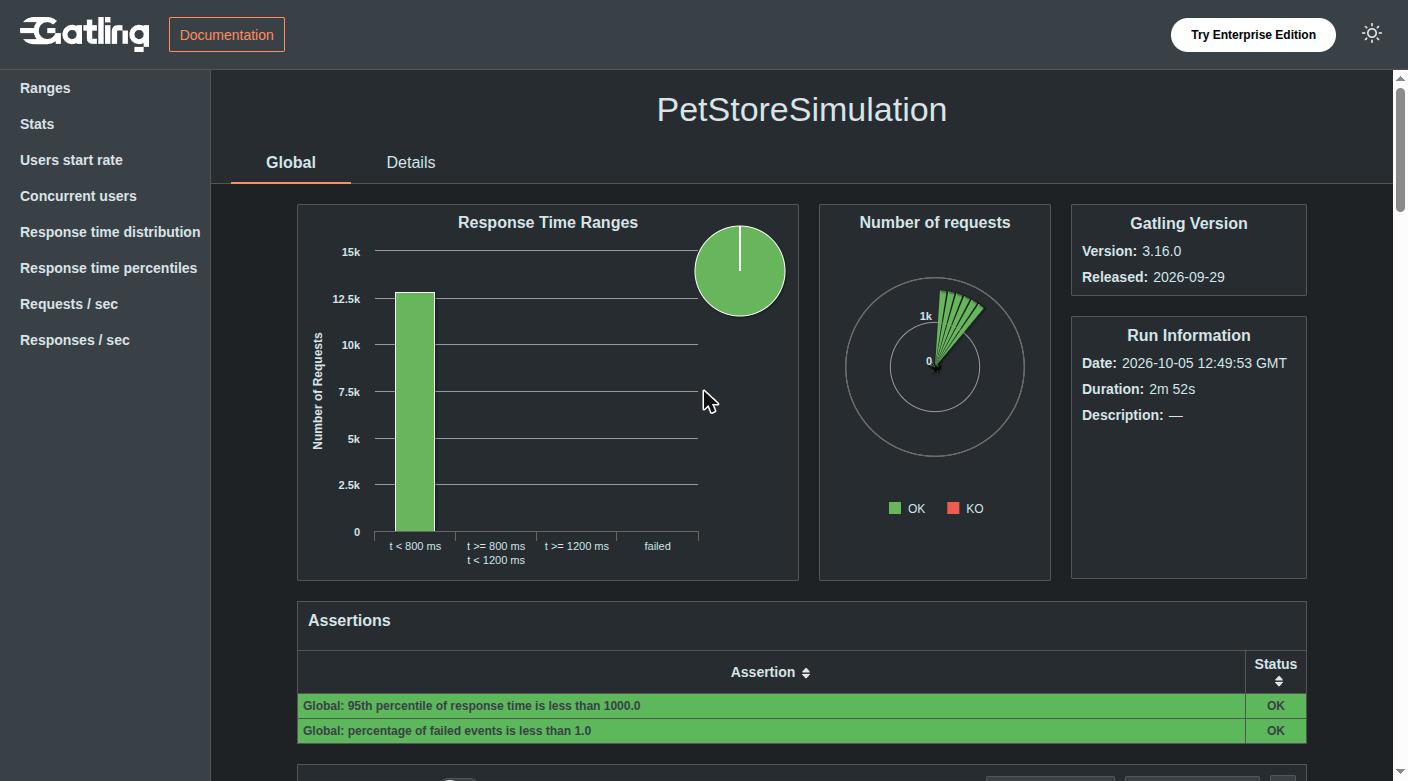
**12,787 requests, no error and a 95th percentile of 38 ms.** Keep these numbers in mind, we will come back to them.
## Step 1: survey { #survey }
The agent uses the [OctoPerf MCP server](https://api.octoperf.com/doc/mcp/), like in our [release article](https://blog.octoperf.com/octoperf-mcp-server/). The first prompt does not ask for a conversion yet:
> Here is a Gatling project. Before converting anything, tell me whether it is worth migrating.
The agent zips the whole project and sends it to `analyze_gatling_project`. **Nothing is written in the OctoPerf project at this stage.** Here is the answer (trimmed):
```json
"portability": "ASSISTED",
"languages": ["JAVA"],
"inventory": {
"simulations": 1, "httpRequests": 11, "checks": 5, "extractors": 3,
"feeders": 2, "pauses": 10, "loops": 2, "sessionFunctions": 2
},
"simulations": [{
"name": "PetStoreSimulation",
"injectionSteps": ["CONSTANT_USERS_PER_SEC", "RAMP_USERS_PER_SEC",
"CONSTANT_CONCURRENT_USERS", "RAMP_CONCURRENT_USERS"]
}]
```
There are three possible verdicts:
- `MECHANICAL`: plain HTTP and a closed load, the result should validate almost as is,
- `ASSISTED`: everything has a K6 equivalent, but some parts must be written by hand,
- `MOSTLY_MANUAL`: the simulation uses a protocol that no K6 extension supports (JMS, MQTT, AMQP) or a library that is not part of the upload.
**`MOSTLY_MANUAL` means that part of the code cannot be rewritten at all.** For example, if a simulation signs its requests with an in-house crypto library, rewriting the DSL is not enough. The agent tells you before converting anything, and you decide whether to go on.
Our simulation is `ASSISTED`. The `unconverted` list tells where the manual work is, with the **source file and line** of each item:
```json
{ "kind": "OPEN_MODEL_INJECTION", "source": "PetStoreSimulation.java", "line": 27,
"excerpt": "rampUsersPerSec(0.1).to(0.5).during(Duration.ofSeconds(30))," }
{ "kind": "OPEN_MODEL_INJECTION", "source": "PetStoreSimulation.java", "line": 28 }
{ "kind": "HTML_RESOURCES", "source": "PetStoreSimulation.java", "line": 19 }
{ "kind": "ASSERTION", "source": "PetStoreSimulation.java", "line": 30 }
{ "kind": "CUSTOM_CODE", "source": "Visitor.java", "line": 33 }
{ "kind": "CUSTOM_CODE", "source": "Visitor.java", "line": 38 }
{ "kind": "TRY_MAX", "source": "Buyer.java", "line": 83,
"excerpt": ".tryMax(2).on(exec(CONFIRM_ORDER));" }
```
These seven entries are all the manual work. The agent also warns that the conversion is meant to be done once: the K6 Virtual User becomes an OctoPerf asset, so converting the simulation again after editing it would overwrite whatever you finished by hand.
## Step 2: rebuild the load first { #rebuild-the-load }
> Convert it, in the JPetStore Gatling project, on our on-premise provider.
The agent starts with the load and not with the requests, because **the load decides the shape of the script**. OctoPerf runs a closed load, meaning a number of concurrent virtual users, so the Gatling injection steps fall into two groups.
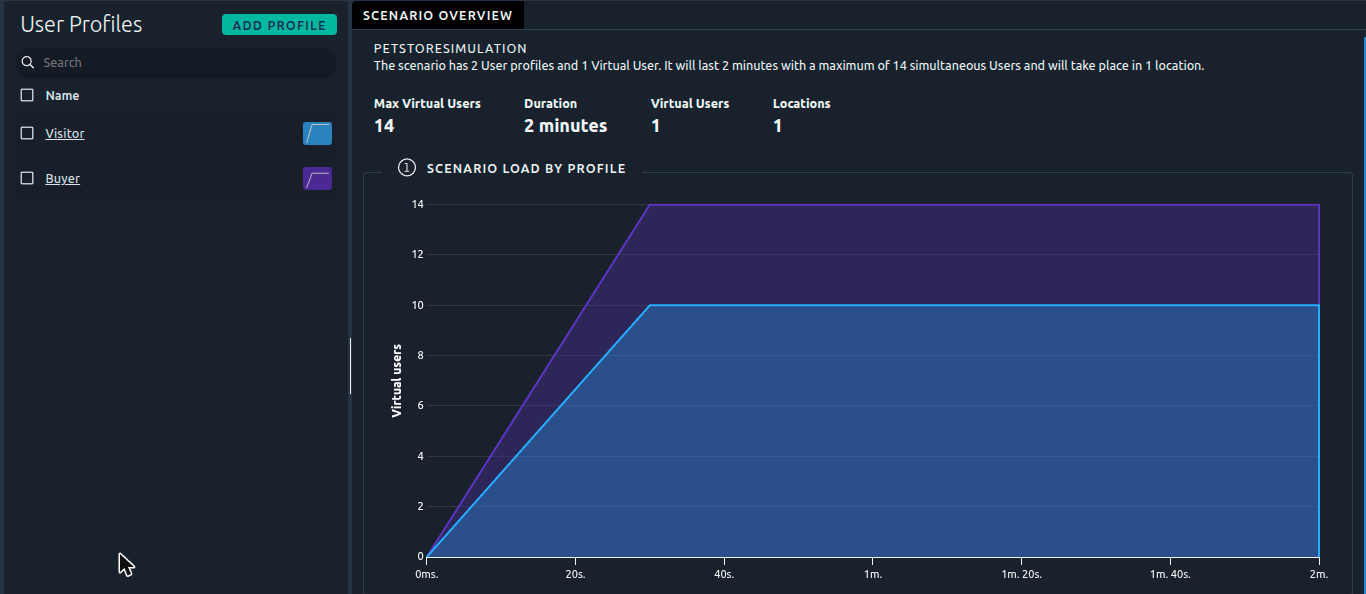
The visitors already use a closed model. `rampConcurrentUsers(0).to(10)` over 30 seconds, then 10 users for 90 seconds, translates directly into the stages of a K6 `ramping-vus` executor.
The buyers use an open model. `constantUsersPerSec(0.5)` injects one buyer every two seconds, and each one makes a purchase then leaves, however long the purchase takes. OctoPerf has no equivalent yet, so the agent rebuilds it as a closed load using [Little's law](https://en.wikipedia.org/wiki/Little%27s_law): **concurrent users = arrival rate × duration of one journey**.
To get the duration of the journey, the agent measured it. The Gatling report already gives a hint:
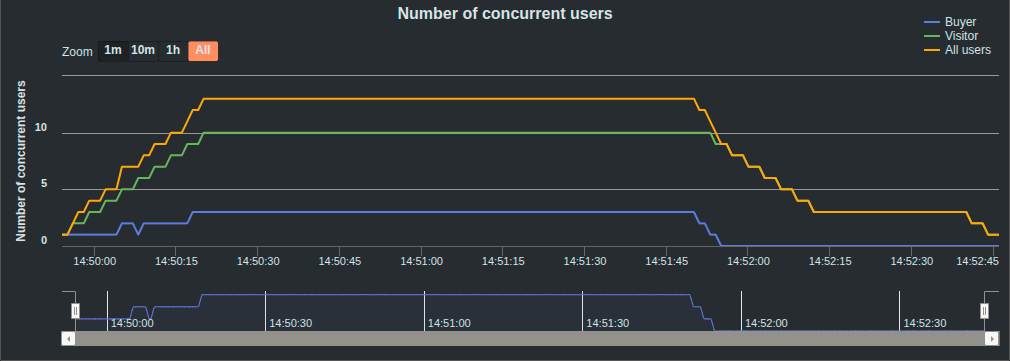
The validation of step 5 gives the exact value: a purchase takes about 4 seconds, seven pauses of half a second and eight requests of 35 ms. So:
- 0.5 arrivals per second × 4 seconds = 2 concurrent buyers,
- doubled for safety, since a slower server makes the journey longer: **4 buyers, each one pacing its purchase to 8 seconds**,
- to double check, 4 buyers / 8 seconds = 0.5 purchases per second, which is the rate injected by Gatling.
The pace is stored in a constant variable, `PACE_SECONDS`, so you can tune it without editing the script. The agent writes down how it got these numbers, and it clearly says that this is an approximation: a closed load slows down its arrivals when the server slows down, an open load does not.
Then `create_scenario_from_k6_options` turns the two K6 scenarios into one OctoPerf user profile each, with **nothing left unconverted**:
## Step 3: rewrite the scenario { #rewrite-the-scenario }
The agent writes one K6 file per Gatling class, and one exported function per Gatling scenario. Both DSLs are close, so **most of the rewrite is mechanical**:
| Gatling | K6 on OctoPerf |
|---------|----------------|
| `http.baseUrl(...)` | a constant variable, read as `__ENV.BASE_URL` |
| `http("Login #{login}").post(...)` | `http.request('POST', ...)` with a fixed `name` tag: `'Login'` |
| `formParam("username", "#{login}")` | a body object, `{ username: user.login }` |
| `regex("productId=...").findAll().saveAs(...)` | `res.body.matchAll(/productId=([^"&]*)/g)` |
| `substring("Welcome #{firstName}!").exists()` | `check(res, { 'welcome message': r => r.body.includes(...) })` |
| `feed(csv("credentials.csv").random())` | a CSV variable, `csv('credentials')` and a random pick |
| `pause(Duration.ofMillis(500))` | `sleep(0.5)` |
| `during(10 s)` with `pace(1 s)` | a `while` over `Date.now()`, sleeping what is left of each second |
A few things are worth explaining though.
**Request names are fixed.** Gatling names requests from the session, like `Product #{productId}`, which gives one line per product in its report. A K6 name tag built the same way would do the same in OctoPerf, so the agent uses a single `Product` name for all products.
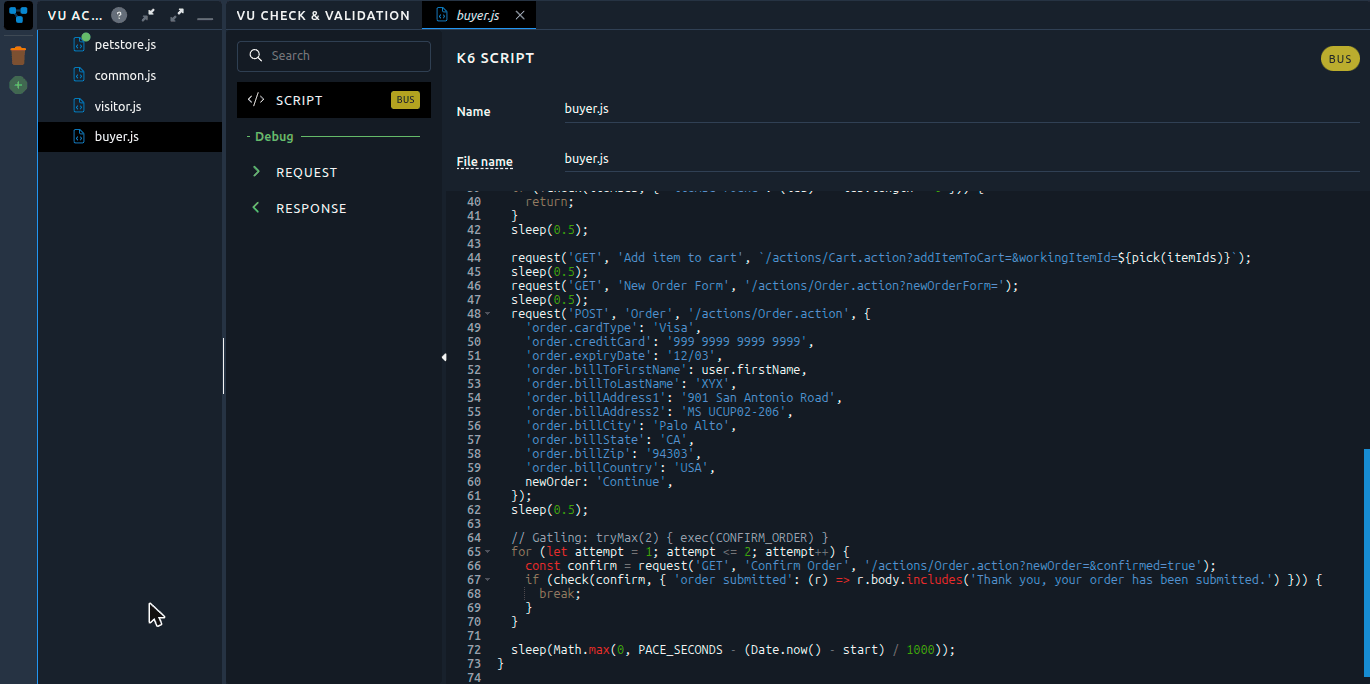
Gatling also checks every request, even when the script declares no check: the status must be between 200 and 209, or 304. K6 does not do that, so the agent wrote a small `request()` helper in `common.js` that **sends the request and checks it in one call**.
When an extraction finds nothing, **the iteration ends**. Gatling would continue with an unresolved expression:
```js
const productIds = findAll(search, /productId=([^"&]*)/g);
if (!check(productIds, { 'productId found': (ids) => ids.length > 0 })) {
return;
}
```
Finally, one feeder did not become a CSV variable. The visitors go through the whole `categories.csv` file with `foreach`. By default a CSV variable is [split between the load generators](https://blog.octoperf.com/running-k6-scripts-on-octoperf/), so each one would only browse part of the catalog. With the [Private sharing mode](https://api.octoperf.com/doc/design/edit-virtual-user/configuration/variables/csv/#private), a CSV variable gives the same values to every load generator instead, but the agent kept it simpler here: these five categories are the catalog itself and not test data, so **the agent wrote them as a constant array** in `visitor.js`.
## Step 4: work the unconverted list { #unconverted-list }
### Open injection { #open-injection }
Step 2 already covers it. **This is the current limit of OctoPerf**: K6 has `constant-arrival-rate` and `ramping-arrival-rate` executors, but OctoPerf does not run them yet. If the whole point of a simulation is a rate of arrivals (a checkout during a marketing peak for example), the conversion is only an approximation, and the agent tells you so.
### Session code { #session-code }
The visitor picks a random product in the list returned by the category page:
```java
exec(session -> {
List productIds = session.getList("productIds");
String productId = productIds.get(ThreadLocalRandom.current().nextInt(productIds.size()));
return session.set("productId", productId);
}),
```
**In K6 this is just a function call**, `pick(productIds)`, since the list is a plain JavaScript variable of the iteration. The other entry, which copied the `categoryId` of a record into the session, disappeared with the constant array.
### Assertions, retries and resources { #assertions }
- `ASSERTION`: the two Gatling assertions became K6 thresholds, `http_req_duration: ['p(95)<1000']` and `http_req_failed: ['rate<0.01']`. They are evaluated and displayed in the report, but they do not stop the test unless the user profile enables Abort on failed threshold. If you want to follow the verdict in trends, use an [SLA profile](https://api.octoperf.com/doc/design/edit-virtual-user/configuration/sla-profiles/),
- `TRY_MAX`: a `for` loop with two attempts around the confirmation, that breaks on success,
- `HTML_RESOURCES`: K6 only downloads what the script asks for. **The agent left the images and the stylesheet out**, and said so, so the page weight is not part of the test anymore. To measure what a browser downloads and renders, a [Playwright Virtual User](https://blog.octoperf.com/playwright-vs-jmeter/) is the right tool.
## Step 5: import and validate { #import-and-validate }
> Import it and validate it.
The agent first declares the variables: the two feeders become CSV variables, `BASE_URL` and `PACE_SECONDS` become constants. Then it calls `import_k6_virtual_user` with the four files and runs a sanity check. Its only warning is expected: the `scenarios` of the script are ignored, since the OctoPerf scenario defines the load.
**The first validation is green**, as the K6 log shows:
```text
█ THRESHOLDS
http_req_duration ✓ 'p(95)<1000' p(95)=37.82ms
http_req_failed ✓ 'rate<0.01' rate=0.00%
checks_succeeded...: 100.00% 73 out of 73
http_req_failed....: 0.00% 0 out of 65
iteration_duration.: 57.21s
```
One purchase and one visit, 65 requests and 73 checks. This is less common than it looks! The skill actually expects the first run to fail, on a GJSON path written as JSONPath, a CSV column named differently, or a header that the protocol block only set once. **Plain HTML forms and regular expressions are easy to convert.**
The 4 seconds of step 2 come from `iteration_duration`: the visit takes about 53 of the 57 seconds, five categories of ten and a half seconds each.
## What this saves { #what-it-saves }
I ran the converted scenario for two minutes: **1,830 requests, no error and a 90th percentile of 22 ms**. Compared to the 12,787 requests of Gatling, the difference comes from the embedded resources. About 10 visitors at one product per second, plus one purchase of eight requests every two seconds, make roughly 1,700 page requests. The rest of the Gatling requests were images and a stylesheet.
On the other hand, OctoPerf shows something that the open source Gatling report does not: **the connect time and latency of each request**.
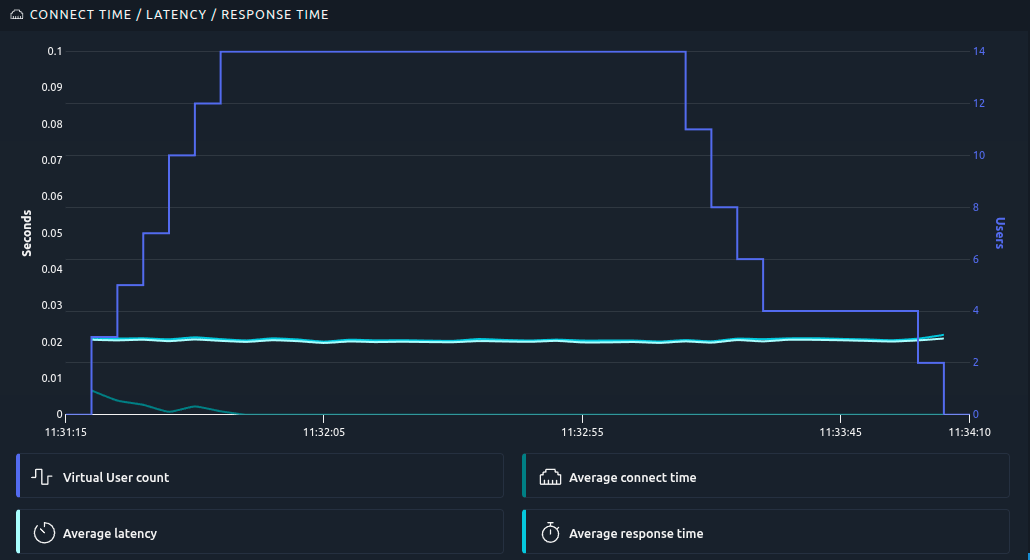
The connect time increases while users ramp up and open their connections, then drops to zero: **keep-alive works**. If the server closed its connections, you would see it here first. And you get the rest of a [reporting engine](https://octoperf.com/product/load-testing-reporting-engine/): report history, comparison, trends, server monitoring and SLAs, shared with your team.
To be honest, the migration also has a cost:
- the open model is rebuilt as paced users,
- the embedded resources are left out,
- you lose the typed DSL, if your team valued compile-time checks more than JavaScript.
What the agent did is the boring part of the job. It read every line of three Java files, mapped each construct, measured the journey before computing a number of users, and declared the variables with the right names. **It took three prompts**, and the result validated on the first run.
## Conclusion { #conclusion }
So, three prompts: one to survey, one to convert, and one to import and validate. The [Gatling project](https://blog.octoperf.com/img/blog/migrate-gatling-simulations-with-ai/jpetstore-gatling.zip), its [K6 version](https://blog.octoperf.com/img/blog/migrate-gatling-simulations-with-ai/jpetstore-k6.zip) and JPetStore are public, so you can check everything yourself.
Now the question is for you: **is the open model a must-have for your tests?** If your simulations inject arrivals and not users, let us know. It will help us decide whether OctoPerf should run arrival-rate executors next.
If you plan to move off Gatling, start with the survey, then read [Running K6 Scripts on OctoPerf](https://blog.octoperf.com/running-k6-scripts-on-octoperf/) to see what the converted Virtual User can do. [Our Gatling comparison](https://octoperf.com/gatling-alternative/) covers the rest.