---
title: Migrating Your BlazeMeter Tests With an AI Agent
url: https://blog.octoperf.com/migrating-your-blazemeter-tests-with-an-ai-agent/
date: '2026-09-07'
authors:
- gpereira
categories:
- Innovation
tags:
- Artificial Intelligence
- Migration
- BlazeMeter
- JMeter
- Taurus
description: 'Our BlazeMeter to OctoPerf Maven plugin is archived. What replaces it is a migration playbook an AI agent runs from a chat: it surveys the account before writing anything, brings the tests and their load profiles across, validates them, and says what has no equivalent.'
---
# Migrating Your BlazeMeter Tests With an AI Agent
Our [BlazeMeter to OctoPerf Maven plugin](https://blog.octoperf.com/seamlessly-migrate-from-blazemeter-to-octoperf-with-our-new-maven-plugin/) is archived. What replaces it is not another tool to install: OctoPerf 17 ships a **BlazeMeter migration playbook** for AI agents.
Real prompts, real output, run against a real BlazeMeter account.
## Table of Contents
- [Why the Plugin Is Archived](#why-the-plugin-is-archived)
- [Your Keys Stay Yours](#your-keys-stay-yours)
- [Step 1: Inventory First](#inventory)
- [Step 2: The Import](#import)
- [Step 3: The CSV Trap](#csv-trap)
- [Step 4: The Load Profile](#load-profile)
- [Step 5: Validate](#validate)
- [What Does Not Come Across](#what-does-not-come-across)
- [Conclusion](#conclusion)
## Why the Plugin Is Archived { #why-the-plugin-is-archived }

The plugin worked: one `mvn` command copied your workspaces, projects and JMeter scripts into OctoPerf. But **a Maven command cannot ask you a question**, so it never said which tests were worth moving, never brought your load profiles, and never replayed what it imported. Those three gaps *are* the migration. Fetching a `.jmx` over HTTP is the easy part.
So we wrote no importer, and you need none. **A BlazeMeter test is an [Apache JMeter](https://jmeter.apache.org/) `.jmx`, its data files and a load profile**, three things OctoPerf already reads. What was missing was the decisions in between, and that is what the playbook in the [OctoPerf MCP server](https://api.octoperf.com/doc/mcp/) makes.
## Your Keys Stay Yours { #your-keys-stay-yours }
BlazeMeter authenticates with an API key id and secret. You give them to your own agent, and **your agent calls BlazeMeter, not OctoPerf**. Our servers never touch `a.blazemeter.com`: what arrives here is bytes, a `.jmx`, a `.csv`, a scenario. No third party holds your credentials, and the export is you exporting your own data.
Check that your agreement with BlazeMeter/Perforce allows it before you start. OctoPerf is not affiliated with BlazeMeter, and BlazeMeter is a trademark of Perforce Software.
## Step 1: Inventory First { #inventory }
Your first prompt is not an import.
> Here are my BlazeMeter API keys. Before migrating anything, tell me what this account holds and what is worth moving.
**Nothing gets created.** On our own account:
```
workspace "Default workspace" (1)
projects Default project, Gatling, wdsfga, JMX (4)
tests 8 performance, 0 functional, 0 multi-tests
scriptType histogram
1 jmeter
1 taurus
3 gatling
3 (unset)
```
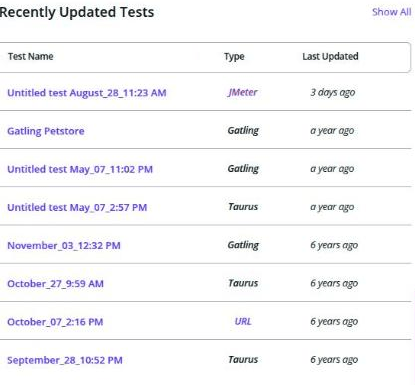
Each test's `scriptType` gives you its verdict:
| `scriptType` | Verdict | Why |
|---|---|---|
| `jmeter` | **Mechanical** | The `.jmx` is what OctoPerf already reads |
| `taurus` | **Assisted** | Mechanical when the YAML points at a `.jmx`, hand-built when the requests are inline |
| `selenium` | **Manual** | A Java, Python or C# project, so a rewrite rather than a conversion |
| gatling, locust, grinder, pytest, robot | **Not migrated** | No OctoPerf equivalent, the traffic has to be rebuilt |
**One test out of eight converts mechanically here.** Three are Gatling Scala simulations nothing will translate, and three have no script and no files at all: created once, abandoned, still in the list.
If your account is nine tenths Gatling, you are not facing a difficult migration, **you are facing a different project**. Five minutes is a good moment to find out.
## Step 2: The Import { #import }
> Migrate the JMeter test. Mirror the BlazeMeter hierarchy on the OctoPerf side.
One workspace per workspace, one [design project](https://api.octoperf.com/doc/design/) per project.
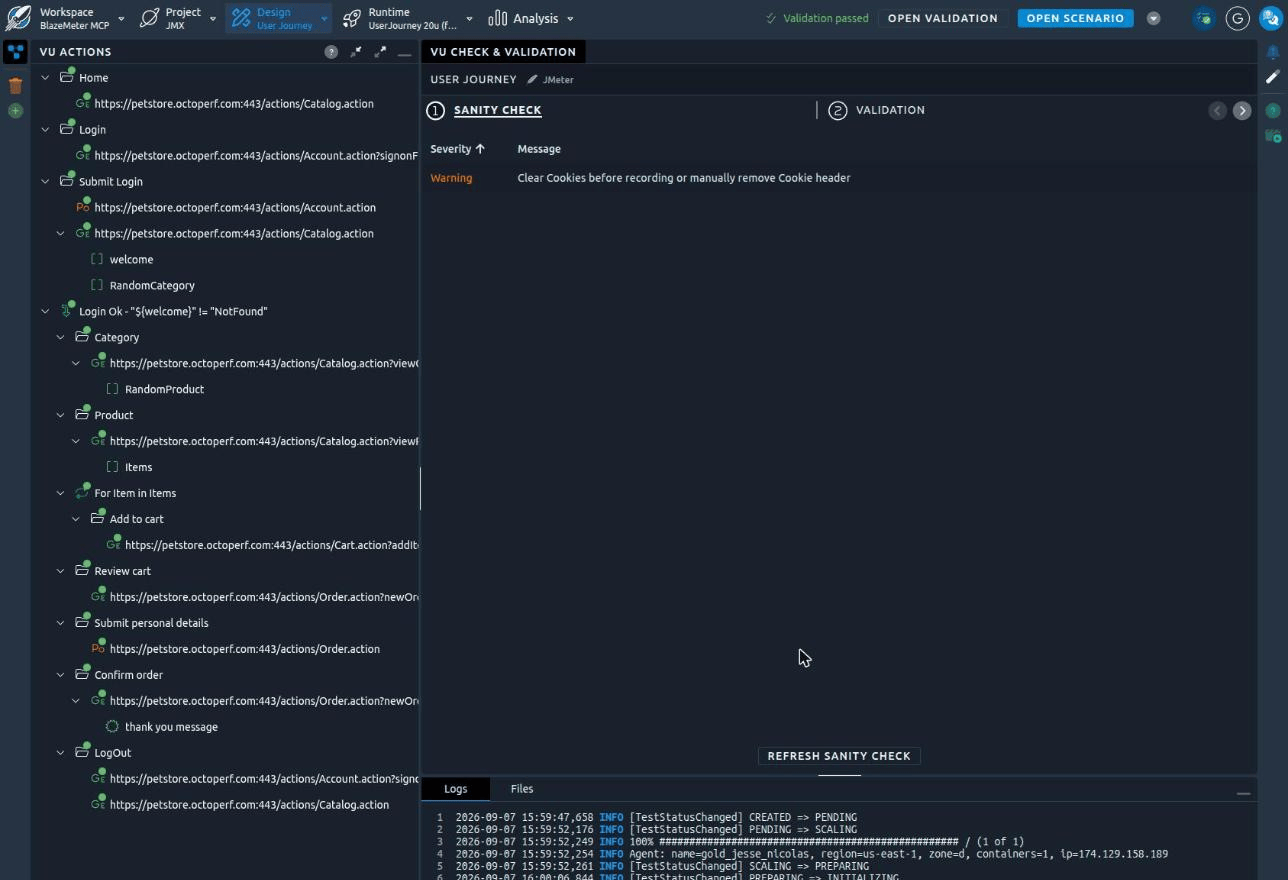
Our `UserJourney.jmx` crossed over whole: ten Transaction Controllers became named containers, four regex extractors kept their names, the `IfController` kept its condition **in the node name** (`Login Ok - "${welcome}" != "NotFound"`), the `ForeachController` became `For Item in Items`.
Your Taurus tests split in two: a YAML whose `script:` names a `.jmx` takes the same path, while **inline `requests:` get rebuilt**, exactly for a flat list of URLs and approximately once there are bodies or extractors.
## Step 3: The CSV Trap { #csv-trap }
This is where a BlazeMeter migration quietly breaks.
The BlazeMeter Test Data Model describes our `credentials.csv` with the columns `user1` and `pass`. The `CSVDataSet` inside the same test's `.jmx` disagrees:
```xml
login,password
false
```
**Only the script's names are substituted at runtime.** Its requests read `${login}` and `${password}`; `${user1}` appears nowhere. Build your variable from the data model and you get two columns nothing uses, plus a login step sending an empty user.
You do not have to build anything: the JMX import already made the variable, with the right names and file. Add a second one over the same CSV and the sanity check tells you off, *"File x.csv is used by multiple csv variables. This can lead to unpredictable behavior."*
One last trap in that file: its first line is `user1,pass`, which **looks like a header and is a real credential pair**. Treat it as one and you drop an account.
## Step 4: The Load Profile { #load-profile }
The numbers you need are already in the test:
```json
{ "concurrency": 20, "rampUp": "1m", "holdFor": "19m", "steps": 0,
"locations": { "us-east4-a": 20 } }
```
That becomes a scenario: a plain ramp-up, or ascending stairs when `steps` is above 1.
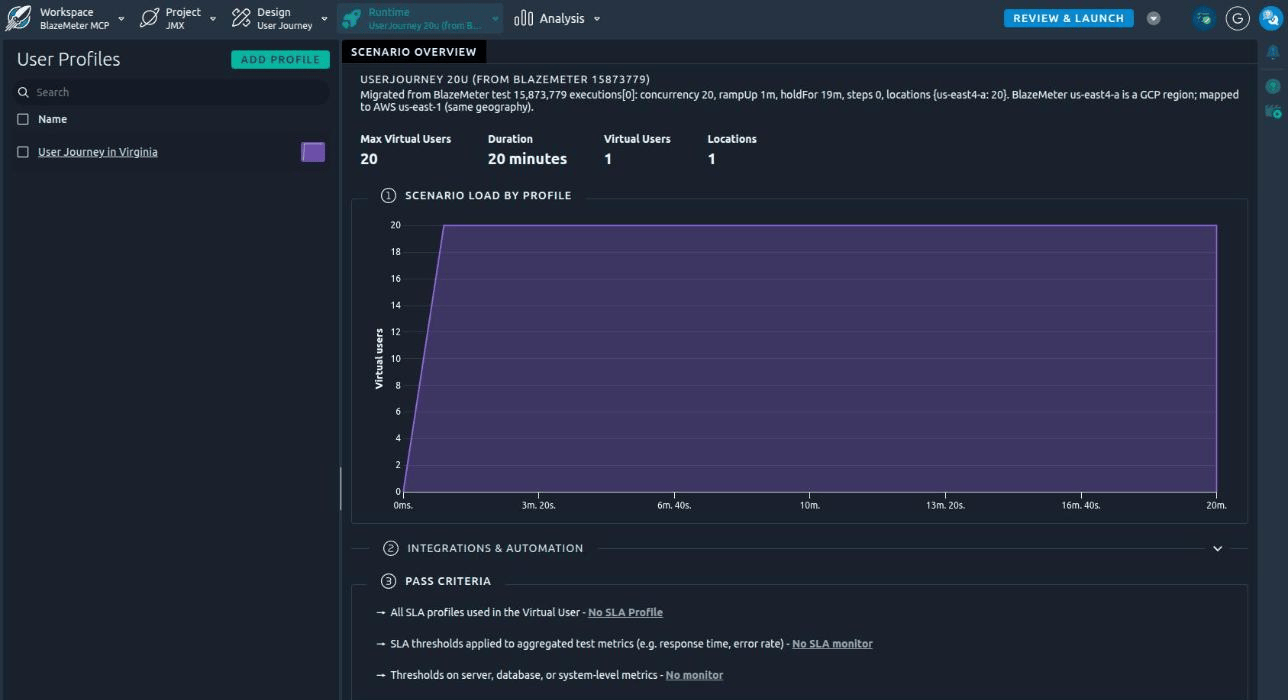
Two numbers do not carry over as they are. **Your location** is not even the same cloud: BlazeMeter's own UI spells `us-east4-a` out as *US East (Virginia, Google)*, and our public providers are AWS, Digital Ocean and Azure, so you pick the closest equivalent rather than look one up. We took AWS `us-east-1`. **Your concurrency** is split across locations by BlazeMeter, while OctoPerf applies `users` to **each** user profile: one Virtual User means 20 stays 20, but spread that test over three locations and you divide.
Failure criteria do not convert. Ours were empty, but if your tests carry thresholds you rebuild them as an [SLA profile](https://api.octoperf.com/doc/design/edit-virtual-user/configuration/sla-profiles/).
## Step 5: Validate { #validate }
> Validate the imported Virtual User.
**An import that has never run is not a migration.** Validation replays the Virtual User on a real load generator and costs no test hours.
Ours passed on the first run, dynamic values resolved for real: `categoryId=CATS`, `productId=FL-DLH-02`, `workingItemId=EST-16` then `EST-17`. The only remark was a `Cookie` header left over from the original recording.
Do not expect that on a bigger account: your first run will usually be red on session tokens and CSRF values, which is what [validation triage](https://blog.octoperf.com/octoperf-mcp-server-in-action-browser-probes-scheduled-runs-and-smarter-reports/) and auto-correlation are for. Wait until one Virtual User is clean before launching a scenario, because a run burns test hours and a validation does not.
## What Does Not Come Across { #what-does-not-come-across }
You get told this at the end of the migration, not three weeks later:
| Test | Type | Result | Notes |
|---|---|---|---|
| Untitled test August_28 | `jmeter` | **Migrated** | 1 VU, 1 data file, scenario `UserJourney 20u` |
| October_07_2:16 PM | `taurus` | **Partial** | Inline requests rebuilt as 1 GET |
| Gatling Petstore | `gatling` | Not migrated | Scala simulation, needs rebuilding |
| Untitled test May_07_11:02 PM | `gatling` | Not migrated | Same simulation file |
| November_03_12:32 PM | `gatling` | Not migrated | Scala simulation |
| October_27, September_28, May_07_2:57 PM | none | Nothing to migrate | No script, no files |
Whatever your account holds, these never come across: functional tests, multi-tests, mock services, API monitors, private locations, thresholds, historical reports and trends, team members and permissions.
## Conclusion { #conclusion }
Five prompts: survey, import, check the data, build the scenario, validate. The playbook ships with [OctoPerf 17](https://blog.octoperf.com/octoperf-v17-a-new-foundation-for-test-results/). Mid-migration with the plugin? Nothing is lost, the Virtual Users it created are ordinary Virtual Users and the playbook picks up from there.
**Run the inventory first.** It writes nothing, costs nothing, and tells you the one thing about your migration that is genuinely hard to guess. Our [BlazeMeter comparison](https://blog.octoperf.com/octoperf-vs-blazemeter-which-jmeter-based-performance-testing-platform-should-you-choose-in-2026/) and the [alternative page](https://octoperf.com/blazemeter-alternative/) cover the rest.
The [NeoLoad](https://blog.octoperf.com/migrating-a-neoload-project-to-octoperf-with-an-ai-agent/) and [LoadRunner](https://blog.octoperf.com/migrating-a-loadrunner-script-to-octoperf-with-an-ai-agent/) walkthroughs follow the same path, on projects that do need an importer.