---
title: 'OctoPerf 18: Test as Code With K6, and Core Web Vitals for Playwright'
url: https://blog.octoperf.com/octoperf-18-test-as-code-with-k6-and-core-web-vitals-for-playwright/
date: '2026-10-25'
authors:
- gpereira
categories:
- Innovation
tags:
- K6
- Playwright
- Real Browser
- Analysis
- Artificial Intelligence
description: OctoPerf 18.0.0 is out. K6 joins JMeter and Playwright as a load engine, Playwright Virtual Users measure the Core Web Vitals of every navigation, SLA profiles judge them on Google's bands, every scenario is checked before it runs, and comparison reports can leave the ramp-up of each test out.
---
# OctoPerf 18: Test as Code With K6, and Core Web Vitals for Playwright
OctoPerf **18.0.0** is out! In version 17 we separated the injection engine from JMeter, and this release is where it starts to pay off: K6 is now available as a load engine next to JMeter and Playwright. Playwright Virtual Users also measure the Core Web Vitals of every page they open.
## Table of Contents
- [Test as Code with K6](#k6)
- [Core Web Vitals for Playwright](#web-vitals)
- [Scenario check](#scenario-check)
- [Analysis](#analysis)
- [Design and validation](#design)
- [CI/CD and REST API](#ci-cd-api)
- [Self-hosted installations](#self-hosted)
- [Conclusion](#conclusion)
## Test as Code with K6 { #k6 }
K6 scripts are code, so they usually live in Git next to the application and get reviewed like it. With OctoPerf 18 **you can run them without modifying them**:
- import a script and its modules, and convert its `options` into an OctoPerf scenario with the Import Scenario option,
- use the constants, secrets, random and CSV variables of the project, through `__ENV` and a generated `octoperf.js` module (CSV files are split between the load generators),
- test more than HTTP: gRPC, WebSocket, SQL, Redis and Kafka calls each appear as a request in the report,
- analyze the results like any other test (requests, groups, checks, custom metrics and thresholds), with a K6 Runtime monitor on the load generators.
This is why we did all that work in [OctoPerf 17](https://blog.octoperf.com/octoperf-v17-a-new-foundation-for-test-results/). Abstracting the injection engine did not change much on its own, but **it is what made a second protocol engine possible**.
Our [K6 walkthrough](https://blog.octoperf.com/running-k6-scripts-on-octoperf/) shows how to import a script that browses our demo shop and run it with 300 virtual users for ten minutes. If you come from Gatling, we also explain how an AI agent can [rewrite a Gatling simulation as a K6 Virtual User](https://blog.octoperf.com/migrating-gatling-simulations-to-octoperf-with-an-ai-agent/), open injection included.
## Core Web Vitals for Playwright { #web-vitals }
A protocol level test tells you how fast the server responds. It does not tell you **what the user actually sees**: a page can respond in 40 ms and still take two seconds to display its main image. This is what the [Core Web Vitals](https://web.dev/articles/vitals) measure:
| Metric | Measures |
|--------|----------|
| **LCP**, Largest Contentful Paint | when the main content of the page is displayed |
| **INP**, Interaction to Next Paint | how fast the page reacts to clicks and key presses |
| **CLS**, Cumulative Layout Shift | how much the content moves while it loads, a score without unit |
| **FCP**, First Contentful Paint | when the first content is displayed |
| **TTFB**, Time To First Byte | when the first byte of the page is received |
**You don't need to change your scripts.** During a test, every [Playwright Virtual User](https://blog.octoperf.com/playwright-vs-jmeter/) measures them for each page it loads. Each measure is attached to the action that loaded the page, a `page.goto()` or a click on a link that opens another page for example. They are stored as custom metrics, in milliseconds. The default report contains a Web Vitals chart, and the rows of the Results Table have a Web Vitals button to chart a single action.
The interesting part is to **measure them under load**. Lighthouse or the Chrome UX Report measure a single user on a quiet server. In OctoPerf, the browser runs in the same scenario as the protocol load. We tried it on our [demo shop](https://petstore.octoperf.com/): 300 K6 virtual users from our [K6 walkthrough](https://blog.octoperf.com/running-k6-scripts-on-octoperf/) ramping up over five minutes, and one Chromium browser browsing the catalog, a fish and the cart during the seven minutes of the test.
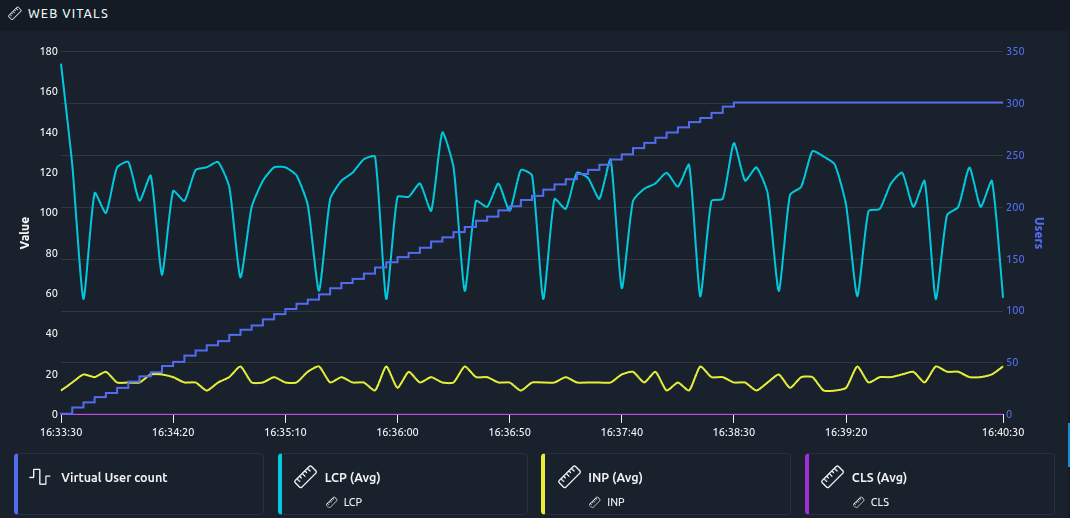
**The shop held the load.** The LCP varies between 60 and 140 ms depending on the page the browser opens, but it does not increase while K6 climbs to 300 users. The INP of the three clicks stays around 20 ms, and the CLS is close to zero. On a slower application, this is where you would see the LCP increase with the load, long before the protocol response times show anything.
The Web Vitals are stored with the custom metrics of the K6 script, so **both engines share the same table**:
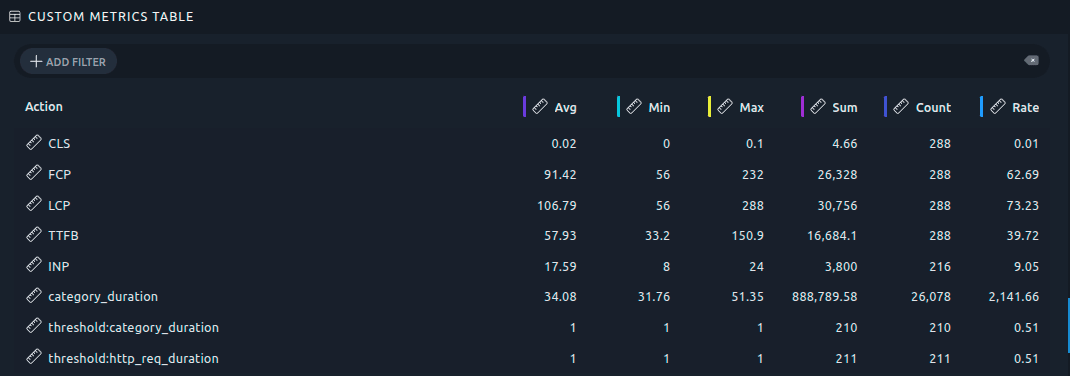
A few things to know:
- INP needs interactions, a page that is only displayed has none,
- LCP and INP come from Chromium based browsers, other browsers may report only part of the metrics,
- validations do not report them, you have to run a test.
Last but not least, **you can apply SLAs to them**. Google rates each metric as good, needs improvement or poor. For example an LCP under 2.5 seconds is good, and over 4 seconds it is poor. An [SLA profile](https://api.octoperf.com/doc/design/edit-virtual-user/configuration/sla-profiles/#custom-metrics) applies the same bands: a Web Vital that needs improvement raises a warning, and a poor one raises a critical alarm. The Core Web Vitals card creates such a profile in one click, and the Playwright sample Virtual User comes with it attached.
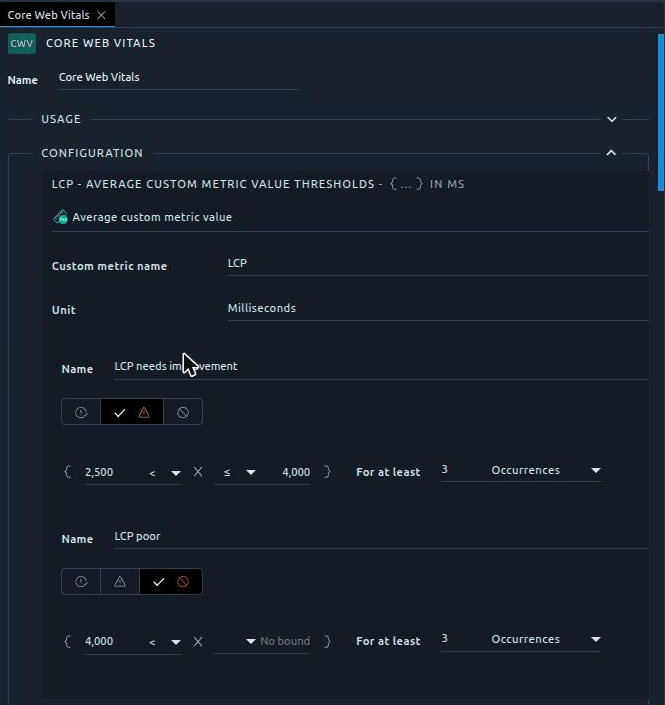
SLA profiles can also check **any custom metric by name**, a K6 `Trend` that measures a checkout duration for example. A breach then shows up in the report and can fail a CI build, just like a slow response time.
## Scenario check { #scenario-check }
Have you ever launched a test only to see it fail after a few minutes, because an agent was down or a server was not reachable from the load generators? **OctoPerf 18 checks every scenario before it runs.** The [scenario check](https://api.octoperf.com/doc/runtime/edit-scenario/scenario-check/) looks for the settings that would make a test fail, stop early or not run the way you expect: a missing provider, a location with no agent up or with too few agents for the load, a load that never ends, a subscription too small...
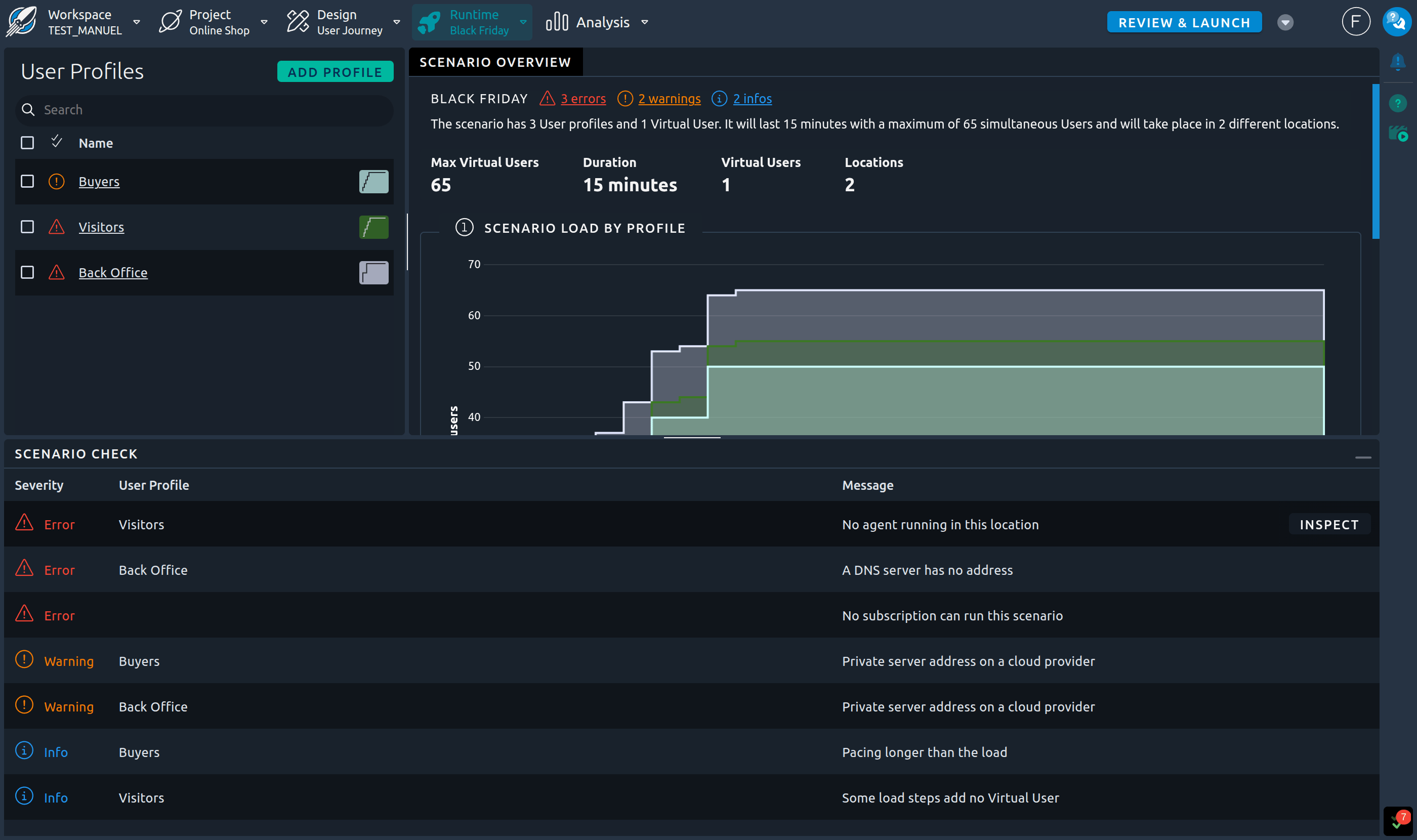
The problems are displayed directly in the scenario editor, next to the scenario name, on each user profile and on each step, and the Scenario Check panel lists all of them. Each problem explains why it matters, and its Fix it link opens the setting to change. The launch wizard runs the same check in its new Check Design and Check Runtime steps.
Each problem is an error, a warning or an info. **A scenario with an error is refused before any test hours are consumed**, whether it is launched from the web UI, the REST API, the Maven plugin, JIRA or the scheduler. Warnings and infos never block the launch, they only tell you what to expect.
The check also looks at the on-premise agents themselves. **Two agents running on the same machine now raise a warning**: each agent reports the whole memory of the machine, so OctoPerf counted it twice and could start more load generators than the machine actually holds. And when a provider declares much less memory per agent than its agents have, an info tells you that the load is split into more load generators than needed, each one paying its own base memory. Both problems show up in the scenario check of the user profiles using these agents, and also on the [Providers page](https://api.octoperf.com/doc/on-premise-agent/providers/#sanity-check), in a new status column of the providers and agents tables:

A click on the icon opens the details of each problem, with the names and figures of your agents and how to fix it.
## Analysis { #analysis }
We also made a few improvements to the **analysis of the results**:
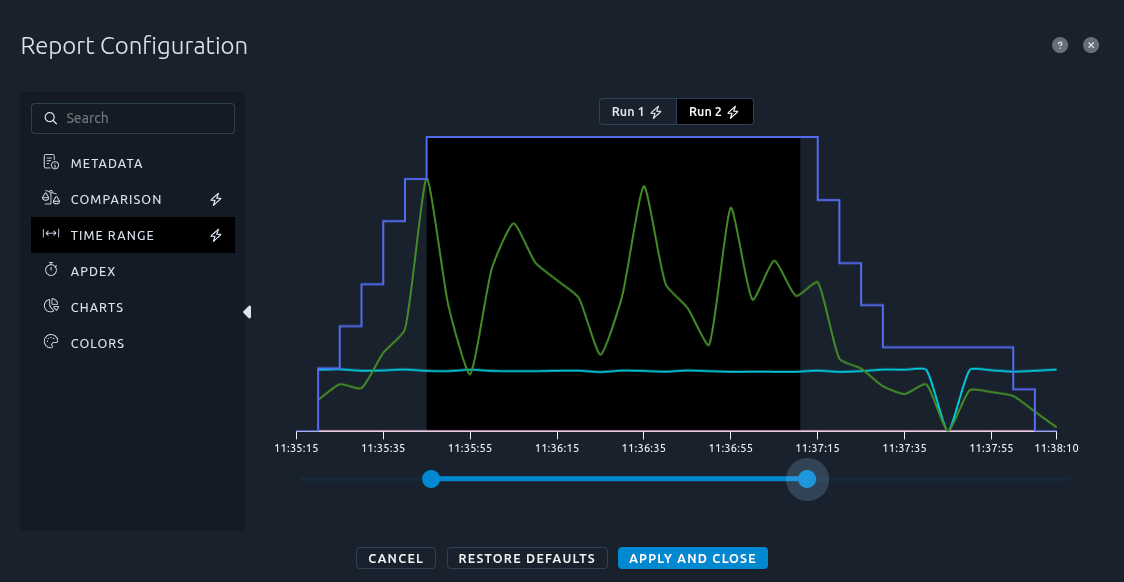
- a [comparison report](https://api.octoperf.com/doc/analysis/edit-bench-report/configuration/#comparison-report) can now use a different time range for each test, so the ramp-up of each run stays out of the comparison even when the ramp-ups do not last the same,
- custom metrics are displayed in their unit, milliseconds or bytes for time and data metrics, and share their axis with the curves of the same unit (only metrics without unit, like `CLS` or a counter, get an axis of their own),
- when the Virtual Users record containers (Playwright tests included), the default report shows a Results Table of the containers before the one of the requests,
- the insight on errors without response code is renamed Requests without response, and it covers both JMeter and K6.
To try the per-run time range, I ran the scenario of our [Gatling migration](https://blog.octoperf.com/migrating-gatling-simulations-to-octoperf-with-an-ai-agent/) twice and compared both runs. **Each run gets its own interval**, selected on its own chart. Here I picked the plateau, after the 30 seconds of ramp-up and before the users leave:
The report header then displays Per run, and its tooltip gives the interval kept for each test:

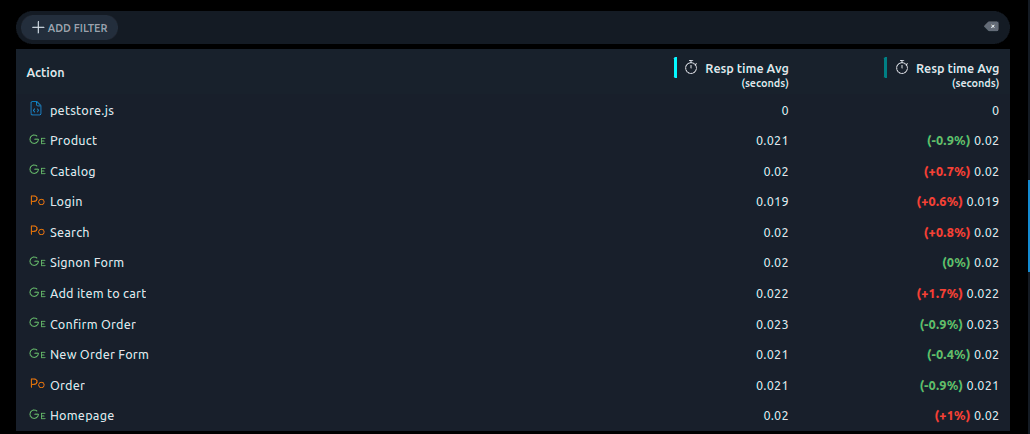
When comparing the two steady states, every request of the second run stays **within 2 % of the first one**:
## Design and validation { #design }
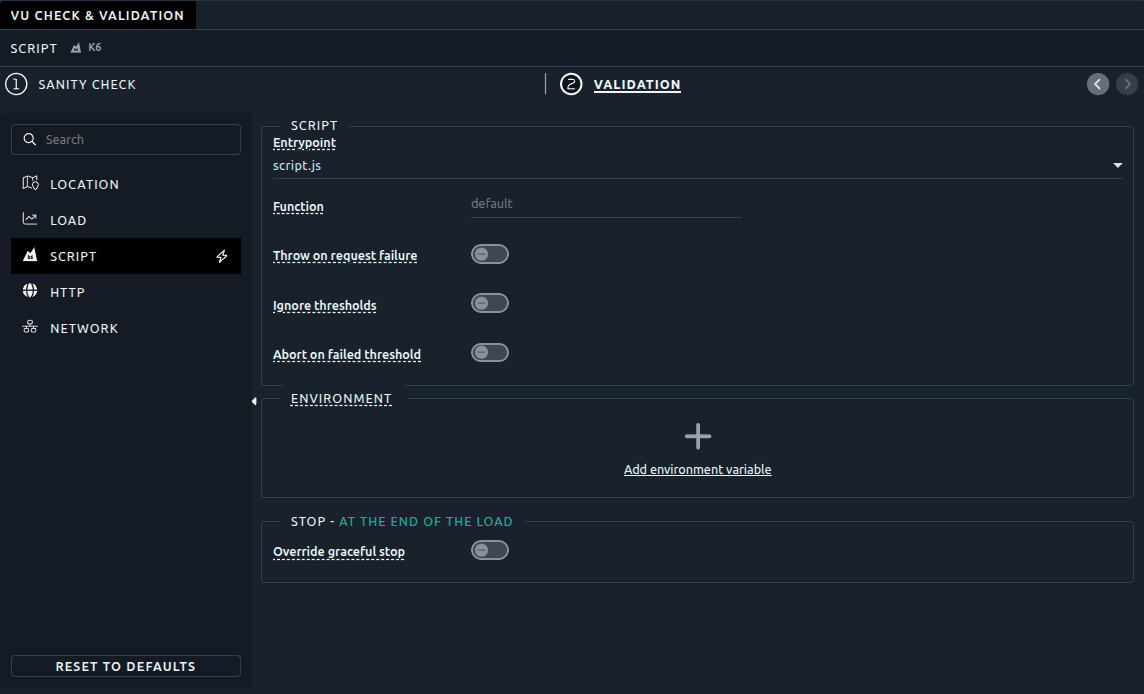
Validation settings are now shared. A validation uses the options of a user profile, and its provider, location, iterations and engine options are **saved with the project**. So whoever opens the Virtual User next validates it the same way. Also, choosing a validation location does not change the default location of new scenarios anymore.
Reports identify Virtual Users by their name, so two Virtual Users with the same name in a project would mix their measurements. **The sanity check now warns you about duplicate names**:

Finally, **a downloaded Virtual User now runs on your computer as is**. The [download](https://api.octoperf.com/doc/design/#virtual-users-list-actions) of a JMeter Virtual User contains the JMX file along with every file of the project, and runs one iteration of one user with `jmeter -n -t`. A K6 one comes with a local copy of `octoperf.js` and the CSV files, so `k6 run` works, and a Playwright one runs with `npx playwright test`. Secrets are never written to the file, you pass them on the command line. This is pretty useful to debug a script locally before running it again in OctoPerf.
## CI/CD and REST API { #ci-cd-api }
Version `2.7.0` of the [Maven plugin](https://api.octoperf.com/doc/runtime/edit-scenario/integrations-automation/ci-cd/maven/#k6-scripts) has a new `import-k6` goal. It runs `k6 inspect` on the build machine and creates the scenario. Also, `execute-scenario` now **fails the build when the test ends in error** or exceeds its timeout.
!!! warning "Running validations through the REST API?"
The validation of a Virtual User now takes a new body, with its provider, location, iterations and engine settings, and the route with `{providerId}/{location}` is removed. A scenario with an error in its scenario check is refused at launch with a `400`, and the two provider capacity endpoints are replaced by the check of a scenario. New enum values also appear in the responses (`K6`, `CUSTOM`, `K6_RUNTIME`...). All the changes are listed in [REST API changes: 17.1.0 to 18.0.0](https://api.octoperf.com/doc/api-changes-18.0/).
The web UI, the Maven plugin and the [MCP server](https://api.octoperf.com/doc/mcp/) are up to date with the platform. So if you only use them, there is nothing to do. The MCP server also gets three new tools: `sanity_check_scenario`, which an AI agent runs before launching or scheduling a scenario, `sanity_check_provider`, which checks the agents of an on-premise provider, and `export_virtual_user`, which downloads a Virtual User so the agent can run and fix it locally.
## Self-hosted installations { #self-hosted }
**Nginx is replaced by Traefik.** The [configuration files](https://api.octoperf.com/doc/on-premise-infra/download/) now use a Traefik load balancer. We use its standard image, the HTTPS version redirects HTTP to HTTPS, and the Kubernetes example files work with the Traefik ingress controller of k3s and RKE2. Stop the stack before replacing the files, and copy over your custom port or SSL certificates as described in the [migration guide](https://api.octoperf.com/doc/on-premise-infra/migration/17.1.x-to-18.0.0/).
You also need to **pull the load generator images again**: the agent and the JMeter images are now tagged `18.0.0`, and K6 virtual users run in a new image. Here is the full list:
- `octoperf/enterprise-edition:18.0.0`,
- `octoperf/octoperf-ui:18.0.0`,
- `octoperf/enterprise-documentation:18.0.0`,
- `elasticsearch:8.19.20`,
- `octoperf/jmeter-standard:18.0.0`,
- `octoperf/jmeter-webdriver:18.0.0`,
- `octoperf/jmeter-playwright:18.0.0`,
- `octoperf/k6:18.0.0`,
- `octoperf/docker-agent:18.0.0`,
- `octoperf/utility-server:18.0.0`,
- `octoperf/mcp-server:18.0.0`,
- `traefik:v3`.
The `octoperf/k6` image can be [rebuilt with your own xk6 extensions](https://api.octoperf.com/doc/design/edit-virtual-user/action-types/k6-actions/k6-protocols/#adding-your-own-extensions), using the `Dockerfile` it contains.
Last thing, **your on-premise agents must be relaunched with a new token**. At its first start, `18.0.0` renews the secret that signs the agent tokens, so the agents installed before the upgrade are refused. Launch them again with a new installation command taken from the UI, and include the `configentry` index in your database backups since it holds this secret. The [migration guide](https://api.octoperf.com/doc/on-premise-infra/migration/17.1.x-to-18.0.0/#your-on-premise-agents-must-be-relaunched-with-a-new-token) explains it step by step. If you use OctoPerf SaaS, there is nothing to do.
A few settings also changed, the [migration guide](https://api.octoperf.com/doc/on-premise-infra/migration/17.1.x-to-18.0.0/) lists them all:
- the [rate limits](https://api.octoperf.com/doc/on-premise-infra/configuration/#rate-limits) on logins, account emails and test notifications move under `octoperf.rate-limit`, and **the former keys are no longer read**, so move them if your `application.yml` sets any,
- optional [quotas](https://api.octoperf.com/doc/on-premise-infra/configuration/#quotas) can cap the number of workspaces per account and of projects per workspace,
- the [Kubernetes agent](https://api.octoperf.com/doc/on-premise-agent/provider-type/on-premise/#kubernetes-agent) reads the resources of the load generator pods from new keys, and it can now set the security context of these pods for clusters that enforce a security policy,
- the retention of the validation and recorded requests and responses moves to `octoperf.validation.retention-days` and `octoperf.recorded.retention-days`, and the nightly `octoperf.eviction.http-recorded` cleanup is removed (nothing warns you about the former keys, so check your `application.yml`),
- when email activation is enabled, the activation links sent before the upgrade no longer work, and users can ask for a new one from the page the link opens.
## Conclusion { #conclusion }
With OctoPerf 18, the engine abstraction we did in version 17 finally pays off. You get **K6 for Test as Code**, real browsers that measure what users see, SLAs to check those measures, and you can run all of them in the same scenario as JMeter.
To go further, we wrote two walkthroughs: [running K6 scripts on OctoPerf](https://blog.octoperf.com/running-k6-scripts-on-octoperf/) and [migrating Gatling simulations with an AI agent](https://blog.octoperf.com/migrating-gatling-simulations-to-octoperf-with-an-ai-agent/). And to try it with your own scripts, [start a free trial](https://octoperf.com/pricing/).