Seamlessly Migrate from BlazeMeter to OctoPerf with Our New Maven Plugin
Switching performance testing platforms has traditionally been a daunting task. The thought of manually recreating workspaces, projects, test designs, and data sets can discourage teams from exploring better alternatives - even when their current tool doesn't meet their needs.
Today, we're excited to announce the BlazeMeter to OctoPerf Maven Plugin, an open-source tool that automates the entire migration process. Whether you're looking for true unlimited pricing, collaborative script editing, genuine on-premise deployment, or simply a more powerful testing platform, migrating your BlazeMeter assets to OctoPerf is now as simple as running a Maven command.
Why Migrate from BlazeMeter to OctoPerf?
Before diving into the technical details, let's address why teams are making the switch:
- True Unlimited Pricing: OctoPerf offers unlimited pricing based on concurrent users, without restrictions on virtual users, tests, or test duration,
- Built-in Script Builder: Create and edit JMeter™ scripts directly in the platform without opening JMeter™, with full team collaboration support,
- Unlimited Concurrent Testing: Run as many tests simultaneously as your team needs,
- Dynamic Results Engine: Get comprehensive, real-time analysis instead of static reports,
- Genuine On-Premise Option: Deploy OctoPerf in your own infrastructure for enhanced security and compliance,
- Superior Support: Responsive customer service backed by 10+ years of experience serving 1000+ customers across 32 countries.
Learn more about why OctoPerf is the best BlazeMeter alternative.
Table of Contents
What Gets Migrated
The plugin performs a comprehensive migration of your BlazeMeter assets, ensuring you can continue working without interruption.
Workspaces and Projects
Your complete organizational structure is preserved. The plugin migrates all workspaces and projects, maintaining the hierarchy you've established in BlazeMeter. You can also choose to migrate specific workspaces or projects if you prefer a selective approach.
Test Designs
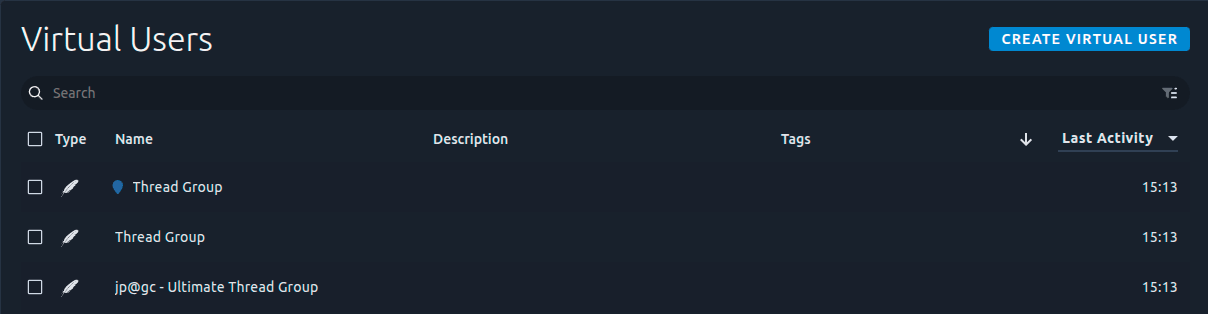
All JMeter-based test designs are converted into OctoPerf Virtual Users. These are the core of your testing strategy - the HTTP requests, extractors, assertions, and all elements that define virtual user behavior.
Important: Only JMeter-based BlazeMeter tests are supported. Tests created with Locust, Gatling, or other frameworks are not included in the migration.
Test Files and Shared Folders
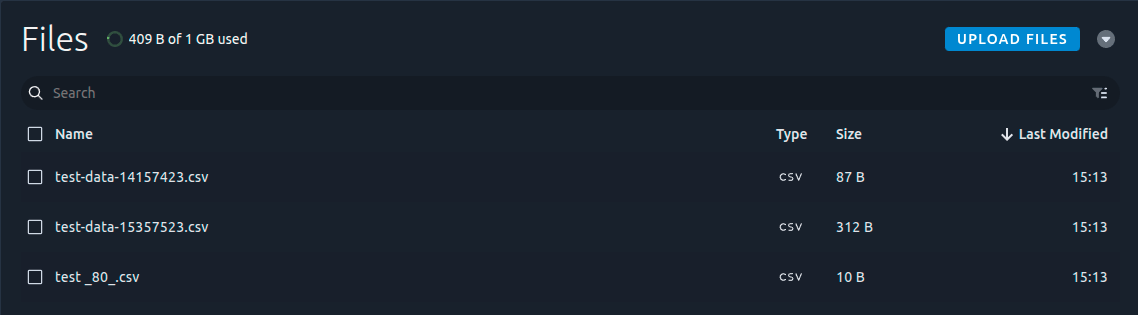
All test files uploaded to your BlazeMeter projects are migrated, along with workspace-level shared folders. These files remain accessible to your tests in OctoPerf, exactly as they were in BlazeMeter.
Test Data Sets
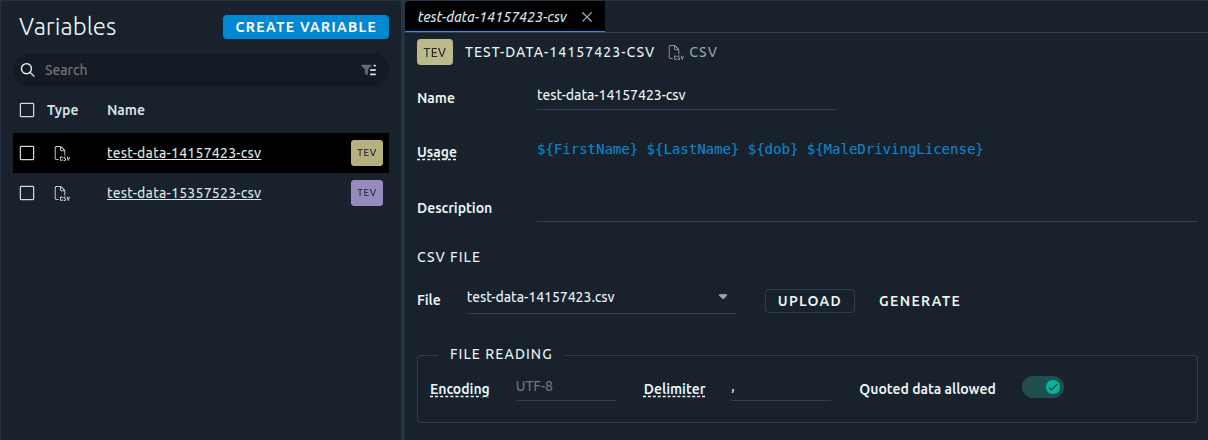
CSV files used for parameterization in BlazeMeter are automatically converted to CSV variables in OctoPerf. Your data-driven tests will continue to work seamlessly.
How It Works
The migration process is straightforward and secure:
- API-Based Access: The plugin uses only BlazeMeter's publicly documented APIs to access resources within your BlazeMeter account,
- Intelligent Conversion: BlazeMeter assets are retrieved and intelligently converted into their OctoPerf equivalents,
- Automated Import: Converted assets are imported into OctoPerf using your API credentials,
- Preserved Structure: Your organizational hierarchy, test logic, and data relationships remain intact.
All operations are performed through official APIs, ensuring your data remains secure throughout the migration process.
Prerequisites
Before running the migration, ensure you have:
- Maven 3.6 or higher installed on your system,
- Java 17 or higher (required for plugin version 1.0.0+),
- OctoPerf 16.1.0 or higher (for plugin compatibility),
- Active accounts on both BlazeMeter and OctoPerf,
- API credentials for both platforms.
Configuration
The plugin is configured through Maven's standard pom.xml file. Here's what you need to provide:
Required Parameters
These parameters are mandatory for the migration to proceed:
- OctoPerf API Key: Obtain this from your OctoPerf account under User Account > API Keys,
- BlazeMeter API Key ID: Found in BlazeMeter under Settings > Personal > API Keys,
- BlazeMeter API Secret: Also located in Settings > Personal > API Keys.
Optional Parameters
Fine-tune the migration behavior with these optional settings:
- OctoPerf Server URL - octoPerfServerUrl: Defaults to the SaaS platform; specify if using on-premise,
- Always create new Workspace - alwaysCreateNewWorkspace: Set to
trueto always create new workspaces instead of reusing existing ones (default:false), - Always create new Project - alwaysCreateNewProject: Set to
trueto always create new projects instead of reusing existing ones (default:false), - BlazeMeter Workspace ID - bzmWorkspaceId: Migrate a specific workspace only,
- BlazeMeter Project ID - bzmProjectId: Migrate a specific project only.
Demonstration
Let's walk through a complete migration from BlazeMeter to OctoPerf.
Step 1: Obtain Your API Keys
BlazeMeter API Credentials:
- Log into your BlazeMeter account
- Navigate to Settings > Personal > API Keys
- Copy your API Key ID and API Secret
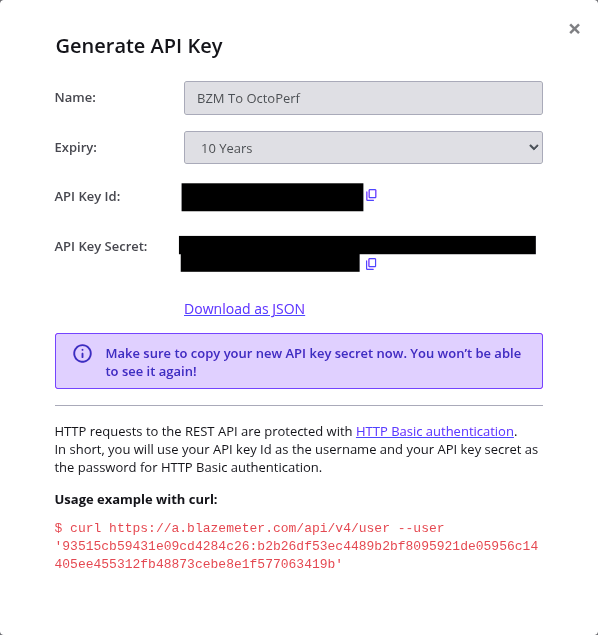
OctoPerf API Key:
- Log into your OctoPerf account
- Go to User Account > API Key
- Copy your API Key
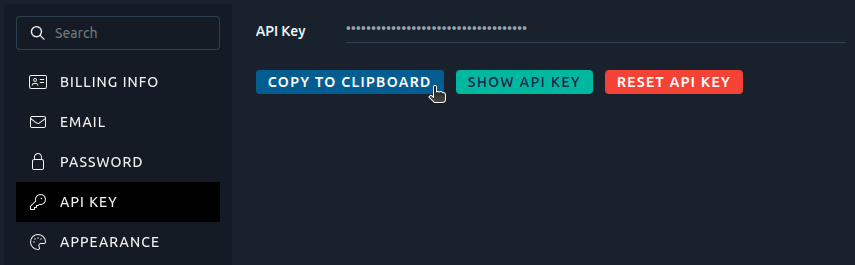
Step 2: Create a Maven Project
Create a minimal Maven project structure for the migration:
mkdir blazemeter-migration
cd blazemeter-migration
Download the sample pom.xml file from the GitHub repo or directly using wget:
wget https://raw.githubusercontent.com/OctoPerf/bzm-to-octoperf-maven-plugin/refs/heads/main/example/pom.xml
Step 3: Configure the Plugin
Using the previously downloaded API Keys, edit the pom.xml file with the following configuration:
<octoPerfApiKey>YOUR_OCTOPERF_API_KEY</octoPerfApiKey>
<blazemeterApiKeyId>YOUR_BZM_API_KEY_ID</blazemeterApiKeyId>
<blazemeterApiKeySecret>YOUR_BZM_API_KEY_SECRET</blazemeterApiKeySecret>
Step 4: Run the Migration
Execute the migration with a single Maven command:
mvn com.octoperf:bzm-to-octoperf-maven-plugin:1.0.0:migrate
The plugin will display progress as it migrates your assets:
[INFO] ------ [BlazeMeter to OctoPerf] starting migration ------
[INFO] [WORKSPACE] 'Default workspace'
[INFO] [PROJECT] 'Default project'
[INFO] [IMPORT JMX] BZM script file = 'demo.jmx':
[INFO] [IMPORT JMX - VU] 'Thread Group' imported
[INFO] [PROJECT FILES] 'test _80_.csv'
[INFO] [IMPORT JMX] BZM script file = 'demo.jmx':
[INFO] [IMPORT JMX - VU] 'Thread Group' imported
[INFO] [IMPORT JMX] BZM script file = 'demo _1_.jmx':
[INFO] [IMPORT JMX - VU] 'Thread Group' imported
[INFO] [IMPORT JMX] BZM script file = 'demo.jmx':
[INFO] [IMPORT JMX - VU] 'Thread Group' imported
[INFO] [IMPORT JMX] BZM script file = 'demo.jmx':
[INFO] [IMPORT JMX - VU] 'Thread Group' imported
[INFO] [IMPORT JMX] BZM script file = 'demo.jmx':
[INFO] [IMPORT JMX - VU] 'Thread Group' imported
[INFO] [PROJECT] 'Project2'
[INFO] [IMPORT JMX] BZM script file = 'demo.jmx':
[INFO] [IMPORT JMX - VU] 'Thread Group' imported
[INFO] [PROJECT FILES] 'api.octoperf.com_Archive _23-03-31 10-18-07_.har'
[INFO] [PROJECT] 'project-test-data'
[INFO] [IMPORT JMX] BZM script file = 'test-with-variable.jmx':
[INFO] [IMPORT JMX - VU] 'Thread Group' imported
[INFO] [IMPORT JMX] BZM script file = 'demo.jmx':
[INFO] [IMPORT JMX - VU] 'Thread Group' imported
[INFO] [PROJECT] 'project1'
[INFO] [IMPORT JMX] BZM script file = 'all-test.jmx':
[INFO] [IMPORT JMX - VU] 'bzm - Arrivals Thread Group' imported
[INFO] [IMPORT JMX - VU] 'bzm - Concurrency Thread Group' imported
[INFO] [IMPORT JMX - VU] 'bzm - Free-Form Arrivals Thread Group' imported
[INFO] [IMPORT JMX - VU] 'Thread Group' imported
[INFO] [IMPORT JMX - VU] 'bzm - Concurrency Thread Group' imported
[INFO] [IMPORT JMX - VU] 'jp@gc - Stepping Thread Group' imported
[INFO] [IMPORT JMX - VU] 'jp@gc - Ultimate Thread Group' imported
[INFO] [IMPORT JMX] BZM script file = 'demo.jmx':
[INFO] [IMPORT JMX - VU] 'Thread Group' imported
[INFO] [PROJECT FILES] 'shared files'
[INFO] [PROJECT FILES - Default workspace > project-test-data] 'rocket.svg'
[INFO] [PROJECT FILES - Default workspace > project-test-data] 'simplelogger.properties'
[INFO] [PROJECT FILES - Default workspace > project1] 'rocket.svg'
[INFO] [PROJECT FILES - Default workspace > project1] 'simplelogger.properties'
[INFO] [PROJECT FILES] 'shared files' done
[INFO] [PROJECT TEST DATA - Default workspace > Default project] 'test-data-15357523.csv'
[INFO] [PROJECT TEST DATA - Default workspace > Default project] 'test-data-15357523-csv' variable created (id=Qt0zUpwB6PCZJgTcj8xI)
[INFO] [PROJECT TEST DATA - Default workspace > Default project] 'test-data-14157423.csv'
[INFO] [PROJECT TEST DATA - Default workspace > Default project] 'test-data-14157423-csv' variable created (id=pTwzUpwBfl0MwDjZmqs_)
[INFO] [PROJECT TEST DATA - Default workspace > project-test-data] 'test-data-15377753.csv'
[INFO] [PROJECT TEST DATA - Default workspace > project-test-data] 'test-data-15377753-csv' variable created (id=ETwzUpwBfl0MwDjZoawI)
[INFO] [PROJECT TEST DATA - Default workspace > project-test-data] 'test-data-15378585.csv'
[INFO] [PROJECT TEST DATA - Default workspace > project-test-data] 'test-data-15378585-csv' variable created (id=JOMzUpwBG2D025D8pAYN)
[INFO] ------ [BlazeMeter to OctoPerf] migration done ------
[INFO] Metadata of migration: CopyMetadata(projects={86QzUpwBtypcVSVYThhX=Project(id=86QzUpwBtypcVSVYThhX, userId=user-270, workspaceId=7aQzUpwBtypcVSVYTRgV, name=Default project, description=, type=DESIGN, created=2026-02-12T14:13:40.030Z, lastModified=2026-02-12T14:13:40.056Z, tags=[]), 5eMzUpwBG2D025D8ZwWr=Project(id=5eMzUpwBG2D025D8ZwWr, userId=user-270, workspaceId=7aQzUpwBtypcVSVYTRgV, name=Project2, description=, type=DESIGN, created=2026-02-12T14:13:46.529Z, lastModified=2026-02-12T14:13:46.541Z, tags=[]), EuMzUpwBG2D025D8cQaK=Project(id=EuMzUpwBG2D025D8cQaK, userId=user-270, workspaceId=7aQzUpwBtypcVSVYTRgV, name=project-test-data, description=, type=DESIGN, created=2026-02-12T14:13:49.056Z, lastModified=2026-02-12T14:13:49.068Z, tags=[]), 7zwzUpwBfl0MwDjZd6qy=Project(id=7zwzUpwBfl0MwDjZd6qy, userId=user-270, workspaceId=7aQzUpwBtypcVSVYTRgV, name=project1, description=, type=DESIGN, created=2026-02-12T14:13:50.627Z, lastModified=2026-02-12T14:13:50.641Z, tags=[])}, bzmTestIdToBzmWorkspaceId={15357523=2072194, 15235495=2072194, 15235483=2072194, 15235475=2072194, 14157401=2072194, 14157423=2072194, 15375696=2072194, 15377753=2072194, 15378585=2072194, 15365649=2072194, 15357533=2072194}, workspaces={7aQzUpwBtypcVSVYTRgV=Workspace(id=7aQzUpwBtypcVSVYTRgV, userId=user-270, name=Default workspace, description=Imported from BlazeMeter, created=2026-02-12T14:13:39.719Z, lastModified=2026-02-12T14:13:39.732Z)}, projectIdToBzmFolderIds={EuMzUpwBG2D025D8cQaK=[6972550be4bfc56c7c0a1db8, 698afbad7922b664760b0a45], 7zwzUpwBfl0MwDjZd6qy=[6972550be4bfc56c7c0a1db8]}, projectIdToBzmTestIds={86QzUpwBtypcVSVYThhX=[15357523, 15235495, 15235483, 15235475, 14157401, 14157423], 5eMzUpwBG2D025D8ZwWr=[15375696], EuMzUpwBG2D025D8cQaK=[15377753, 15378585], 7zwzUpwBfl0MwDjZd6qy=[15365649, 15357533]})
[INFO] ------------------------------------------------------------------------
[INFO] BUILD SUCCESS
[INFO] ------------------------------------------------------------------------
[INFO] Total time:  01:39 min
[INFO] Finished at: 2026-02-12T15:14:02+01:00
[INFO] ------------------------------------------------------------------------
Step 5: Verify in OctoPerf
Once the migration completes, log into OctoPerf to verify your assets:
Workspaces:
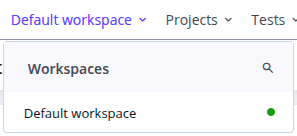

Projects:

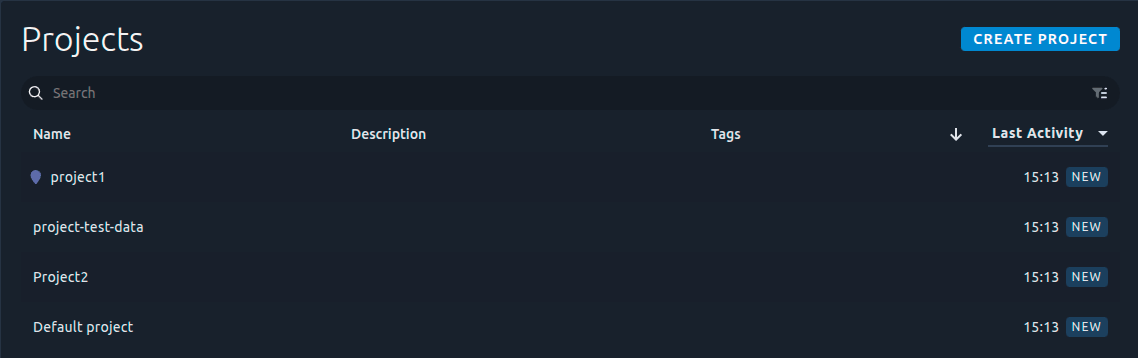
Virtual Users (Test Designs):
CSV Variables (Data Sets):
Test Files:
Conclusion
Migrating performance testing platforms should be straightforward, not a roadblock. With the BlazeMeter to OctoPerf Maven Plugin, you can move your entire testing infrastructure in minutes - not days or weeks.
Whether you're drawn to OctoPerf's unlimited pricing model, collaborative features, on-premise deployment options, or superior reporting capabilities, the migration barrier has been removed. Your workspaces, projects, test designs, and data sets transfer seamlessly, letting you focus on what matters: delivering high-performance applications.
The plugin is open-source and free to use. We've built it to help teams make the transition confidently and quickly, with full transparency into the migration process.
Ready to experience the OctoPerf difference? Start your migration today and discover why teams are choosing OctoPerf over BlazeMeter.
Have questions or need assistance with your migration? Reach out to our support team - we're here to help make your transition as smooth as possible.