OctoPerf v17: A New Foundation for Test Results
OctoPerf 17.0.0 is available, on the SaaS platform and for On-Premise installations. It rebuilds how test results are stored and read, upgrades Playwright, and considerably extends what an AI agent can do through the OctoPerf MCP server.
One thing to know before you upgrade. A result recorded before this version must be updated before its report shows data again. Nothing is lost, and the update runs on its own the first time you open the report.
Table of Contents
- Test Results, Rebuilt
- Before You Open an Old Report
- If You Read Results From the API or the CI
- What Your AI Agent Can Now Do
- Upgrading
- The Real Point: Abstracting the Injection Engine
Test Results, Rebuilt
Until now, a measurement pointed at what produced it by internal identifier: an opaque string, tied to one Virtual User in one project.
Version 17 replaces the identifier with the name of the thing, and its position in the tree. A measurement now carries key and value pairs, and the values are readable: action path, Virtual User name, user profile, region, load generator, monitoring connection, counter path. Adding a dimension becomes adding a word to that vocabulary.
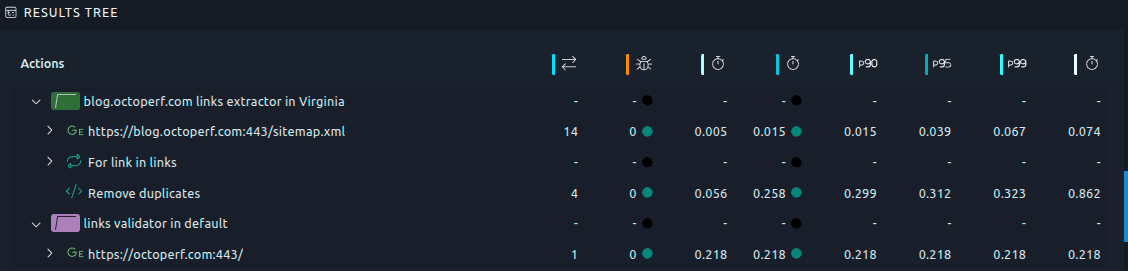
Read that tree and you are reading the new model. The Virtual User is named. So is the region it ran from. Every action underneath carries its own name and its place in the sequence. The data holds that now, instead of resolving it separately for display.
One corollary matters if you drive OctoPerf from an agent: the edition contract moved to the server. The platform answers which sample types, metrics and filter values a report item accepts, and validates it before saving. The web interface no longer decides.
Before You Open an Old Report
Results recorded before 17.0.0 are preserved, in the previous format. They need a one-time update before their report shows data again.
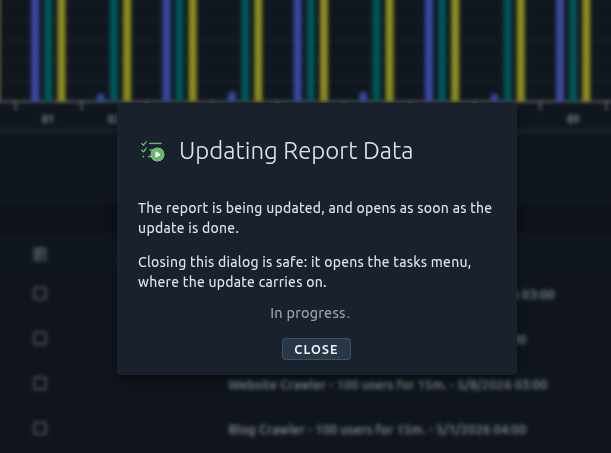
There is no mass migration in the background. The update runs on demand, one result at a time, when you first open the report. The dialog explains what is happening, then opens the report itself. Closing it is safe: the update carries on, and lands in the tasks menu.
Duration depends on the size of the result. A smoke test is instant. A run holding millions of requests takes a while, and you can keep working meanwhile. Nothing is deleted and no result is lost. Once updated, the dialog never comes back for that result.
Full behaviour, failures included, in Updating report data.
If You Read Results From the API or the CI
An automated reader faces the same state, and version 17 gives it the means to handle it.
The MCP report tools detect a result whose data is not up to date. Empty metrics read exactly like a test that generated no traffic, so the tools refuse instead, and point at the one that runs the update. Report listings flag the results concerned. Your pipeline can check before it reads, rather than after it has drawn the wrong conclusion.
Calling the REST API from your own scripts? Read the breaking changes first. The check-update-read sequence is documented there, with every endpoint that moved.
What Your AI Agent Can Now Do
The MCP server shipped in 16.2 covered the core loop: import, fix, run, analyze. Version 17 fills in what surrounded it.
- Workspaces, end to end: create, rename, list members, add one by e-mail, change a role, remove a member,
- SLA profiles: list, read, create with the same defaults the web interface uses, retune, delete, attach to or detach from a Virtual User,
- Report templates and comparison reports: build a template from a report, edit it, apply it, compare two to four finished results,
- Scenario user profiles: read which Virtual User a profile plays, on which provider and location, re-point it, set up the full Set Up and Tear Down options,
- Monitoring: a monitor that would collect nothing is refused with the reason instead of created silently. Counters can be picked by family and filed into named folders, thresholds set, the whole configuration read back,
- Guided report item editing: the platform says what is selectable, and validates before saving,
- Project deletion, so an evaluation import can be undone.
Two additions change the experience more than that list suggests. An account tool reports which account the agent works as, whether it administers the platform, and its role on each workspace. And the report tools flag a result whose data is out of date, instead of serving zeroes.
One deserves its own articles. Migrating off a commercial tool has always had the same problem: you find out what does not convert after committing to the migration. A LoadRunner or NeoLoad project can now be surveyed before importing, without writing anything to your project. The survey answers a portability verdict, a breakdown per script or per Virtual User, and the list of what is left to do by hand. The import reports the same list, with markers planted where the work is. Both flows are walked end to end in migrating a NeoLoad project and migrating a LoadRunner script.
Six new playbooks ship with the server:
- LoadRunner migration,
- NeoLoad migration,
- workspaces,
- SLA profiles,
- scenario composition,
- report item editing.
They are packaged expertise an agent reads before acting, like the ones we covered previously.
Upgrading
On the SaaS platform, nothing to do beyond the report update described above.
Self-hosted installations must upgrade their load generators along with the server. A 16.2 load generator produces the previous shape of data and cannot report to a 17.0 server, so on-premise Docker agents have to be pulled again. Elasticsearch moves to 8.19.19.
Calling the REST API from your pipelines? This release contains breaking changes, all listed with their replacement in REST API changes: 16.2 to 17.0.
octoperf/enterprise-edition:17.0.0
octoperf/octoperf-ui:17.0.0
octoperf/enterprise-documentation:17.0.0
octoperf/jmeter-standard:17.0.0
octoperf/jmeter-webdriver:17.0.0
octoperf/jmeter-playwright:17.0.0
octoperf/docker-agent:17.0.0
octoperf/utility-server:17.0.0
octoperf/mcp-server:17.0.0
elasticsearch:8.19.19
The Real Point: Abstracting the Injection Engine
Our analysis engine could only read measurements shaped the way our own JMeter injector produced them, because it read identifiers only that pipeline issued. The reports, the filters, the trend logic: all tied, at the bottom, to one way of generating load.
A measurement carrying readable names and paths describes itself. The action, the Virtual User, the phase, the region: nothing in that vocabulary belongs to the tool that produced it. The engine becomes an implementation detail of the analysis rather than a premise of it. The same reports, the same filters, the same trend logic, over results produced by JMeter and by other load testing tools alike.
No date, no list, nothing to try today. But it is why the part of this release you cannot see took the longest.
The rest of the release is elsewhere: the two migration walkthroughs, NeoLoad and LoadRunner, driven end to end from a chat. The complete changelog is in the 17.0.0 release notes. As always, tell us what you think: real usage is the best judge, and your account manager and our support team are listening.