Migrating a NeoLoad Project to OctoPerf With an AI Agent
Migrating a load testing project is rarely hard. It is long, and easy to abandon halfway. OctoPerf 17 ships a NeoLoad migration playbook for AI agents.
Real prompts, real output, project downloadable.
Table of Contents
- The Project
- Step 1: Survey
- Step 2: Import
- Step 3: Work the Unconverted List
- Step 4: Check What Came Through Silently
- Step 5: Validate
- What This Saves
- Conclusion
The Project
Target: JPetStore, our public MyBatis demo shop. Every step is reproducible.
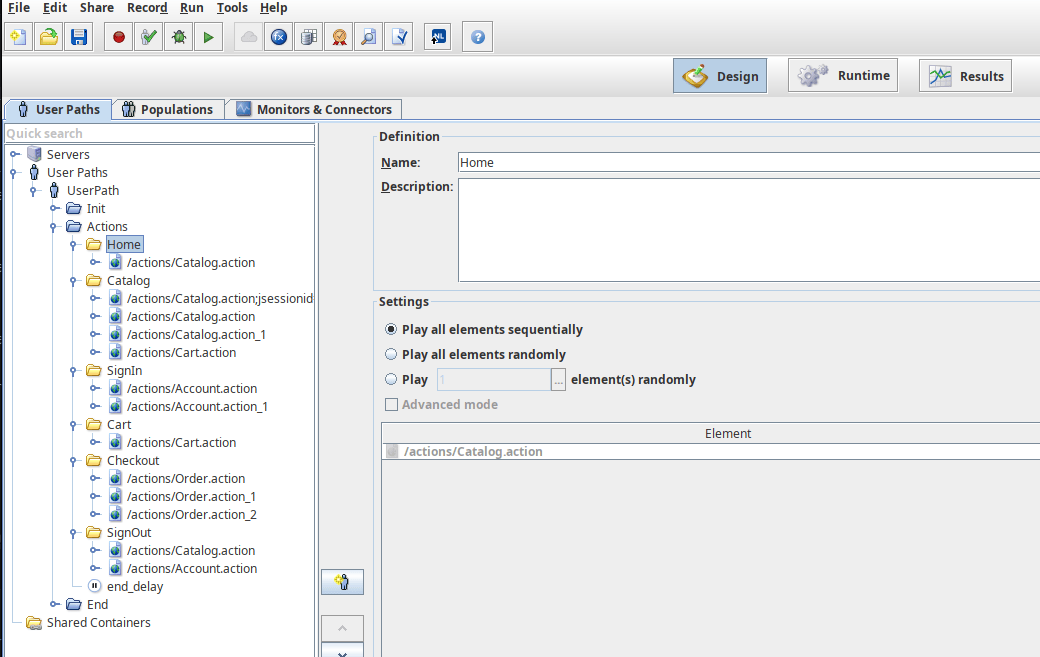
One User Path, split Init / Actions / End, six containers walking a purchase. Around them:
- a file variable reading
accounts.csv, and an encrypted variable holding the password, - a JavaScript action picking which item the user buys,
- a try/catch around the checkout, logging in the catch branch,
- an SLA profile applied to eleven pages,
- a Population and a Scenario with a ramp-up policy.
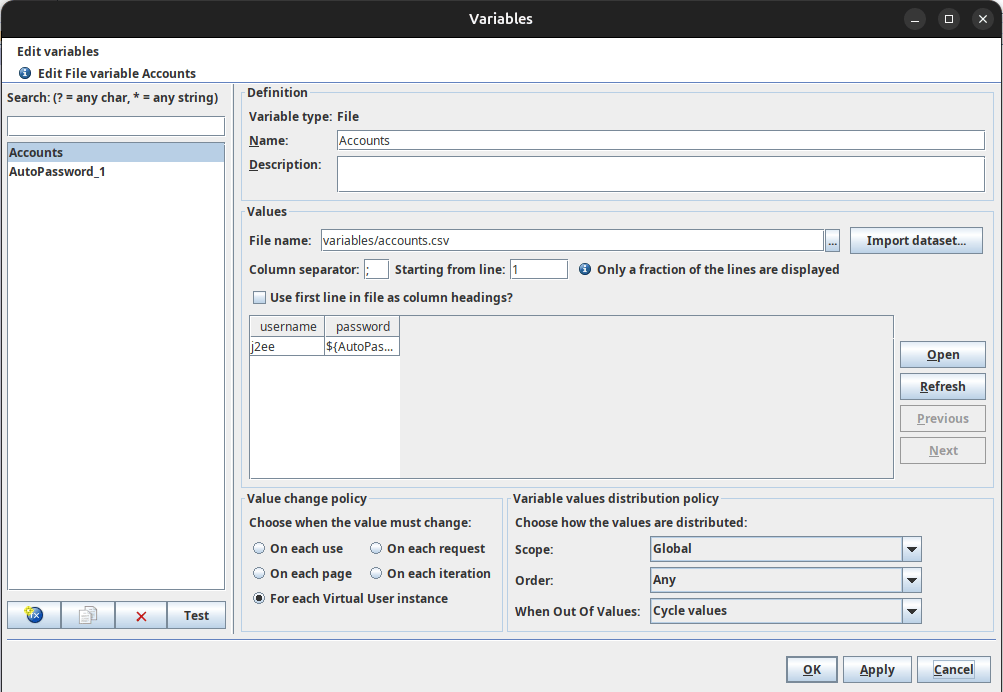
Download it to follow along. Export the whole project folder, not config.zip alone: config.zip holds only the three XML documents, so it arrives without the recorded bodies, the JavaScript sources and the CSV.
The OctoPerf MCP server sits at https://api.octoperf.com/mcp and plugs into any MCP-aware client. Our release article covers the setup.
Step 1: Survey
The first prompt is not an import.
Here is a NeoLoad project. Before importing anything, tell me whether it is worth migrating.
Nothing is created. Trimmed answer:
"portability": "ASSISTED",
"plugins": [],
"inventory": {
  "httpRequests": 31, "pages": 13, "containers": 6,
  "controlFlows": 1, "scripts": 2, "variables": 2,
  "populations": 1, "scenarios": 1, "pluginRequests": 0
}
Three verdicts:
MECHANICAL, plain HTTP, runs nearly as it is,ASSISTED, HTTP plus scripts or control flow, import and work the list,MOSTLY_MANUAL, protocol plugins outnumber the HTTP requests.
MOSTLY_MANUAL is not a difficulty rating, it is a different project. A NeoLoad plugin request (Oracle Forms, AMF, GWT, Siebel, RTMP, Hessian) carries a proprietary dialog encoded in base64, not an HTTP body. Nothing to translate: that traffic has to be recorded again.
Ours is ASSISTED with pluginRequests: 0. Two numbers already say where the work is: controlFlows: 1 is the try/catch, scripts: 2 the JavaScript actions.
Step 2: Import
Import it into a new project, on the public AWS provider in eu-west-1.
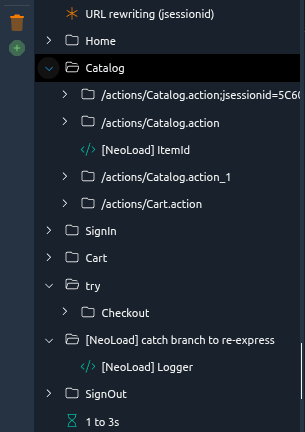
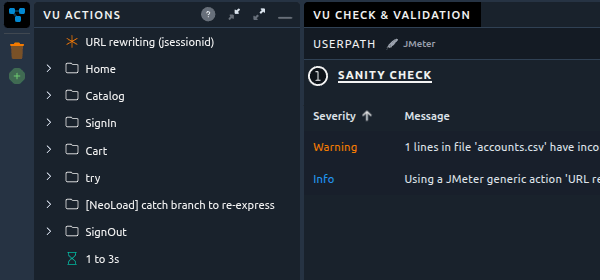
Containers kept their names, requests their think times, the file variable its CSV. The server arrived with its jsessionid URL rewriting as a JMeter URL Rewriting Modifier.
Passing a provider is what brings the scenario in. A NeoLoad scenario names load generators by hostname, which says nothing about an OctoPerf provider. Without one, you get the Virtual Users alone.
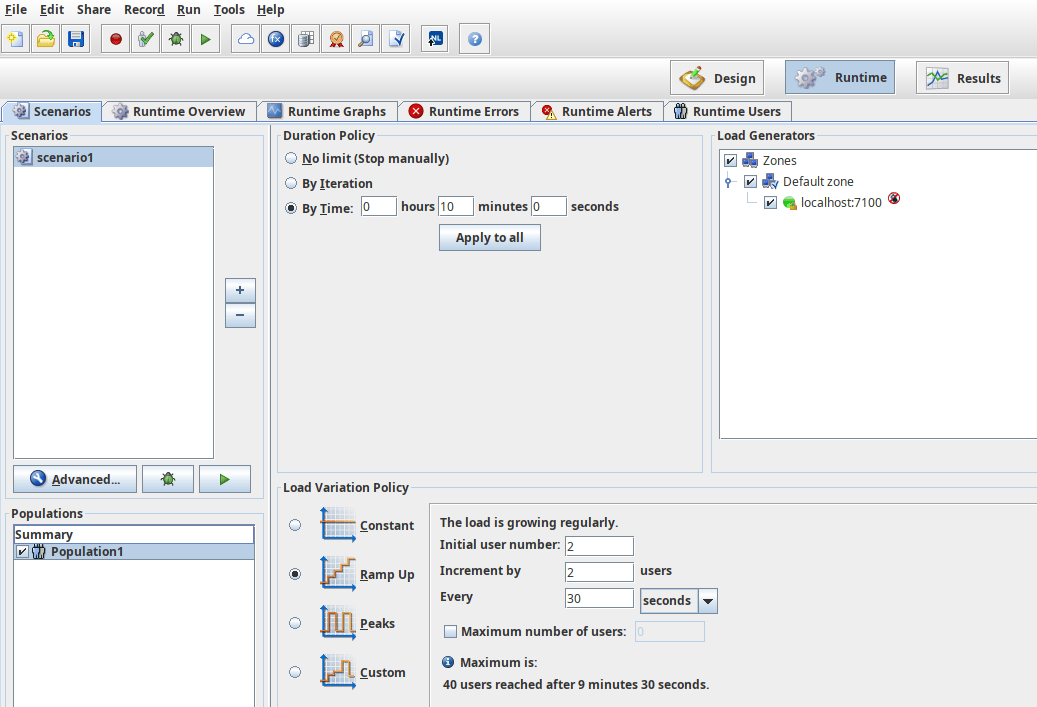
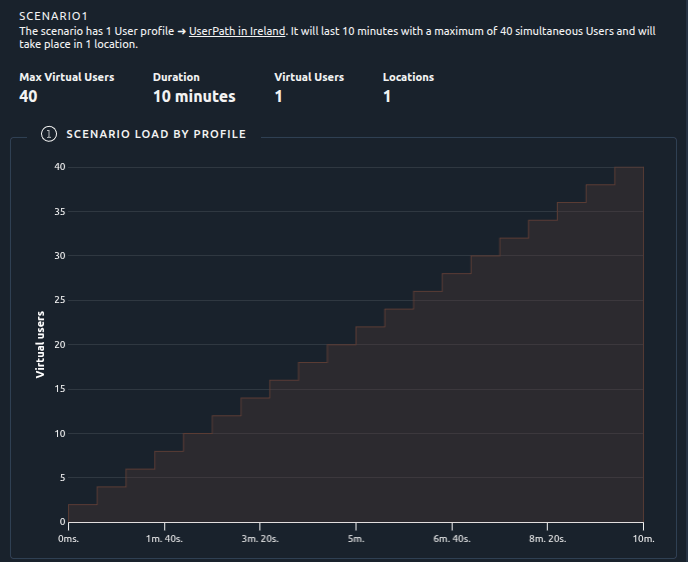
Forty users over ten minutes, two at a time every thirty seconds. The NeoLoad policy, reproduced.
Same list as the assessment, and this time the markers are planted:
{ "kind": "JAVASCRIPT_ACTION",  "marker": "[NeoLoad] ItemId",  "virtualUser": "UserPath" }
{ "kind": "JAVASCRIPT_ACTION",  "marker": "[NeoLoad] Logger",  "virtualUser": "UserPath" }
{ "kind": "TRY_CATCH",          "marker": "[NeoLoad] catch branch to re-express",
  "facts": { "catchesErrors": true, "catchesAssertions": false } }
{ "kind": "ENCRYPTED_VARIABLE", "marker": "AutoPassword_1" }
{ "kind": "SLA_PROFILE",        "marker": "",
  "facts": { "profile": "Profile", "metrics": 1, "alarms": 2, "boundTo": [ "UserPath", "..." ] } }
Five entries, the whole of the manual work. An entry is data, not prose: a kind, the facts the importer had, where the marker went. The last one has no marker, because an SLA profile was never inside a Virtual User.
Step 3: Work the Unconverted List
Work the unconverted list. Explain each entry before you fix it.
Work from the list, not from the tree. If a [NeoLoad] ... name is not in unconverted, leave it alone.
The JavaScript Actions
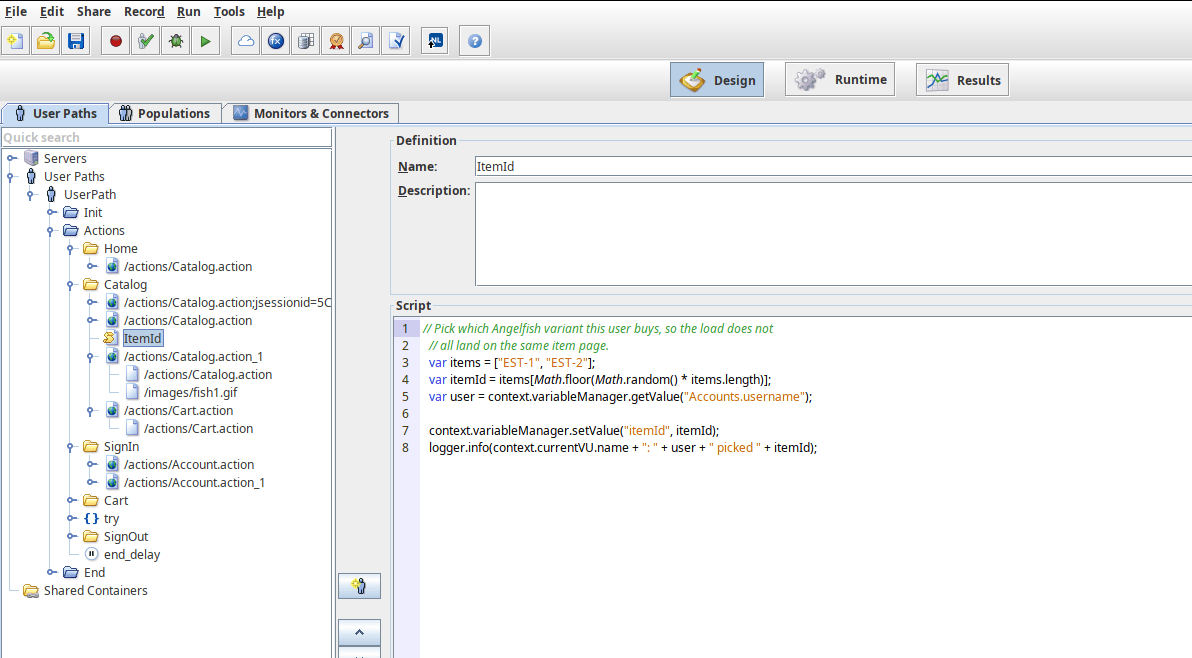
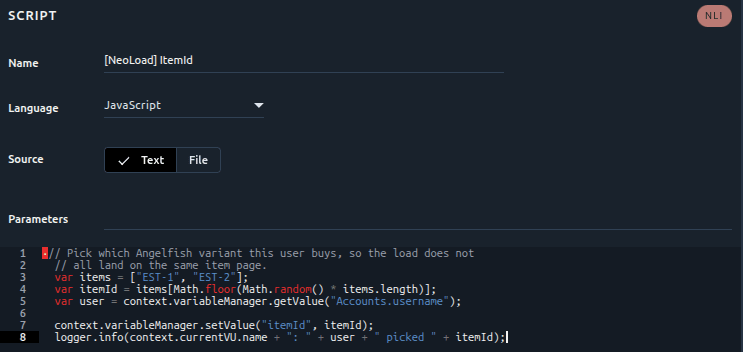
The script came over verbatim, in a JSR223 action, language still JavaScript. It does not run: it is written against the NeoLoad JavaScript API. The load generators do carry a JavaScript engine, so it starts, then fails on objects that are not there.
The playbook holds the translation table:
| NeoLoad | JSR223 (Groovy) |
|---|---|
context.variableManager.getValue("X") |
vars.get("X") |
context.variableManager.setValue("X", v) |
vars.put("X", v) |
logger.info(msg) / logger.error(msg) |
log.info(msg) / log.error(msg) |
context.currentVU.name |
ctx.getThreadGroup().getName() |
Our item picker becomes:
def items = ["EST-1", "EST-2"]
def itemId = items[new Random().nextInt(items.size())]
def user = vars.get("username")

vars.put("itemId", itemId)
log.info(ctx.getThreadGroup().getName() + ": " + user + " picked " + itemId)
Switch the language to Groovy. Watch the variable names: NeoLoad reads the column as Accounts.username, OctoPerf exposes it as username.
The Try/Catch
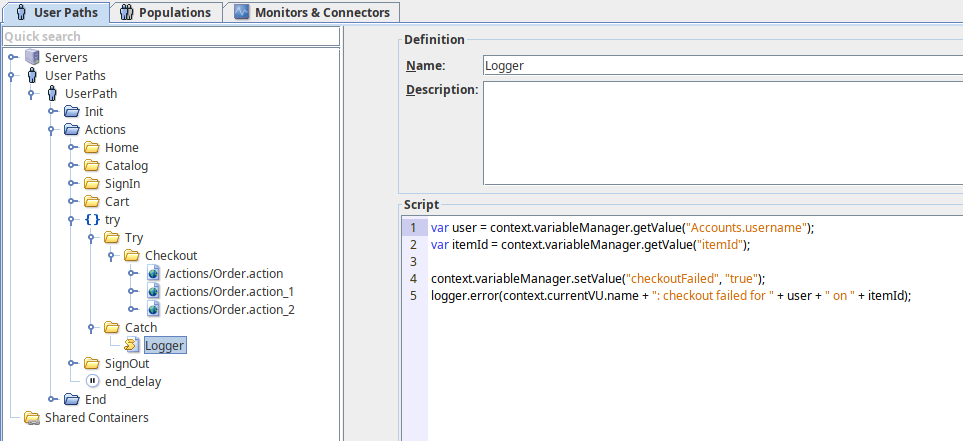
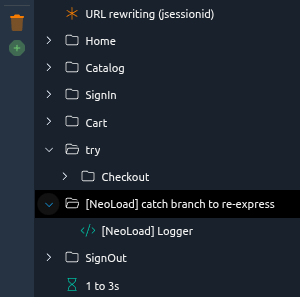
The try branch needs nothing. The catch branch sits beside it, so its steps run unconditionally: it logs a checkout failure on every iteration, including the successful ones. Nothing errors, and the test does the wrong thing quietly.
catchesErrors: true means the branch caught request errors, so the condition comes from the preceding requests. Wrap the former catch steps in an If container:
${__groovy(!prev.isSuccessful())}
An assertion branch is rebuilt from the assertion's own result instead.
The Encrypted Variable and the SLA Profile
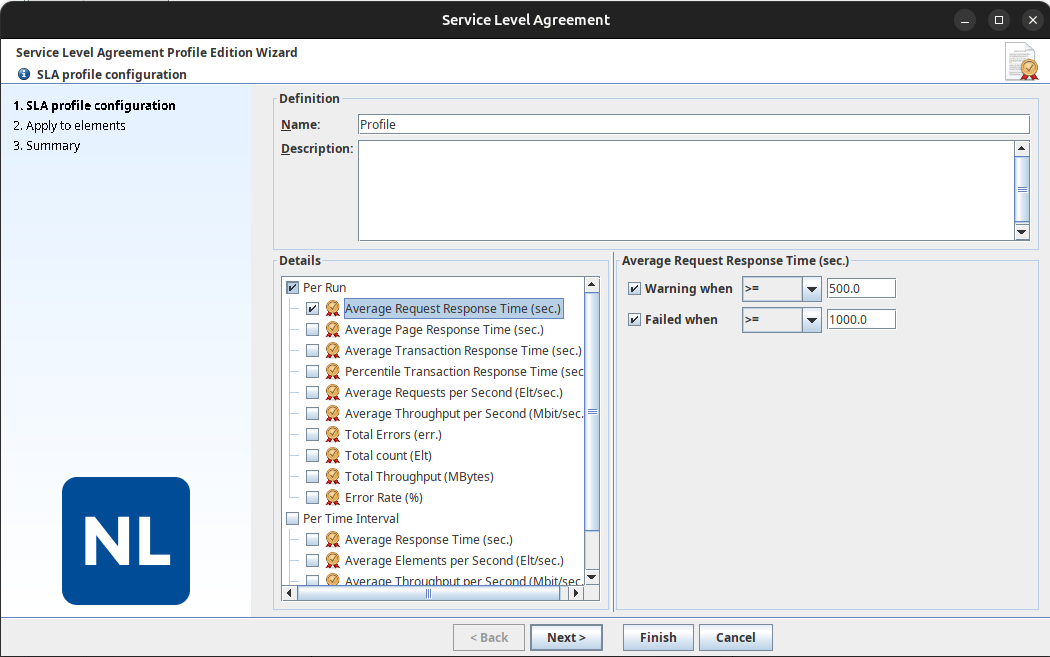
NeoLoad exports encrypted variables without their value. Type the password back in as a Secret variable, encrypted at rest and never read back.
The SLA profile carries no marker, but its facts say what NeoLoad measured and where: one metric, average request response time, two bands, eleven pages. Rebuild it as a Design SLA profile and attach it. It stays inert until attached.
Step 4: Check What Came Through Silently
The unconverted list is what the import could not do. It is not everything worth checking.
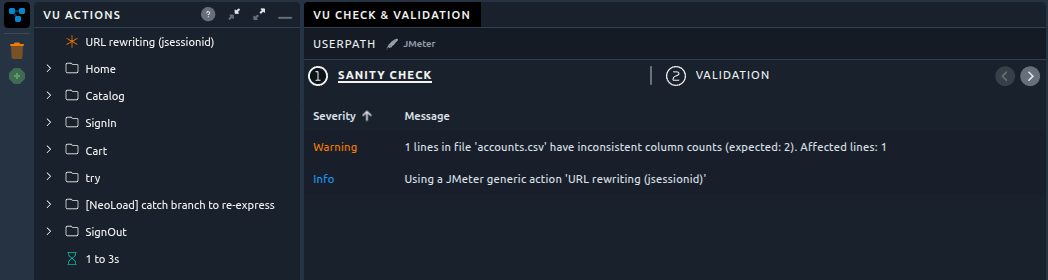
The CSV. NeoLoad writes comment lines into the files it generates from a recording, and JMeter reads them as data rows. The sanity check catches it unprompted: 1 lines in file 'accounts.csv' have inconsistent column counts (expected: 2).
The extractor and its assertion. NeoLoad has a tick box on extractors, fail the request if the extraction finds nothing. No OctoPerf element matches a tick box, so the pair crosses over as an extractor plus an assertion named [NeoLoad] <variable> found. It is not in the list, because nothing was lost. But it reads like a duplicate of the extractor above it, and deleting it turns a controlled failure into a silent pass.
Step 5: Validate
Validate the Virtual User on the same provider.
Validation replays the Virtual User on a real load generator and costs no test hours.
The first run fails on the markers, and everything downstream fails with them: no item picker, no item page. One root cause with a tail, which is what the validation triage playbook untangles.
After the list, the same Virtual User validates 52 out of 52.
The request count went down between the two runs, from 54 to 52. The two that disappeared are the checkout logging steps, which now run only when the checkout actually fails. The count dropped because the test became correct.
What This Saves
The agent invented nothing. Requests, containers, variables, think times and load policy converted mechanically.
What it added: knowing what to do with the five things that did not convert, in the right order. Plus the boring half, checking real variable names instead of assuming them, and noticing that the catch branch changed meaning when its position changed.
The caveat: it depends entirely on the verdict. ASSISTED is where an agent shines. MOSTLY_MANUAL is a re-recording, and no amount of prompting changes that.
Conclusion
Five prompts: survey, import, work the list, check what came through silently, validate. The project archive and JPetStore are public, so nothing here needs to be taken on trust.
Moving off NeoLoad? Run the survey first: point an agent at your project and read the verdict before planning anything. Our NeoLoad comparison covers the rest.
The LoadRunner walkthrough follows the same path, on a VuGen script.