Running K6 Scripts on OctoPerf
We just released OctoPerf 18 and its main addition is a new load testing engine: K6. You can now import your K6 scripts and run them without changing a single line, next to JMeter and Playwright Virtual Users, in the same scenarios and the same reports.
In this blog post I import a K6 script that browses our public demo shop, validate it, run it and go through the results. The scripts can be downloaded if you want to follow along. I will finish with the things that work differently than with JMeter.
Table of Contents
- Why K6 in OctoPerf
- Import a K6 script
- Edit and validate
- Variables and test data
- Beyond HTTP
- Run and analyze
- Mixing engines in one scenario
- K6 in your CI/CD pipeline
- What works differently
- Conclusion
Why K6 in OctoPerf

A K6 test is a plain JavaScript file. It usually lives in the same Git repository as the application it tests, goes through the same pull requests and evolves with the code. That's the whole point of Test as Code, and K6 is pretty good at it.
But a K6 script does not handle what happens around the test run:
- spreading the load over several load generators, possibly in several regions,
- splitting the test data so that two load generators never log in with the same account,
- keeping the reports, comparing a test with the previous one and following trends,
- monitoring the servers under load and checking SLAs.
This is what an OctoPerf project already does for JMeter. With version 18, K6 becomes our third engine, along with JMeter for protocol tests and Playwright for real browsers. It is also the first visible result of the work we did in OctoPerf 17 to separate the injection engine from JMeter.
Import a K6 script
Our test script browses the catalog of JPetStore. You can download it to follow along. It is made of two files: petstore.js, a module that holds the requests, and script.js, the entrypoint:
import { group, sleep } from 'k6';
import { row } from './octoperf.js';
import { viewCatalog, viewCategory, viewProduct } from './petstore.js';

export const options = {
  scenarios: {
    browse: { executor: 'ramping-vus', exec: 'browse', stages: [ /* 1m up to 10, 3m at 10, 1m down */ ] },
    fish: { executor: 'constant-vus', exec: 'fish', vus: 5, duration: '4m' },
    search: { executor: 'constant-arrival-rate', exec: 'browse', rate: 2, timeUnit: '1s', duration: '5m', preAllocatedVUs: 10 },
  },
  thresholds: {
    http_req_duration: ['p(95)<1000'],
    category_duration: ['avg<500'],
  },
};

export function browse() {
  const product = row('products');
  group('Catalog', () => {
    viewCatalog();
    sleep(1);
  });
  group('Product', () => {
    viewCategory(product.category);
    sleep(1);
    viewProduct(product.productId);
    sleep(1);
  });
}
It declares three K6 scenarios, two thresholds and two groups, and reads one CSV row on each iteration.
To import it, I used the K6 Scripts card of the Virtual User creation and selected both files. The first one is the entrypoint, the others are the modules it imports (OctoPerf matches them by file name).
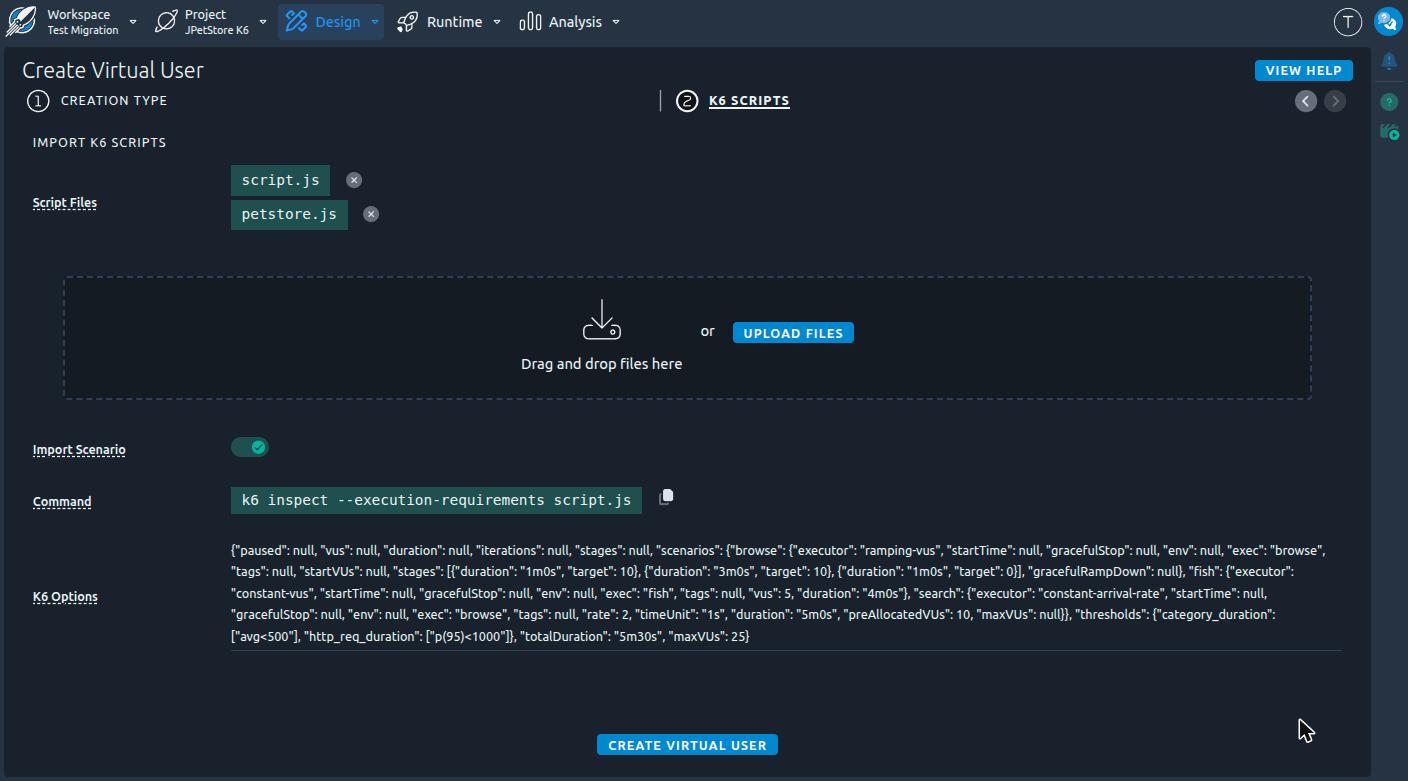
The Import Scenario option creates an OctoPerf scenario from the options of the script. OctoPerf does not execute your script to read them. Instead, you run k6 inspect --execution-requirements script.js on your computer and paste its output in the import dialog.
Note:
The
--execution-requirementsflag is important. Without it, K6 does not print anyscenariosfor scripts that use thevusorstagesshortcuts.
Once the import is done, a notification tells what could not be converted:
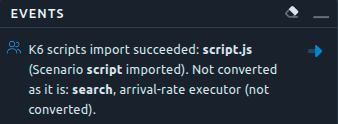
In our case the search scenario is missing. It uses a constant-arrival-rate executor, which targets a throughput: two iterations per second, whatever the number of virtual users it takes. An OctoPerf user profile is defined by a number of concurrent users, so there is no equivalent. The import converts what it can and reports the rest, it does not try to approximate it.
The two other K6 scenarios became one user profile each, with their own load and the exec function of the original scenario:
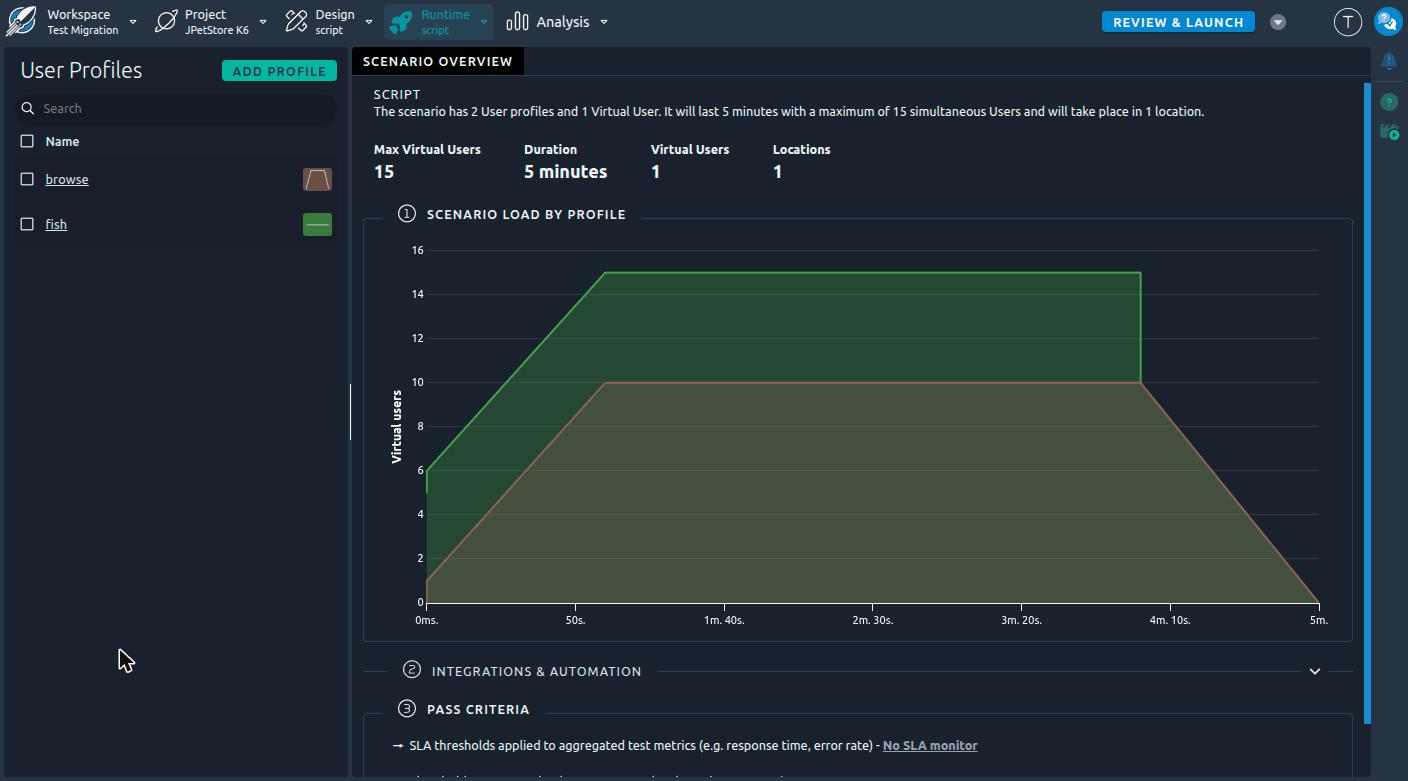
The conversion rules documentation lists every executor.
From now on, keep in mind that the OctoPerf scenario defines the load. At run time, the scenarios, vus, duration and stages of the script are ignored. The sanity check reminds you of it:

All the other options still apply, thresholds included.
Edit and validate
Each file of the Virtual User becomes a K6 Script action. The editor checks the JavaScript syntax while you type, and Ctrl+Space completes the K6 API as well as the variables of the project, written the way the script reads them:
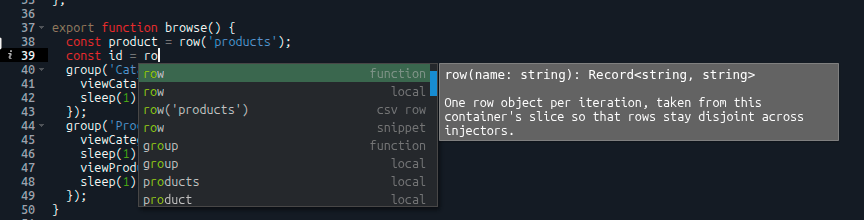
You can make small fixes directly in OctoPerf, but I would recommend to keep the reference version of your scripts in Git. The Download K6 Script files entry in the menu of the Virtual User exports them back as a ZIP file, which runs on your computer as we will see below.
To check the script, run a validation. It executes a single iteration on a load generator and records every request. The requests are listed in the Debug section, named after their group and the name tag of the request:
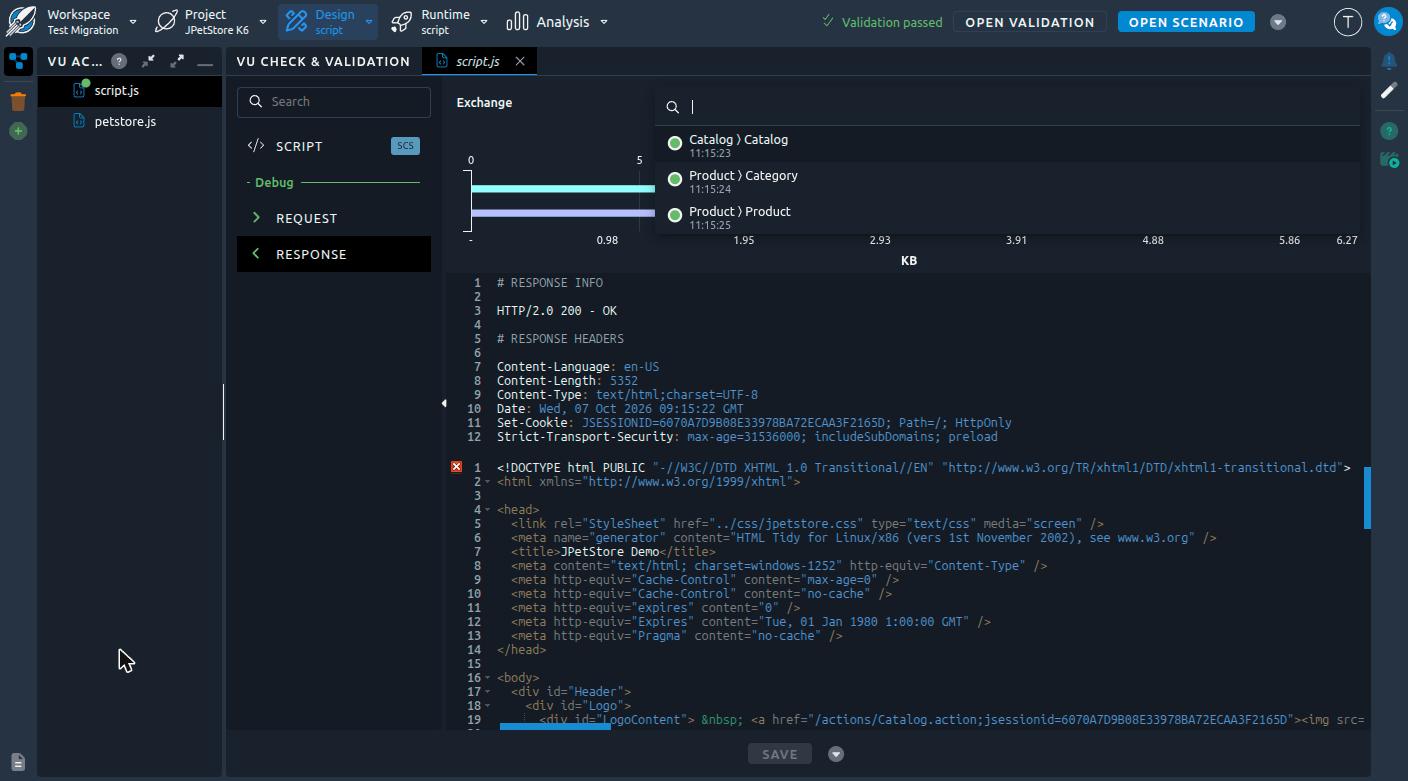
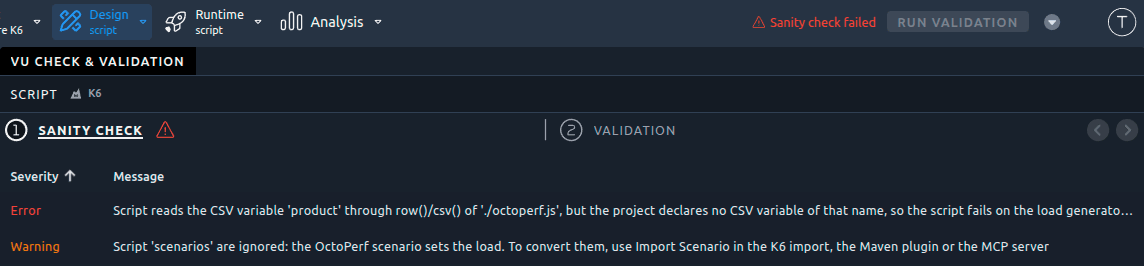
Some mistakes are caught before the script even reaches a load generator. For example I made a typo in the CSV variable name: row('product') instead of row('products'). The sanity check blocks the validation and lists the CSV variables declared in the project:
When the script fails at run time, the error points at the faulty line. Here viewProduct tries to parse the product page with res.json(), like an API test would do, but JPetStore returns HTML:
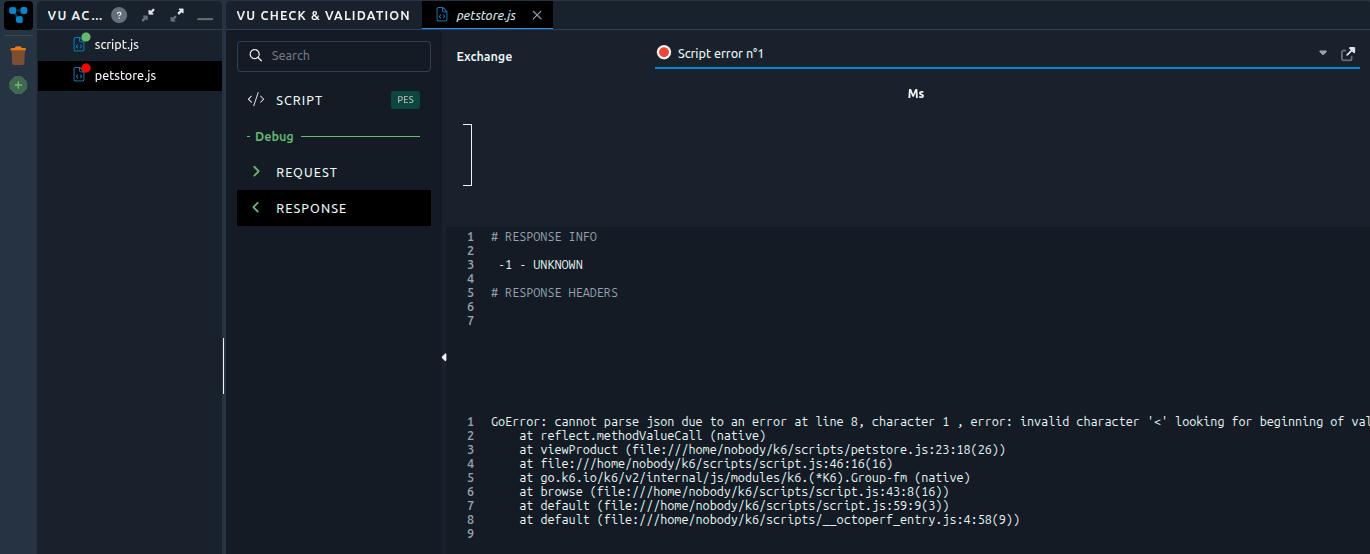
petstore.js is displayed in red while script.js stays green. The stack trace mentions petstore.js:23:18, then the line of script.js that calls viewProduct. K6 runs your JavaScript files as is, so the line numbers match the ones of your editor.
Last thing: the validation settings (provider, location, iterations and K6 options) are saved with the project. The next person who opens the Virtual User validates it the same way.
Variables and test data
The variables of the project are available in the script without any configuration:
- constants and secrets are
__ENVentries, passed to K6 through its environment (never on its command line, nor in the OctoPerf logs), - CSV and random variables are read with
octoperf.js, a module that OctoPerf generates next to your scripts.
import { row, csv, random, run } from './octoperf.js';

const product = row('products');      // one row per iteration
const all = csv('products');          // every row of this load generator
const quantity = random('quantity');  // a new value at each call
Each load generator gets its own rows. The CSV file is split between the load generators of the test, so two of them never read the same line. There is no need to split it yourself with __VU: K6 numbers its virtual users per load generator, and the file is already split before the test starts.
Since octoperf.js is generated on the load generators, it is not in your repository and k6 run would fail on your computer. That's why the ZIP file of Download K6 Script files also contains a local copy of the module, its data and the CSV files of the variables. The downloaded folder runs with k6 run as is, which is pretty handy to debug a script on your machine:
k6 run --vus 1 --iterations 1 script.js
The --vus and --iterations options replace the scenarios of the script for a single quick run. Constants and secrets are never written to the ZIP file, so pass them with -e NAME=value when your script needs them. Also, row() reads the whole CSV file on your machine, since there is only one load generator. Our archive is such a download, so you can try it right away.
Note:
To bring your changes back, import the
.jsfiles of the folder again. OctoPerf leaves outoctoperf.jsand its data file, as it generates its own on the load generators.
Beyond HTTP
HTTP is not the only protocol available. The octoperf/k6 Docker image contains the K6 modules plus three xk6 extensions, and every call they make shows up as a request in the report, with its response time and status:
| Protocol | Module | A request in the report |
|---|---|---|
| HTTP | k6/http |
one per request |
| gRPC | k6/net/grpc |
one per call, unary or streamed |
| WebSocket | k6/websockets, k6/ws |
one per session, its messages counted as sent and received |
| SQL | k6/x/sql, Postgres and MySQL drivers |
one per query, named after the statement |
| Redis | k6/x/redis |
one per command |
| Kafka | k6/x/kafka |
one per produce, flush and consume |
I put together a second archive to try them. It contains a docker-compose.yml that starts a Postgres database, a Redis cache, a gRPC server and a WebSocket echo server, and a protocols.js script that calls all four:
const db = sql.open(driver, `postgres://k6:k6@${HOST}:5432/shop?sslmode=disable`);
const cache = new redis.Client(`redis://${HOST}:6379`);

export default async function () {
  const fish = db.query('SELECT id, name FROM product WHERE category = $1', 'FISH');
  await cache.set(`cart:${__VU}`, fish[0].id, 60);
  grpcClient.invoke('hello.HelloService/SayHello', { greeting: 'JPetStore' });
  await addToCart(fish[0].id); // a WebSocket session
}
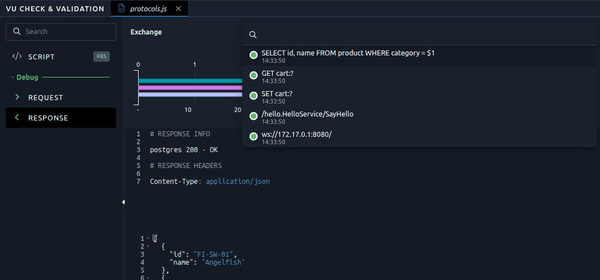
The load generators must reach the machine that runs these containers, so you need an on-premise agent on your network for this one. The TARGET_HOST constant variable holds the address of the machine. Here is the validation:
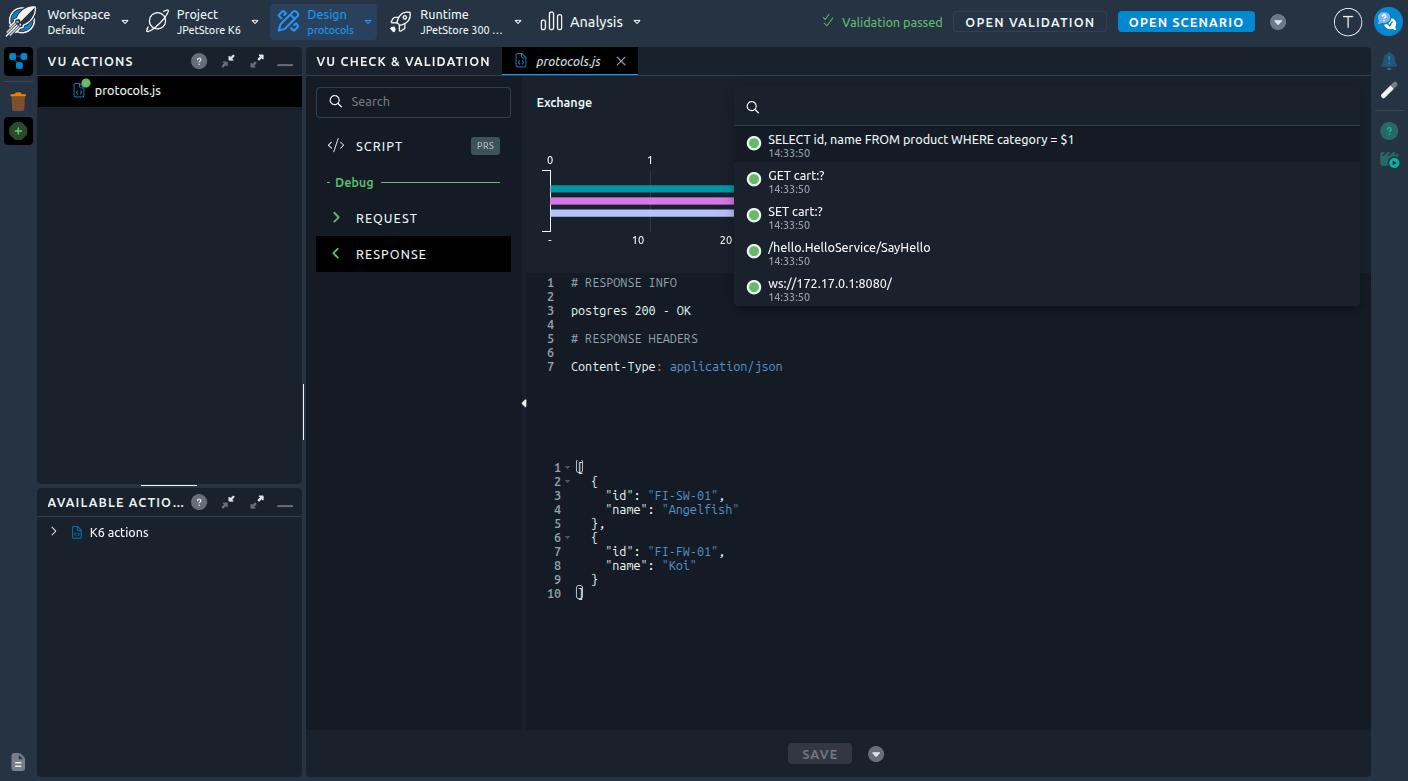
Sensitive data is not recorded. SQL statements keep their placeholders, Redis keys are masked, and neither the connection string nor the Redis credentials appear in the report.
xk6 extensions are compiled into the K6 binary, so you cannot add one through the project: the sanity check rejects a script that imports an extension missing from the image. If you run OctoPerf on-premise, you can rebuild the image with your own extensions from the Dockerfile it contains.
Run and analyze
K6 user profiles have their own settings, each one matching an option of k6 run:
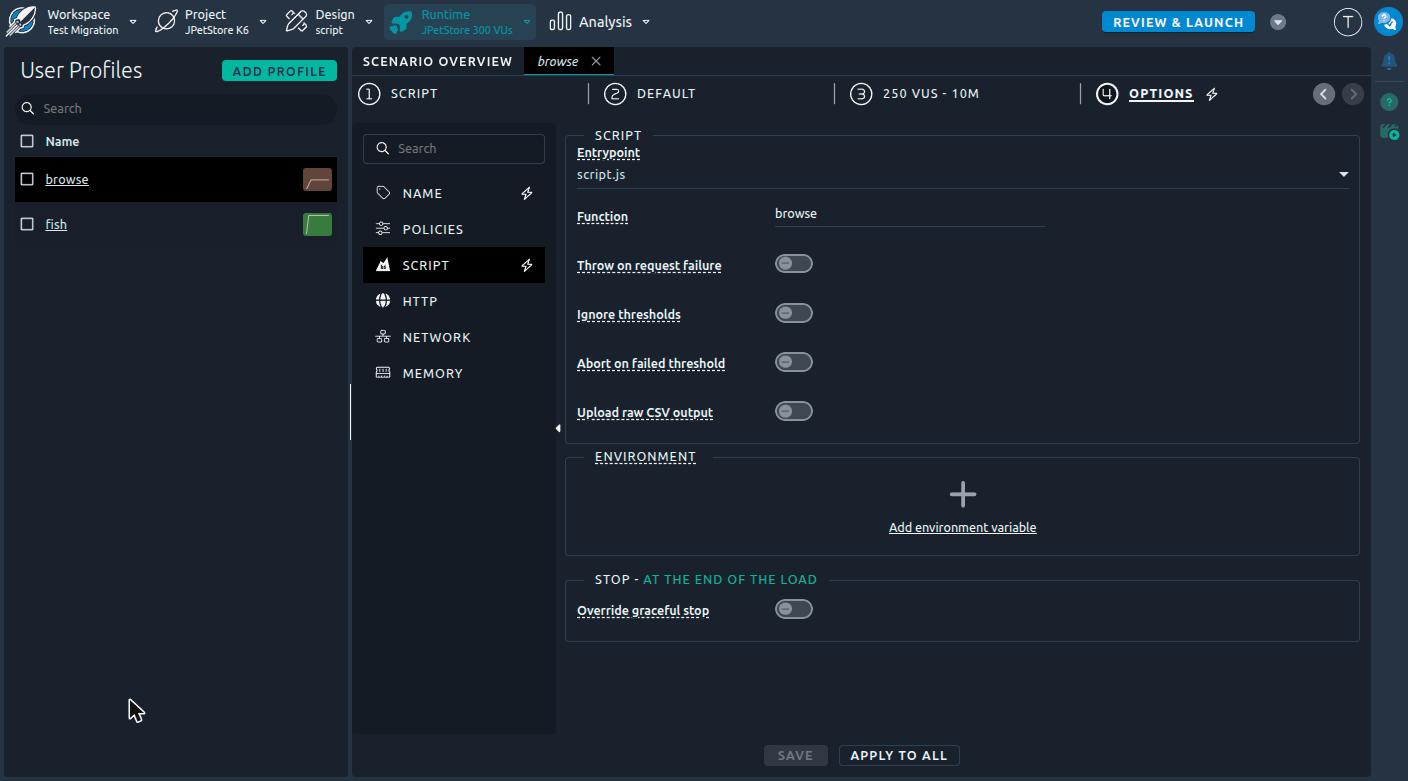
- Entrypoint and Function are filled in by the import, so the same script can be used by several user profiles,
- Throw on request failure (
--throw) ends the iteration when, for example, a connection is refused, - Abort on failed threshold is disabled by default: thresholds are evaluated and reported, but the test runs until the end,
- Environment, HTTP and Network options go from the user agent to blocked hostnames,
- Memory is set to 6 MB per virtual user by default.
For the test run, I increased the load to 300 virtual users for ten minutes: 250 on browse and 50 on fish.
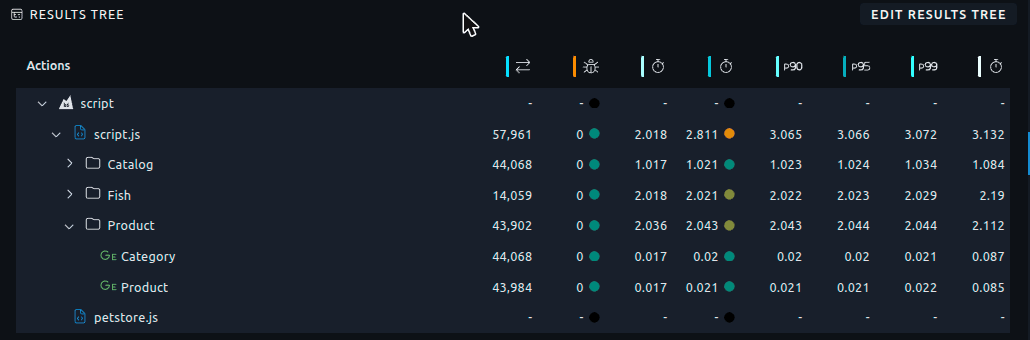
The test ran for ten minutes without a single error. The results tree shows the entrypoint, its group blocks and their requests, just like the containers of a JMeter Virtual User. When a scenario mixes engines, the K6 and Engine filters isolate one of them. Also note that a failed check() counts as a failed assertion, not as a request error.
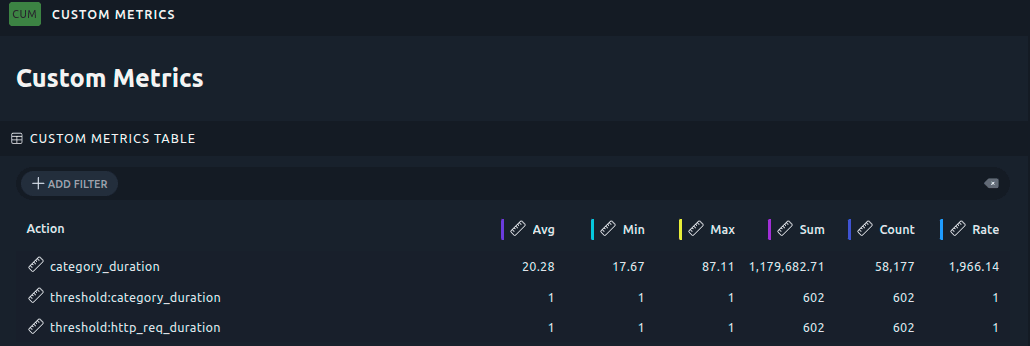
The Trend, Counter, Gauge and Rate metrics declared in the script are displayed as custom metrics, in the Custom Metrics section of the default report. Our category_duration averaged 20 ms over 58,177 values. Thresholds show up as threshold:<metric> metrics, equal to 1 while the threshold holds and to 0 once it fails. Both of ours stayed at 1.
Be careful when reading the response times of groups, they include the pauses. For example Product takes about 2 seconds: two requests of 20 ms plus two sleep(1). So look at the requests to analyze the server, and at the groups for what the user experiences.
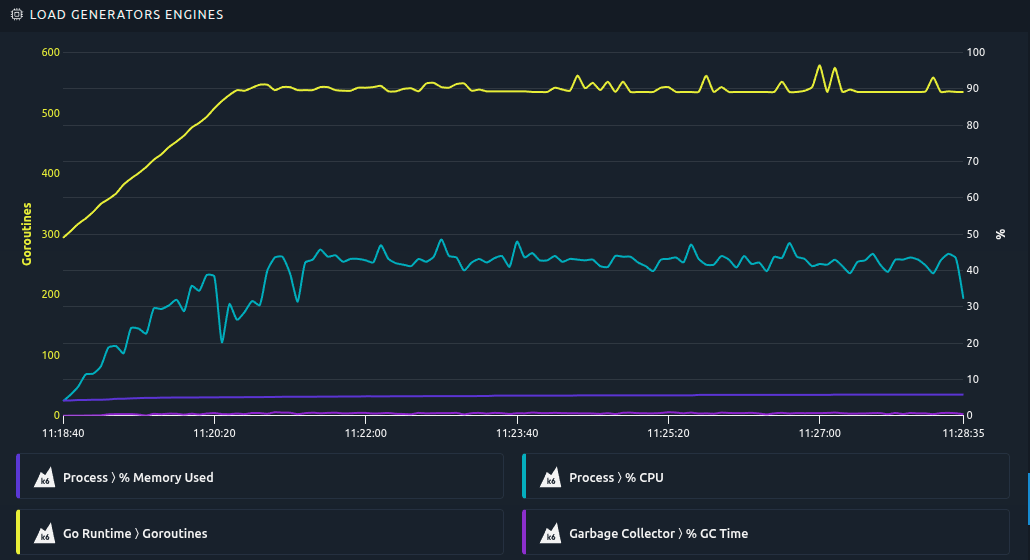
There is no JVM to monitor on a K6 load generator. Instead, the K6 Runtime monitor follows the K6 process: CPU, memory, Go heap, garbage collection and file descriptors. It raises an alarm when the garbage collector uses more than 5 % of the CPU or when the memory gets close to its limit, which usually means that the virtual users need more memory. We were far from it: with 300 virtual users on a single load generator, K6 ran around 550 goroutines and used about 40 % of one core and 5 % of the memory reserved. Garbage collection time was negligible.
Mixing engines in one scenario
A K6 Virtual User is a Virtual User like any other, so a scenario can run it along with JMeter or Playwright ones. For example, K6 can generate the protocol load at a low cost while a few Playwright users measure the Core Web Vitals of the pages as the load rises.
Reports identify Virtual Users by their name. That's why the sanity check now warns you when two of them have the same name, whatever their engine.
K6 in your CI/CD pipeline
Version 2.7.0 of the Maven plugin imports the script stored in your repository at every build, using the new import-k6 goal:
<plugin>
  <groupId>com.octoperf</groupId>
  <artifactId>octoperf-maven-plugin</artifactId>
  <version>2.7.0</version>
  <configuration>
    <apiKey>${api}</apiKey>
    <workspaceName>Demo</workspaceName>
    <projectName>JPetStore K6 CI</projectName>
    <providerName>OctoPerf</providerName>
    <location>eu-west-1</location>
    <k6Entrypoint>${project.basedir}/script.js</k6Entrypoint>
    <k6Modules>
      <k6Module>${project.basedir}/petstore.js</k6Module>
    </k6Modules>
    <scenarioName>Scenario</scenarioName>
    <timeoutMinutes>30</timeoutMinutes>
  </configuration>
</plugin>
mvn octoperf:wipe-project octoperf:import-k6 octoperf:execute-scenario -Dapi=YOUR_API_KEY
The plugin runs k6 inspect for you on the build machine. The execute-scenario goal fails the build when the test ends in error or exceeds its timeout. Also note that wipe-project empties the project first, so use a dedicated project for your pipeline.
Actually, our demo script would fail this build! The search scenario cannot be converted, and failOnUnconverted is true by default. In a CI pipeline I prefer a red build to a test that quietly runs with less load than expected. So either remove the scenario from the script, or set the flag to false once you have read the warning.
Jenkins, GitLab CI or GitHub Actions only need to run this Maven command. Check our continuous testing page for more information.
What works differently
Most of OctoPerf features apply to K6 Virtual Users. The K6 limits documentation page lists the exceptions. Here are the ones you should know before starting:
- there is no open model:
constant-arrival-rateandramping-arrival-rateexecutors are never converted, because a scenario runs a fixed number of virtual users and not a throughput (this is the main limitation), - the scenario defines the load, the
scenarios,vus,durationandstagesof the script are ignored, - thresholds do not stop the test unless Abort on failed threshold is enabled in the user profile, and even then only the load generator where the threshold failed stops,
k6/browseris not supported, use a Playwright Virtual User instead,- npm packages are not supported, only relative and
https://imports, so you have to bundle your dependencies first, - there is no APM integration, the APM settings of a scenario only apply to JMeter,
- the started and finished users in the report are in fact the iterations of K6,
- each load generator is limited to 100 custom metric names, so never build a metric name from an id or a URL.
Conclusion
To sum up, it took two files, one k6 inspect command and one import to run our K6 script in OctoPerf. The script was not modified, and OctoPerf brought what K6 lacks on its own: load generators, split test data, reports and monitoring. Both archives and JPetStore are public, so you can replay every step of this blog post.
If you use Gatling rather than K6, have a look at our Gatling migration walkthrough: it converts a simulation into a K6 Virtual User with an AI agent. And to try it with your own scripts, start a free trial.