AI Load Testing With a French LLM: OctoPerf MCP Meets Mistral Vibe
When we released the OctoPerf MCP Server, most teams connected to it straight from Claude.ai. Then we showed how to run the whole stack on-premise with a local model. But a question kept coming back from European teams: can we drive our load tests with a French LLM, hosted in Europe, instead of a US model? The answer is yes, and it takes about five minutes. Mistral Vibe, the assistant formerly known as Le Chat, now supports custom Model Context Protocol connectors, so you can point it straight at the OctoPerf MCP Server and start testing in plain French (or English).
Table of Contents
- Why a French LLM Changes the Equation
- What You Need
- Step 1 - Grab the OctoPerf MCP Endpoint
- Step 2 - Add a Custom MCP Connector in Mistral Vibe
- Step 3 - Authenticate With OAuth
- Step 4 - Run a Test Prompt
- What About Vibe Code, Mistral's Claude Code?
- What This Unlocks
- Conclusion
Why a French LLM Changes the Equation
Mistral AI is a Paris-based lab whose models are trained and hosted in Europe, which matters when your prompts carry production URLs, test data or business context. For finance, healthcare and public-sector teams bound by GDPR or data-residency rules, keeping the LLM inside European jurisdiction is often the deciding factor between adopting an AI workflow and shelving it.
The piece that makes this practical is the Model Context Protocol. MCP is an open standard, so the OctoPerf MCP Server does not care which model calls it: Claude, a local Qwen3, or Mistral Vibe all speak the same protocol. Mistral shipped its Custom MCP Connectors for Vibe alongside its Agents API, which means you can wire around 100 OctoPerf tools into a French chat assistant without writing a line of code.
What You Need
The setup is deliberately light:
- a Mistral Vibe account, where you are the administrator (on Free, Pro and Student plans the account owner is admin by default),
- an OctoPerf account on the SaaS platform, which already exposes the MCP Server over HTTPS,
- nothing to install locally, no API key to generate.
One technical requirement is worth flagging up front: Vibe connects to MCP servers over Streamable HTTP and HTTPS with a valid TLS certificate. The OctoPerf SaaS endpoint satisfies this out of the box, and we cover the self-hosted case in Step 1.
Step 1 - Grab the OctoPerf MCP Endpoint
There is nothing to deploy. The OctoPerf MCP Server runs as a hosted endpoint:
https://api.octoperf.com/mcp
That single URL is all Vibe needs, keep it handy for the next step.
Prefer your own instance? The MCP server is bundled with OctoPerf Enterprise, so a self-hosted deployment exposes the exact same endpoint under your own domain, https://<your-octoperf-host>/mcp. Our fully on-premise guide walks through the Docker install end to end. Just remember Vibe runs in the cloud, so that route must be reachable over public HTTPS with a valid certificate (a TLS reverse proxy in front of OctoPerf), then everything below works identically against your own server.
Step 2 - Add a Custom MCP Connector in Mistral Vibe
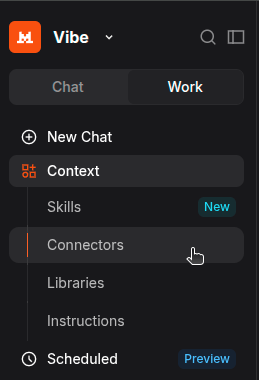
Open Mistral Vibe, and in the Work sidebar head to Context ▸ Connectors, then click + Add Connector and switch to the Custom MCP Connector tab.
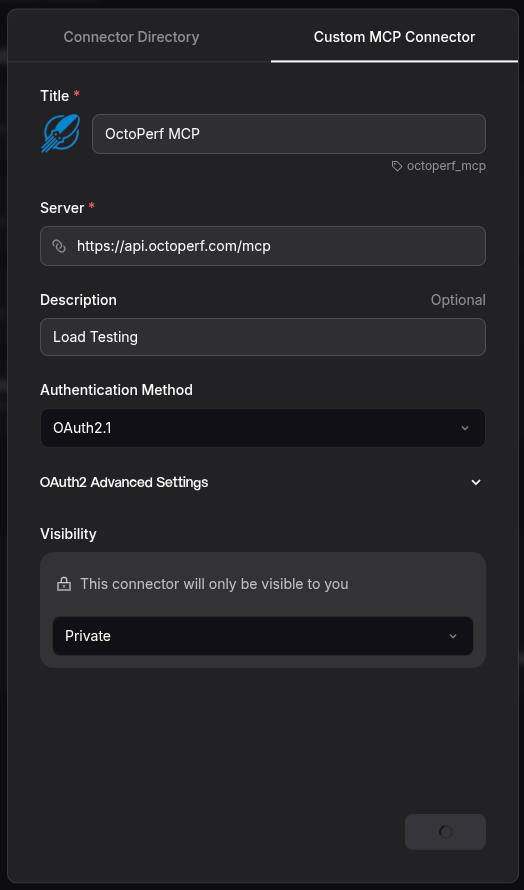
Fill in the form, only the first two fields are mandatory:
- Title: a human-friendly name like
OctoPerf MCP, Vibe derives a reference (octoperf_mcp) from it, - Server: the endpoint from Step 1,
https://api.octoperf.com/mcp, - Description (optional): a short note like Load Testing,
- Authentication Method: pick OAuth2.1, which is what the OctoPerf MCP Server uses,
- Visibility: leave it Private to keep the connector to yourself, or share it with your workspace.
Then submit the form. Because you selected OAuth 2.1, Vibe prepares the consent flow for the next step rather than asking you for a token.
Step 3 - Authenticate With OAuth
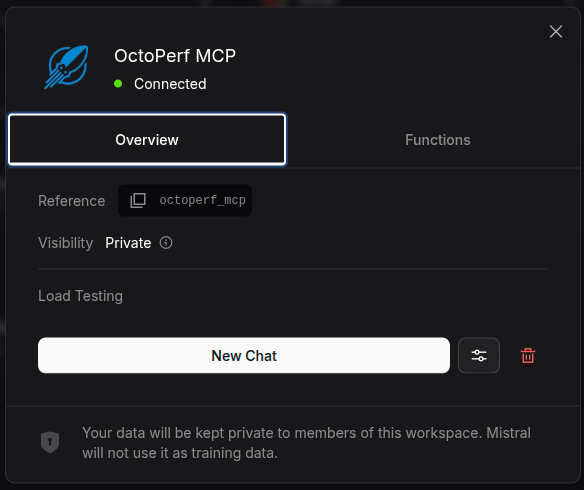
Because the OctoPerf MCP Server uses OAuth 2.1 with dynamic client registration, there is no token to paste. When Vibe prompts you, it opens the OctoPerf login in a guided consent flow. Sign in, approve the access, and the connector flips to a green Connected status, with the authorization cached for next time.
From that moment, every tool call runs as you inside OctoPerf, scoped to your own workspaces and projects, and you can revoke the access anytime from OctoPerf's Connected Apps page. No shared secret, no service account, no credentials living in a config file.
One honest caveat: Vibe's custom connectors currently focus on tool calls and, per Mistral's own documentation, do not yet support a few optional MCP capabilities (dynamic tool discovery, resources and prompt templates). That has no impact here, because the OctoPerf workflow is driven entirely by its tool catalogue, which Vibe reads at connection time.
Step 4 - Run a Test Prompt
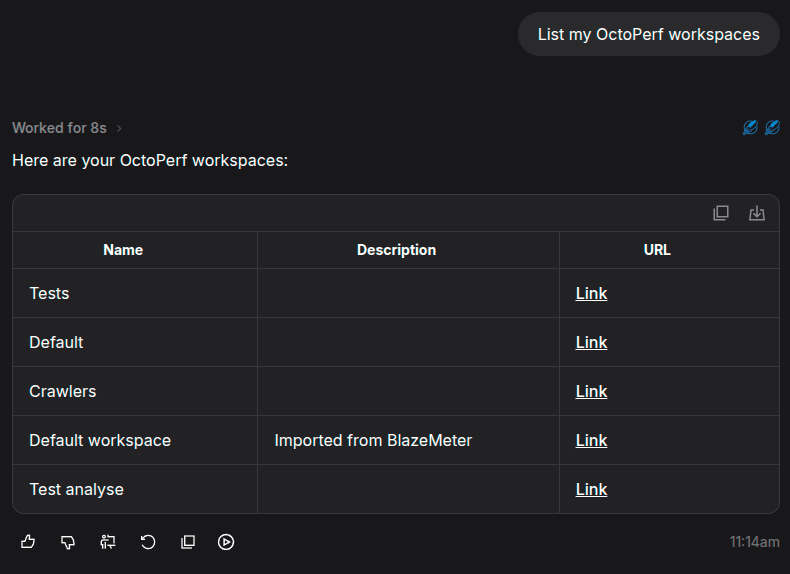
Time to prove the chain works. Enable the OctoPerf MCP connector in your conversation, then start with a simple discovery prompt (Vibe understands the request in French or English):
You: List my OctoPerf workspaces.
Vibe: (calls
list_workspaces)Here are your 5 OctoPerf workspaces, each with a deep link back to its page:
- Tests,
- Default,
- Crawlers,
- Default workspace (imported from BlazeMeter),
- Test analyse.
Want me to open one or start a new test?
That round trip alone confirms the full chain works: Mistral's model, the MCP connector, and the OctoPerf backend. Now push it into real work, chaining several tools in one request:
You: Create a project Local Checkout, import the attached HAR file as a Virtual User and run a functional validation.
Vibe: (calls
create_project,import_har_virtual_user, thenvalidate_virtual_user)Done:
- Created project Local Checkout,
- Imported
checkout.haras a Virtual User with 24 actions,- Launched a validation. 9 of 24 actions are failing, mostly authentication errors that look like a missing correlation. Want me to triage them and auto-correlate?
This is the same validation-triage and auto-correlation workflow we showed with Claude, except the model answering you is European. The OctoPerf side is identical, only the brain changed.
What About Vibe Code, Mistral's Claude Code?
The chat assistant is only half of Mistral Vibe. The other half is Vibe Code, an agentic coding tool that is Mistral's direct answer to Claude Code: a terminal CLI (vibe), plus VS Code, JetBrains and Zed extensions, powered by the Devstral model. It is open source (Apache 2.0, the mistralai/mistral-vibe repository), so you can read and self-host it.
Like the chat, Vibe Code speaks MCP. You declare servers in a config.toml file, with http, streamable-http or stdio transports:
[[mcp_servers]]
name = "octoperf"
transport = "streamable-http"
url = "https://api.octoperf.com/mcp"
There is one honest catch today. The Vibe Code CLI does not yet support MCP servers that authenticate with OAuth, it only handles a static Authorization header or an API key. The OctoPerf MCP Server, on the other hand, is OAuth 2.1 only: every call carries a JWT minted by OctoPerf's identity provider, and there is no static-token shortcut. So for now, the OctoPerf connector works from Vibe (the chat), not yet from the Vibe Code CLI.
This is a moving target on both sides: the moment Vibe Code adds OAuth MCP support, the same config.toml above will light up your roughly 100 OctoPerf tools straight from the terminal. We will cover that flow in a follow-up once it lands.
What This Unlocks
Pairing OctoPerf with a French LLM is not just a compliance checkbox, though it ticks that one cleanly:
- European data residency: your prompts and test context are processed by a model hosted in Europe, a frequent hard requirement in regulated sectors,
- zero install: no local model, no GPU, no Docker, just a connector URL and an OAuth login,
- the same MCP tools and skills: identical bundled skills for validation triage, auto-correlation and scenario diagnosis,
- freedom of model: MCP is an open standard, so you can switch between Vibe, Claude or a local model without touching OctoPerf.
It fits the same picture we painted in bridging open source and enterprise performance testing: a modern, AI-driven workflow that respects where your data is allowed to go.
Conclusion
With a Mistral Vibe account and one connector URL, you get the full OctoPerf AI experience driven by a French, Europe-hosted LLM, no install and no API key. The OctoPerf MCP Server already speaks the open Model Context Protocol, so adding Vibe is a five-minute, no-code job.
If you need everything inside your own walls, our fully on-premise guide runs the same MCP tools against a local model with nothing leaving your network. And if you are still evaluating, the SaaS platform lets you try this exact Mistral-driven workflow in minutes.