Install OctoPerf on Kubernetes With Our Helm Charts
Most of our self-hosted customers run OctoPerf Enterprise Edition with Docker Compose. But more and more of them run everything else on Kubernetes, and they ask how to install OctoPerf there too. We actually maintain two Helm charts for that: one for the OctoPerf server, and one for an agent that runs the load generators as pods of the cluster.
In this blog post I install OctoPerf 18 on a local minikube cluster with these charts, register a Kubernetes agent and run a small load test against our demo shop. Everything runs on a single Linux laptop, and the same charts work on a real cluster with a few more settings.
Table of Contents
- What you need
- Start minikube
- Install OctoPerf with Helm
- Create an account and a provider
- Install the Kubernetes agent
- Run a first test
- Going further on a real cluster
- Conclusion
What you need
I ran this tutorial on Ubuntu with 24 CPUs and 64 GB of RAM, which is a lot more than needed. Here is what you need on your computer:
- Docker, used by minikube to run the Kubernetes node,
- minikube, I used version
1.39with Kubernetes1.37, - kubectl and Helm
3, gitandmake, to get the charts and run their example,- at least 4 CPUs and 8 GB of RAM that you can give to minikube.
The charts live in our helm-charts repository on GitHub:
enterprise-editioninstalls the OctoPerf server: the backend, the web UI, the MCP server and an Elasticsearch database,kubernetes-agentinstalls an on-premise agent that launches each load generator as a pod of the cluster.
Note: OctoPerf Enterprise Edition comes with a free license: 50 concurrent virtual users, 10 user profiles and tests of up to 1 hour. That's plenty for this tutorial, and you can install a license file later on.
Start minikube
First, let's start a minikube cluster with enough resources. I gave it 8 CPUs and 16 GB of memory:
minikube start --driver=docker --cpus=8 --memory=16g
minikube ip
192.168.49.2
With the docker driver, the IP of the node is 192.168.49.2. It matters because the example of the chart uses the hostname 192.168.49.2.sslip.io: sslip.io is a public DNS service that resolves this name to the IP it contains. Your browser and the pods of the cluster reach OctoPerf on the same address, without editing any /etc/hosts file.
Note: If
minikube ipgives you another IP, for example with another driver, replace192.168.49.2with your IP in thevalues.yamlfile of the example.
Ingresses are served by Traefik since OctoPerf 18, so the ingress addon of minikube (which installs ingress-nginx) must stay disabled:
minikube addons disable ingress
Install OctoPerf with Helm
Now let's get the charts and go into the minikube example of the enterprise-edition chart:
git clone https://github.com/OctoPerf/helm-charts.git
cd helm-charts/enterprise-edition/examples/minikube
make install
The make install target does basically two things. It enables the storage addons of minikube and installs Traefik with its official chart and the settings in traefik-values.yaml. Then it installs the OctoPerf chart in the octoperf namespace, with the values.yaml of the example:
elasticsearch:
  enabled: true
  esJavaOpts: "-Xmx1g -Xms1g"

mcpServer:
  enabled: true
  applicationYml: |-
    server:
      hostname: 192.168.49.2.sslip.io
      public:
        port: 80

backend:
  applicationYml: |-
    server:
      hostname: 192.168.49.2.sslip.io
      public:
        port: 80
    elasticsearch:
      hostname: elasticsearch-master-headless
      password: "0ct0P3rf"

ingress:
  enabled: true
  hosts:
    - 192.168.49.2.sslip.io
The applicationYml blocks are the application.yml of the backend and of the MCP server: any setting of the server can go there. I shortened the file a bit, the example also disables the documentation and the utility server and requests smaller volumes for Elasticsearch.
The first start takes a few minutes, since the images must be downloaded. You can follow it with kubectl:
kubectl -n octoperf get pods
NAME                                            READY   STATUS    RESTARTS   AGE
elasticsearch-master-0                          1/1     Running   0          3m
enterprise-edition-backend-0                    1/1     Running   1          3m
enterprise-edition-frontend-7fb545c9c7-rdc6s    1/1     Running   0          3m
enterprise-edition-mcp-server-b57668fd9-m85wd   1/1     Running   0          2m
Note: Don't worry if the backend restarts once, or if the MCP server fails a few times at startup. They wait for Elasticsearch and for the backend, and everything settles down once all the pods are ready.
OctoPerf is then available on http://192.168.49.2.sslip.io/ui.
Create an account and a provider
OctoPerf Enterprise Edition starts empty. Open the UI and click Register to create an account. You are logged in right away, with a workspace and a sample project.
To run a test, OctoPerf needs load generators. They are grouped in providers, and an on-premise provider gets its load generators from the agents you install yourself. So I opened Workspace > On Premises, clicked Create Provider > On-Prem, named it Minikube and kept the default location.
At the end of the wizard, OctoPerf asks to add an agent. The Add Agent dialog gives a Docker command to run on a Linux machine. We will not run it as is, but it contains the two values our Kubernetes agent needs:
AGENT_TOKEN, the token that identifies the agent and its provider,SERVER_URL, the address the agent connects to, herehttp://192.168.49.2.sslip.io.
The token is masked on screen, so click Copy Command and take the value of AGENT_TOKEN from the copied text.
Install the Kubernetes agent
The Kubernetes agent runs as a pod and starts each load generator as another pod of the cluster. It needs the token and the server URL, which I pass on the command line:
cd ../../../kubernetes-agent
helm install kubernetes-agent . --namespace octoperf \
  --set token='<AGENT_TOKEN>' \
  --set serverUrl=http://192.168.49.2.sslip.io
After a few seconds, the agent shows up on the Providers page. Click Refresh Agents if it is not there yet:

The memory column is the memory the agent sees on its node.
Note: With the docker driver, the minikube node reports the memory of the host computer, not the 16 GB given to minikube. On a real cluster, the agent reports the memory of the nodes. The provider sizes the load generators with its own Amount of memory per agent setting, 4 GB by default, which is the value to adjust to your nodes.
The kubernetes-agent chart has other settings for these load generator pods: memory and CPU requests and limits, tolerations, image pull secrets and, since OctoPerf 18, their security context.
Run a first test
For the test, I created a small Virtual User from four URLs of our demo shop: the catalog, the Fish and Dogs categories and a product page. In Design, click Create Virtual User > Manual creation > Static Website and paste the URLs.
Then I validated it in the location of my Minikube provider. The validation starts a load generator pod on the cluster, runs one iteration and checks that every request gets a proper response:

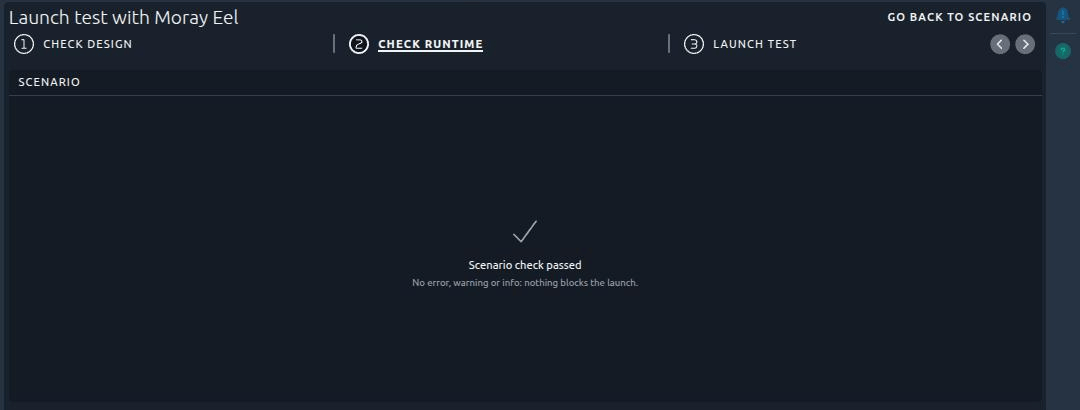
Next, I created a scenario with this Virtual User: 10 concurrent users for 10 minutes, in the default location of the Minikube provider. Before the launch, the scenario check of OctoPerf 18 looks for anything that would make the test fail, like a location without an agent or agents too small for the load. Here everything was fine:
During the test, the load generator runs as a pod next to the agent, named after it:
kubectl -n octoperf get pods
NAME                                READY   STATUS    RESTARTS   AGE
enterprise-edition-backend-0        1/1     Running   0          6m
kubernetes-agent-684bfcd869-vk9gl   1/1     Running   0          44m
yellow-curt-johns-trev              1/1     Running   0          26s
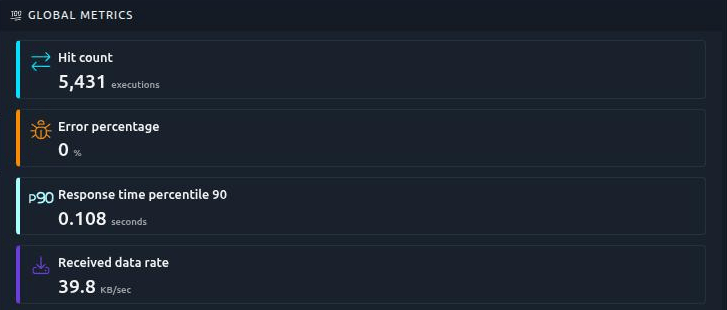
The agent deletes the pod at the end of the test. The 10 users sent 5,431 requests in 10 minutes, without a single error, and 90 % of the pages answered in less than 108 milliseconds:
The report is the same as with any other provider, so I won't go through it here. Our reporting engine page shows what it can do.
Going further on a real cluster
The minikube example is meant for a test on your computer. On a production cluster, here are the settings I would look at first:
- the hostname, in
ingress.hostsand in theapplicationYmlof the backend and of the MCP server, with TLS on the Traefik side, - the Traefik request read timeout, to raise for the upload of large JMeter projects and CSV files,
- a real Elasticsearch, either the cluster of the chart with three nodes and persistent volumes, or your own with
elasticsearch.enabled: false, - your license file, under
backend.licenseFile, - one Kubernetes agent per node that runs load generators, since an agent only starts pods on its own node.
The README of the chart lists every setting. If you upgrade from OctoPerf 17, also read the migration guide: the chart moved from ingress-nginx to Traefik, and the agents installed before 18.0.0 need a new token.
Note: The chart also installs the OctoPerf MCP server on
/mcp. An AI agent can then drive your self-hosted OctoPerf, as we showed in our fully on-premise MCP walkthrough.
Conclusion
From an empty minikube to a first test result, it took me a make install, a helm install and a few clicks in the UI. The load generators are plain pods of the cluster, so they follow the rules of the cluster like any other workload.
If your company runs its tools on Kubernetes, give the helm charts a try with the free license, and contact us for a license that fits your load. You can also read more about on-premise load testing with OctoPerf.